Authoritative vs Non-Authoritative Active Directory Restore: Complete 2026 Guide
Authoritative vs Non-Authoritative Active Directory Restore: Complete 2026 Guide
Authoritative vs Non-Authoritative Active Directory Restore is one of the most important distinctions to understand before recovering Active Directory Domain Services (AD DS).
The choice determines whether a restored Domain Controller should synchronize with healthy Domain Controllers or whether selected recovered directory data should become the version that wins during replication.
Short answer:
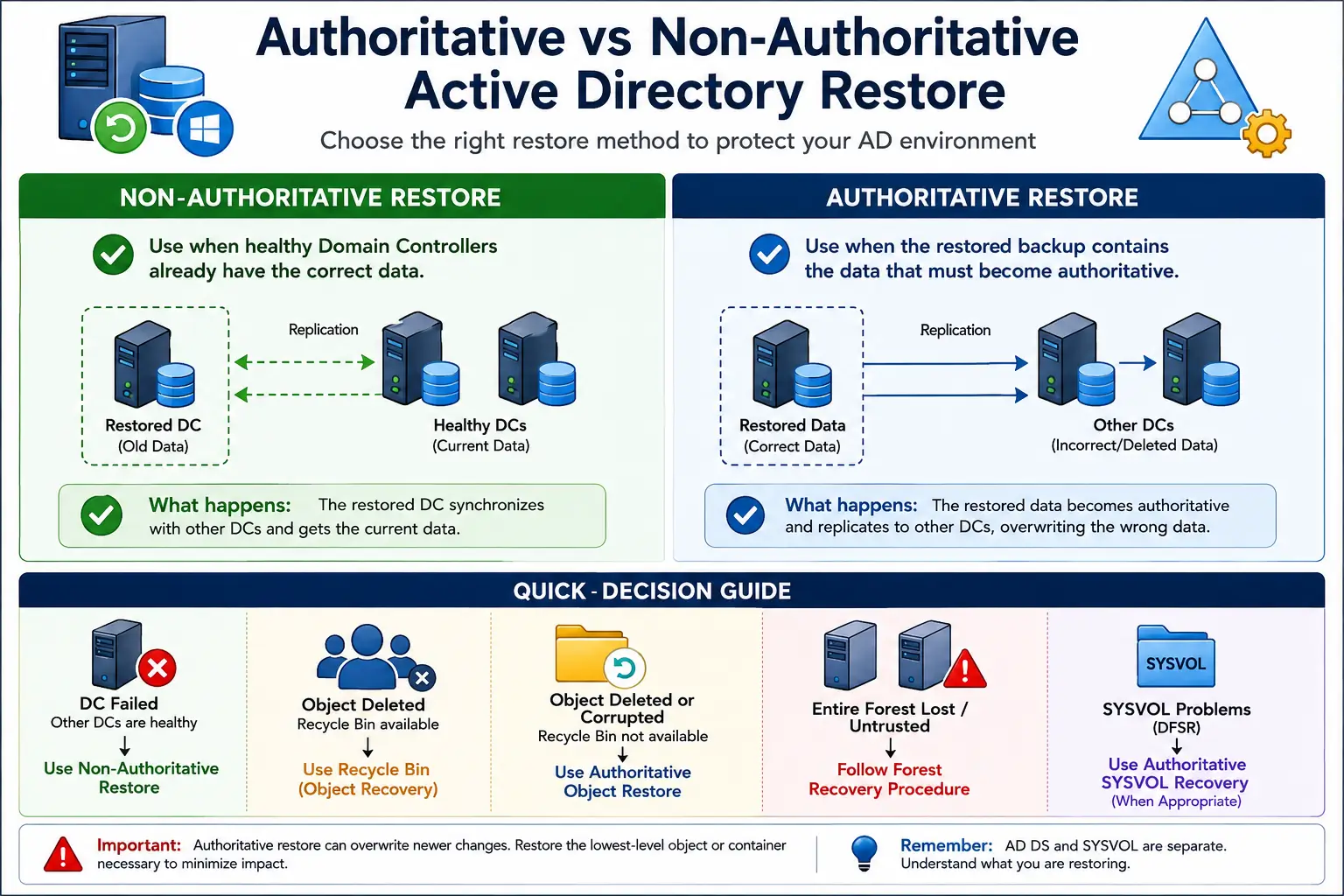
A non-authoritative restore is generally used when a Domain Controller has failed but other healthy Domain Controllers contain the current and trusted Active Directory information.
An authoritative restore is used when specific Active Directory data recovered from backup needs to become the version that wins during replication.
The difficult part is usually not finding a restore command. The difficult part is deciding which recovery method matches the failure.
Using an authoritative restore when healthy Domain Controllers already contain the correct information can unnecessarily replace newer directory data. Conversely, restoring a Domain Controller without understanding which copy of the data is trusted may not recover the information you actually need.
This guide explains the difference between authoritative and non-authoritative Active Directory restoration, when each approach is appropriate, common scenarios, important commands, SYSVOL considerations, and practical recovery best practices.
Authoritative vs Non-Authoritative Restore: Quick Answer
Healthy Domain Controllers have the correct data?
→ Usually use a non-authoritative AD DS restore.
The backup contains directory data that must become authoritative?
→ Consider an authoritative restore of the required objects or containers.
The entire forest is unavailable or no longer trusted?
→ Follow a formal Active Directory forest recovery procedure.
What You Need Before an Active Directory Restore
- A valid Active Directory-aware backup.
- A System State backup when performing System State recovery.
- DSRM credentials for the affected Domain Controller.
- Knowledge of which Domain Controllers are healthy.
- Knowledge of when the problem occurred.
- A tested Active Directory recovery procedure.
- A clear understanding of which copy of the directory data is trusted.
Critical rule:
Never choose an authoritative restore simply because you have a backup. First determine whether the other Domain Controllers already contain the correct information.
Step 1 — Identify What Actually Failed
Before restoring anything, establish exactly what happened.
- Did one Domain Controller fail?
- Are other Domain Controllers healthy?
- Is Active Directory replication working?
- Was an object accidentally deleted?
- Did the bad change replicate?
- Is the problem limited to one Domain Controller, one object, or the entire forest?
Check Replication Health
repadmin /replsummary
Check Domain Controller Health
dcdiag /v
Why this matters:
The restore decision depends on whether another Domain Controller already has the correct copy of the directory information.
Step 2 — Decide Which Copy of Active Directory Should Win
Ask the most important question in the recovery process:
Which copy of the Active Directory data is correct?
If healthy Domain Controllers contain the correct information, the restored Domain Controller normally needs to synchronize with them. That points toward a non-authoritative AD DS restore.
If a backup contains the correct version of specific deleted or damaged directory data and that data needs to replace the copies held elsewhere, an authoritative restore may be appropriate.
Step 3 — What Is a Non-Authoritative Active Directory Restore?
A non-authoritative restore brings a failed Domain Controller back using a trusted backup, but the restored directory data does not become the authoritative source for the other Domain Controllers.
Restore the Domain Controller → reconnect it to the domain → allow healthy replication partners to bring it up to date.
Example: Domain Controller Failure
Consider an environment with:
- DC01 — Primary site
- DC02 — Secondary site
- DC03 — Disaster recovery site
DC02 suffers a hardware or operating-system failure. DC01 and DC03 remain healthy and contain the current users, groups and computer accounts.
You restore DC02 from a valid System State backup.
Correct approach: Non-authoritative restore.
The objective is not to make the old DC02 backup overwrite the current directory. The objective is to recover DC02 and allow it to synchronize with the healthy environment.
Microsoft documents non-authoritative AD DS restoration as part of its Active Directory forest recovery procedures.
Step 4 — What Is an Authoritative Active Directory Restore?
An authoritative restore is different because selected recovered Active Directory objects or containers are deliberately made authoritative so that their restored information can replicate to other Domain Controllers.
The important principle is to keep the recovery scope as small as practical. If only one object needs recovery, restoring a much larger container can unnecessarily affect unrelated objects.
Example: Deleted Security Group
Imagine an administrator accidentally deletes a security group used by a critical business application.
The deletion replicates before the problem is noticed, so the healthy Domain Controllers now agree that the group has been deleted.
If Active Directory Recycle Bin can recover the object, that should generally be considered first.
If backup-based recovery is required, an authoritative object restore may be appropriate so that the recovered object becomes authoritative during replication.
The objective is not to “restore the old Domain Controller.”
The objective is to recover the required directory data and make the correct version win during replication.
Authoritative vs Non-Authoritative Active Directory Restore
| Factor | Non-Authoritative | Authoritative |
|---|---|---|
| Primary purpose | Recover a failed Domain Controller | Recover selected directory data |
| Trusted source | Healthy replication partners | Recovered backup data |
| Typical scenario | DC hardware or OS failure | Deleted or damaged directory data |
| Main risk | Restored DC must synchronize correctly | Older data can overwrite newer changes |
Step 5 — Do Not Confuse AD DS and SYSVOL Recovery
AD DS authoritative restore and authoritative SYSVOL restore are not the same operation.
Active Directory Domain Services stores directory information such as users, groups, computers and directory configuration.
SYSVOL contains important Group Policy and logon-related files and is replicated separately in modern Windows Server environments using DFSR.
Microsoft’s forest recovery procedure can require a non-authoritative AD DS restore together with an authoritative SYSVOL restore.
wbadmin -authsysvol
Important recovery concept:
During forest recovery, AD DS and SYSVOL have separate recovery considerations. Do not assume that one universal authoritative or non-authoritative setting applies to every component.
Step 6 — Check Active Directory Recycle Bin First
If the problem is simply that one or several users, computers or groups were deleted, do not automatically jump to System State recovery.
If Active Directory Recycle Bin is enabled and the objects are still recoverable, object-level recovery can be a cleaner approach than restoring a larger portion of Active Directory.
Practical rule:
Deleted object? Check Recycle Bin first.
Failed Domain Controller? Consider non-authoritative restore.
Backup contains the required correct data? Evaluate authoritative recovery.
Entire forest unavailable or untrusted? Follow the forest recovery procedure.
Important Active Directory Recovery Commands
Check Replication
repadmin /replsummary
Check Domain Controller Health
dcdiag /v
Authoritative Object Restore
For an individual object, Microsoft documents an Ntdsutil authoritative restore syntax similar to:
ntdsutil "authoritative restore" "restore object <object DN path>" q q
Example:
ntdsutil "authoritative restore" "restore object cn=JohnDoe,ou=Mayberry,dc=contoso,dc=com" q q
Production warning:
Do not run an authoritative restore command simply to test it. Recovery operations can affect replicated directory data. Test procedures in an appropriate lab environment and follow Microsoft’s documented recovery sequence for production systems.
Real-World Active Directory Recovery Scenarios
Scenario 1 — Domain Controller Hardware Failure
DC02 fails while DC01 and DC03 remain healthy and contain the current directory information.
Decision: Non-authoritative AD DS restore.
The objective is to recover DC02 and allow it to synchronize with its healthy replication partners.
Scenario 2 — Administrator Deletes a User
A user account is accidentally deleted.
First decision: Check Active Directory Recycle Bin.
If the object is available there, recover it without performing a broader System State recovery.
Scenario 3 — Critical Security Group Deleted
A security group used by a business application is deleted and the deletion replicates throughout the domain.
Decision: Use Recycle Bin when available. If backup-based recovery is required, evaluate authoritative object recovery.
Scenario 4 — Multiple Domain Controllers Are Untrusted
The organization determines that the Active Directory forest can no longer be trusted and needs to be rebuilt from known-good backups.
Decision: Forest recovery.
This is significantly larger than recovering a single Domain Controller and requires a documented forest-recovery procedure.
Scenario 5 — First Domain Controller Recovered During Forest Recovery
During forest recovery, the first writable Domain Controller can have special recovery requirements.
The documented recovery process can involve a non-authoritative AD DS restore while making SYSVOL authoritative.
Key lesson:
“Authoritative vs non-authoritative” is not one universal switch for every component of Active Directory recovery.
Common Active Directory Restore Mistakes
1. Using Authoritative Restore for a Normal DC Failure
If other Domain Controllers already have the correct information, making an older backup authoritative can unnecessarily replace newer changes.
2. Restoring an Entire OU for One Deleted User
A broad authoritative subtree restore can affect objects that were not part of the original problem.
3. Skipping Active Directory Recycle Bin
For a simple deleted-user or deleted-group incident, a full System State recovery may be unnecessarily complicated when Recycle Bin can recover the object.
4. Treating SYSVOL Like the AD Database
SYSVOL has separate replication and recovery requirements. Follow the appropriate DFSR/SYSVOL recovery procedure instead of treating it as identical to AD DS database recovery.
Troubleshooting Active Directory Recovery
Replication Is Not Working
repadmin /replsummary
Investigate DNS, network connectivity, replication errors and the health of the remaining Domain Controllers.
Restored Object Does Not Appear on Other Domain Controllers
Verify that the correct object was restored and that the authoritative recovery procedure was completed correctly. Then check replication health.
SYSVOL Is Not Replicating
Do not attempt to solve SYSVOL replication problems simply by copying SYSVOL files between Domain Controllers. Follow the appropriate Microsoft DFSR SYSVOL recovery procedure.
When NOT to Use an Authoritative Restore
- Don’t use it simply because a Domain Controller failed.
- Don’t use it when healthy Domain Controllers already contain the correct data.
- Don’t restore an entire OU or subtree when recovering one object is sufficient.
- Don’t skip Active Directory Recycle Bin for a suitable deleted-object recovery.
- Don’t treat SYSVOL recovery as identical to AD DS recovery.
Active Directory Restore Best Practices
1. Know your recovery hierarchy.
Start with the least disruptive recovery method that solves the actual problem.
2. Use Recycle Bin for suitable object-level recovery.
Do not use a forest-level recovery procedure for a single deleted account when a simpler recovery method is available.
3. Maintain tested System State backups.
Recycle Bin is not a replacement for disaster recovery.
4. Keep authoritative recovery as narrow as possible.
Recover the lowest-level object or container necessary rather than unnecessarily restoring a larger section of the directory.
5. Monitor replication before and after recovery.
Use repadmin and dcdiag to understand the health of the environment.
6. Maintain a documented forest recovery plan.
A disaster is the worst time to discover that nobody knows which backup, Domain Controller or recovery procedure should be used.
Simple Active Directory Restore Decision Tree
Did one Domain Controller fail?
Are other Domain Controllers healthy and current?
→ YES: Consider a non-authoritative AD DS restore.
Was an Active Directory object deleted?
Is Active Directory Recycle Bin available?
→ YES: Use object-level recovery first.
→ NO: Evaluate backup-based authoritative recovery.
Is the forest unavailable or no longer trusted?
→ YES: Follow the documented forest recovery procedure.
Related Active Directory Guides
→ Active Directory System State Backup: Complete Guide
→ Active Directory Recycle Bin: Recover Deleted Users and Groups
→ How to Restore a Domain Controller Using DSRM
→ Step-by-Step Guide: Backup and Restore in Active Directory
Final Takeaway
The biggest mistake in Active Directory recovery is assuming that an authoritative restore is simply a “stronger” restore.
It isn’t.
Non-authoritative means the restored Domain Controller should catch up with the healthy environment.
Authoritative means selected recovered directory data should become the version that wins during replication.
During forest recovery, AD DS and SYSVOL must be considered separately.
Healthy DCs have the correct data?
Restore the DC and synchronize.
Backup has the required correct data?
Make only the required data authoritative.
Forest is lost or untrusted?
Follow the documented forest recovery sequence.