-
-
-
-
-
-
Active Directory to Entra ID Synchronization: Complete Guide
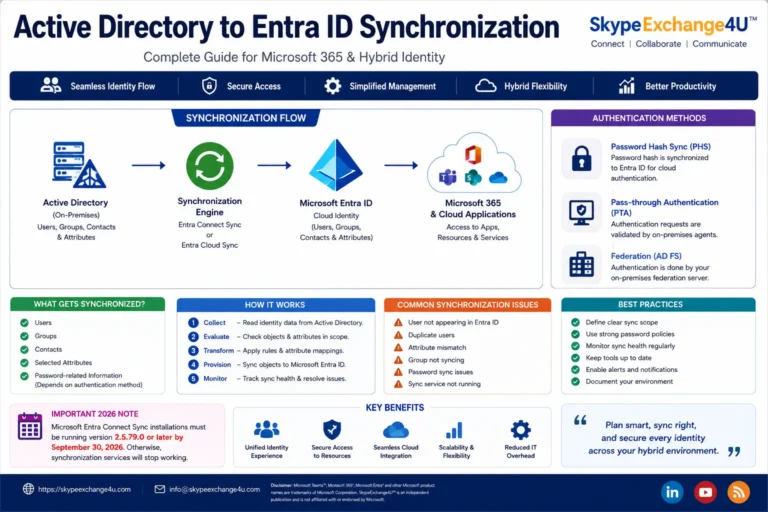
MICROSOFT ENTRA ID® • ACTIVE DIRECTORY • HYBRID IDENTITY Active Directory to Entra ID Synchronization: Complete Guide Learn how identity data moves from on-premises Active Directory to Microsoft Entra ID, including synchronization tools, configuration, authentication, troubleshooting, security and best practices. Editorial update: October 9, 2026 • Reading time: 12–15 minutes ⚡ Quick answer Active Directory…
-
Entra Connect vs Cloud Sync (2026): Comparison Matrix & Migration Guide
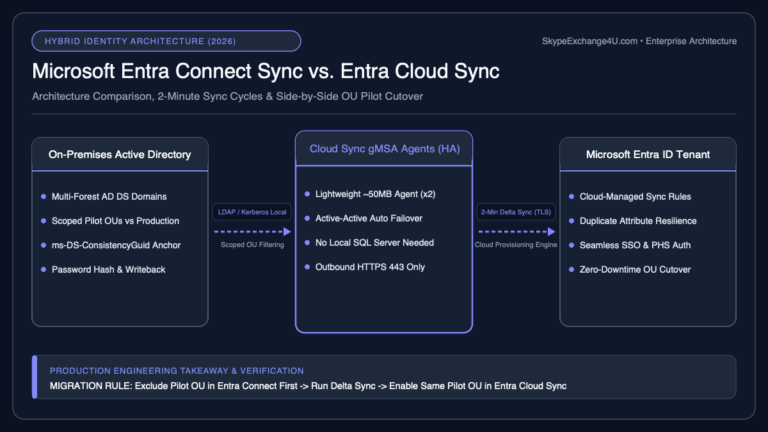
Short answer: Entra Connect vs Cloud Sync is about how you synchronize on-premises Active Directory to Microsoft Entra ID. Entra Connect (Connect Sync) is the full-featured Windows server sync engine for complex forests, advanced attribute flows, and many hybrid scenarios. Entra Cloud Sync is a lightweight agent-based sync for simpler topologies and as a stepping…
-
Microsoft 365 Hybrid Identity Explained: AD, Entra ID, Sync & Authentication
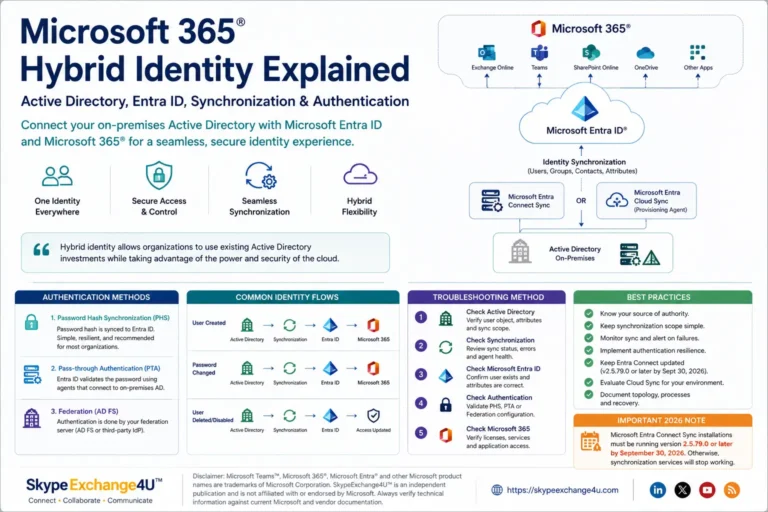
MICROSOFT 365® • HYBRID IDENTITY • ENTERPRISE IT Microsoft 365 Hybrid Identity Explained: Active Directory, Entra ID, Sync & Authentication A practical guide to Microsoft 365 hybrid identity, Active Directory, Microsoft Entra ID, synchronization, authentication, Cloud Sync, Entra Connect and troubleshooting. Updated: August 2026 • Reading time: 10–12 minutes ⚡ Short answer: Microsoft 365 hybrid…
-
How to Connect to Exchange Online PowerShell: Step-by-Step Guide
Short answer: You can connect to Exchange Online PowerShell by installing the ExchangeOnlineManagement module and then running Connect-ExchangeOnline. The connection uses modern authentication and supports accounts protected with MFA. Exchange Online PowerShell is one of the most useful tools for Microsoft 365 administrators. The Microsoft 365 admin center is excellent for everyday management, but PowerShell…
-
Exchange Online PowerShell in 2026: The Commands You Actually Need
From Exchange Server to Microsoft 365 Moving from Exchange Server to Exchange Online changes more than where your mailboxes are hosted. The biggest change is the administration model. Exchange Server → Servers → Databases → DAGs → Queues → Mailboxes Exchange Online → Users → Mailboxes → Permissions → Groups → Mail Flow → Policies…

SkypeExchange4U
Teams Direct Routing, SBC, and hybrid identity guides
Practical Microsoft Teams voice and Entra ID notes from real deployments. Call flow, SBC setup, and troubleshooting. No fluff.