Microsoft 365 Tenant-to-Tenant Migration Runbook: Strategy, Pros & Cons, and Cutover Architecture
In enterprise IT, few technical undertakings carry higher risk or greater organizational visibility than a Microsoft 365 Tenant-to-Tenant (T2T) migration. Whether triggered by corporate mergers, acquisitions, divestitures, rebranding, or legal restructuring, consolidating two distinct Microsoft cloud tenants into a unified environment is a complex, high-stakes project. A single misstep during the zero-hour domain cutover can sever corporate email flow, lock users out of critical SharePoint documents, or corrupt Teams collaboration across thousands of employees.
The primary architectural challenge stems from a fundamental constraint of the Microsoft cloud platform: a custom domain (e.g., contoso.com) can only exist in exactly one Microsoft 365 tenant at any given moment. You cannot register or route mail to a domain in the target tenant while it remains active in the source tenant. Consequently, every tenant-to-tenant migration demands a meticulously engineered cutover sequence, precise coexistence modeling, and robust rollback contingencies.
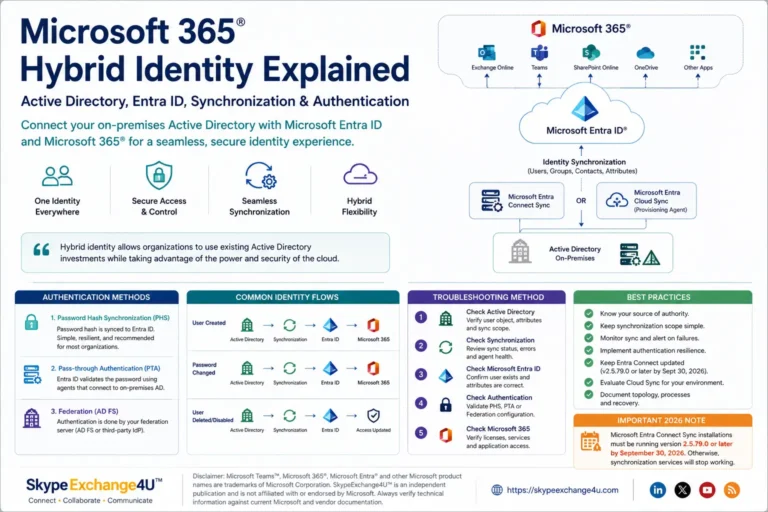
A Microsoft 365 tenant is not merely an email server—it is a deeply integrated ecosystem comprising Microsoft Entra ID identities, Exchange mailboxes, SharePoint document libraries, OneDrive sync points, Microsoft Teams channels, Intune device compliance policies, and Power Platform automations. Successful migrations demand decoupled data pre-syncing long before the cutover weekend.
Pros and Cons: Native Microsoft Tooling vs. Third-Party ISV Migration Suites
Before designing your migration schedule, enterprise architects must select their tooling strategy. Historically, organizations were entirely dependent on third-party Independent Software Vendor (ISV) tools. While Microsoft now provides native Cross-Tenant capabilities, each approach has distinct trade-offs:
| Evaluation Criteria | Native Microsoft Tooling (Cross-Tenant Mailbox & Sync) | Third-Party ISV Suites (BitTitan, Quest, AvePoint, ShareGate) |
|---|---|---|
| Licensing & Cost | PRO: Cross-Tenant Mailbox Move uses built-in MRS architecture. Included in standard M365 licensing (advanced features require Cross-Tenant User Data Migration add-on). | CON: Requires per-user or per-gigabyte licensing ($12 to $35+ per user depending on workload bundle). |
| Mailbox Migration Fidelity | PRO: Mailbox Replication Service (MRS) preserves Outlook profile Autodiscover redirection, folder rules, litigation hold dates, and message read/unread metadata seamlessly. | PRO/CON: High fidelity over Graph API / EWS, but frequently requires complete client Outlook profile re-generation via automated deployment agents. |
| Microsoft Teams Chat & Channel Migration | CON: Native cross-tenant Teams chat history migration is heavily restricted. Microsoft native tools do not migrate private 1:1 or group chat history natively. | PRO: Ingests 1:1 chats, group chats, channel conversations, tabs, and planner boards directly via Teams Graph Export/Import APIs. |
| SharePoint & OneDrive File Permissions | PRO: Native Cross-Tenant OneDrive migration preserves internal direct links and file version history without downloading to staging servers. | PRO: Excellent user mapping matrices, metadata filtering, and selective site collection scheduling. |
| Implementation Complexity | CON: Requires complex PowerShell scripting, Exchange Organization Relationships, and Azure App Registrations across both tenants. | PRO: Centralized SaaS management dashboards, real-time error auditing, and automated delta scheduling. |
Phase 1: Discovery & Comprehensive Tenant Assessment
Every failed migration can be traced back to incomplete discovery. Before configuring a single migration endpoint, run an exhaustive inventory across both environments.
1. Identity & Directory Synchronization Assessment
- Identity Sourcing: Are source users cloud-only identities, or synchronized from on-premises Active Directory via Microsoft Entra Connect?
- Target Identity Model: Will users synchronize to the target tenant from a new on-prem AD domain, or transition to pure cloud-native Entra ID join?
- Stale Voice/Skype Locks: If users have legacy hybrid attributes (e.g.,
msRTCSIP-Line), review our runbook on Fixing Teams OnPremLineURI Sync Errors to ensure phone assignments are not blocked post-migration. - User Principal Name (UPN) Strategy: Plan target UPN formats. Users will initially be provisioned with
user@targettenant.onmicrosoft.comuntil zero-hour domain cutover.
2. Exchange Online Messaging Inventory
- User mailboxes, shared mailboxes, and room/equipment mailboxes.
- Total storage consumption and individual mailboxes exceeding 90 GB.
- In-Place Archives and auto-expanding archive configurations.
- Litigation Holds, Retention Policies, and eDiscovery cases.
- Mail-enabled security groups, distribution lists, and dynamic distribution groups.
- Outbound/inbound mail connectors, transport rules, and third-party spam filters (Mimecast, Proofpoint).
3. SharePoint Online & OneDrive Storage Audit
- Total document storage volume and site collection counts.
- Sites with unique permissions or broken inheritance.
- Large lists exceeding the 5,000-item threshold view limit.
- Custom SharePoint Framework (SPFx) web parts and third-party workflow apps.
4. Microsoft Teams & Voice Infrastructure
- Team count, channel structures (standard vs. private vs. shared channels).
- Phone System licenses, Direct Routing Session Border Controllers (SBCs), and Microsoft Teams Shared Calling Policies.
- Meeting Room systems: Verify whether your meeting hardware uses Teams Rooms Resource Mailboxes or third-party gateways.
Phase 2: Target Tenant Preparation & Identity Pre-Staging
Identity must precede data. Before migrating email or files, target user objects must exist in the target tenant to anchor permissions and access controls.
The Identity Pre-Staging Sequence
- Provision Target Identities: Create users in the target tenant using the target fallback domain:
user@target.onmicrosoft.com. - Assign Required Licenses: Assign target M365 licenses (e.g., E3, E5, Business Premium) to provision target Exchange mailboxes and OneDrive personal sites.
- Match Target Mailbox GUIDs: If using native Cross-Tenant Mailbox Move, ensure the target MailUser object has the
MailboxMoveRemoteHostNameand source GUID properly stamped. - Deploy Security Defaults & MFA: Configure target Entra ID Conditional Access policies, SSPR, and register emergency bypass administrative accounts.
Establishing Cross-Tenant Organization Relationships (PowerShell)
If utilizing native Microsoft Mailbox Move, establish mutual trust between both Exchange Online organizations:
# 1. In the Target Tenant: Configure Organization Relationship with Source
Connect-ExchangeOnline -UserPrincipalName admin@targettenant.onmicrosoft.com

New-OrganizationRelationship -Name "CrossTenant-SourceTrust" `
    -TargetApplicationUri "outlook.com" `
    -TargetAutodiscoverEpr "https://autodiscover-s.outlook.com/autodiscover/autodiscover.svc/WSSecurity" `
    -Enabled $true `
    -DomainNames "sourcetenant.onmicrosoft.com", "customdomain.com" `
    -MailboxMoveEnabled $true `
    -FreeBusyAccessEnabled $true `
    -FreeBusyAccessLevel LimitedDetails

# 2. In the Source Tenant: Mirror the Organization Relationship
Connect-ExchangeOnline -UserPrincipalName admin@sourcetenant.onmicrosoft.com

New-OrganizationRelationship -Name "CrossTenant-TargetTrust" `
    -TargetApplicationUri "outlook.com" `
    -TargetAutodiscoverEpr "https://autodiscover-s.outlook.com/autodiscover/autodiscover.svc/WSSecurity" `
    -Enabled $true `
    -DomainNames "targettenant.onmicrosoft.com" `
    -MailboxMoveEnabled $true `
    -FreeBusyAccessEnabled $true `
    -FreeBusyAccessLevel LimitedDetails
Phase 3: The Data Pre-Sync Strategy (Slashing Cutover Downtime)
Attempting to copy terabytes of messaging and document data during a 48-hour weekend window is a recipe for catastrophic project failure. Modern tenant migrations execute 95% of data replication weeks prior to cutover.
- Exchange Pre-Sync (90-Day Filter): Execute initial mailbox migration passes copying all email older than 30 or 90 days. For active production mailboxes, this relocates 85% to 95% of total gigabytes into target storage without user disruption.
- OneDrive / SharePoint Initial Seeding: Run baseline bulk synchronization across all user personal document libraries and departmental SharePoint sites.
- Continuous Delta Passes: Run automated delta sync passes every 3 to 5 days leading up to the cutover weekend to replicate newly created, modified, or deleted items.
Phase 4: The Zero-Hour Cutover Weekend Execution Runbook
The cutover window typically begins Friday evening and concludes before business hours Monday morning. Execute these steps in strict chronological order:
Pre-Cutover Checklist (T-Minus 72 to 48 Hours)
- Lower DNS TTLs: Reduce Time-to-Live (TTL) on MX, SPF, DKIM, and Autodiscover DNS records from 86,400 seconds (24h) down to 300 seconds (5 minutes).
- Send User Communication: Remind employees of the exact freeze window and provide instructions for webmail access during the maintenance window.
- Final Pre-Cutover Delta Sync: Execute a comprehensive synchronization pass across all mailboxes and file repositories.
Zero-Hour Cutover Chronology (Friday 6:00 PM → Sunday 12:00 PM)
Point your domain’s public MX record to a backup mail spooling service, or configure an inbound pause on your email security gateway (Proofpoint/Mimecast). This queues incoming messages safely without bounce-backs while the domain is in transit.
Microsoft Entra ID will NOT allow removing a custom domain until every object referencing that domain is modified. You must purge the custom domain from all User Principal Names, secondary proxyAddresses, distribution groups, shared mailboxes, and Microsoft 365 Groups.
PowerShell Script: Stripping Custom Domain ProxyAddresses & UPNs
# Run in Source Tenant to replace custom domain with tenant fallback
$SourceDomain = "contoso.com"
$FallbackDomain = "sourcetenant.onmicrosoft.com"

# 1. Update User Principal Names (UPNs)
$Users = Get-CsOnlineUser -Filter "UserPrincipalName -like '*@$SourceDomain'"
foreach ($User in $Users) {
    $NewUPN = $User.UserPrincipalName.Replace("@$SourceDomain", "@$FallbackDomain")
    Write-Host "Updating UPN: $($User.UserPrincipalName) -> $NewUPN" -ForegroundColor Cyan
    Set-MsolUserPrincipalName -UserPrincipalName $User.UserPrincipalName -NewUserPrincipalName $NewUPN
}

# 2. Strip custom domain from proxyAddresses across all mailboxes
$Mailboxes = Get-Mailbox -ResultSize Unlimited
foreach ($Mbx in $Mailboxes) {
    $FilteredAddresses = $Mbx.EmailAddresses | Where-Object { $_ -notlike "*@$SourceDomain" }
    Set-Mailbox -Identity $Mbx.Identity -EmailAddresses $FilteredAddresses
}
- In Source Tenant M365 Admin Center: Navigate to Settings → Domains and click Remove Domain. (Verify removal succeeds).
- In Target Tenant M365 Admin Center: Click Add Domain, enter
contoso.com, and complete public DNS TXT record verification. - Once verified, stamp
contoso.comonto target users’ UPNs and primary SMTP addresses.
- Update public DNS MX records pointing to target tenant:
contoso-com.mail.protection.outlook.com. - Update SPF record:
v=spf1 include:spf.protection.outlook.com -all. - Update DKIM CNAMEs and enable DKIM signing in the target Security portal.
- Execute final delta pass for mailboxes and files to capture any emails received between Friday evening and cutover.
- Release queued mail from your backup spooler.
Phase 5: Post-Cutover & Client Reconfiguration
Once DNS points to the target tenant, users must re-authenticate their client endpoints:
- Desktop Outlook: If using native MRS Cross-Tenant Mailbox Move, Outlook automatically detects the target redirect via Autodiscover and updates the existing OST file. If using third-party migration tools, deploy a profile creation script or use automated tools (e.g., BitTitan DeploymentPro) to generate a clean Outlook profile.
- OneDrive Sync Client: Users must unlink the old source account from the OneDrive sync client and sign in with their target credentials to establish a new sync folder.
- Microsoft Teams Client: Users must sign out of the desktop and mobile Teams apps and sign back in using their target credentials.
- Mobile Devices (MDM / Intune): If corporate mobile devices were enrolled in source tenant Intune, unenroll the devices and push target tenant enrollment policies.
Enterprise Pre-Flight Checklist
| Checkpoint | Owner | Status Verification |
|---|---|---|
| DNS TTLs lowered to 300s | DNS Admin | Verify via nslookup -type=soa domain.com |
| Target licenses provisioned & assigned | M365 Admin | Confirm target mailboxes and OneDrive URLs exist |
| Mailbox & OneDrive 95% Pre-Sync complete | Migration Lead | Delta error rates < 0.5% |
| Domain purge script validated on test user | Voice / Identity Lead | Test user UPN & proxies cleanly stripped |
If migrating Microsoft Teams enterprise voice environments, review our companion runbooks: Teams Direct Routing One-Way Audio Troubleshooting Fix, Teams Shared Calling Outbound Drops Troubleshooting, and Fixing Teams OnPremLineURI Sync Errors & Clearing msRTCSIP Attributes.
Frequently Asked Questions (FAQ)
Can a domain exist in two Microsoft 365 tenants at the same time?
No. Microsoft 365 strictly prevents a custom domain from being registered in more than one tenant simultaneously. The custom domain must be completely removed from all objects in the source tenant before it can be added, verified, and activated in the target tenant.
What happens to incoming emails while the domain is being moved between tenants?
During domain transit, inbound emails will bounce if the MX record points to a non-existent route. To prevent data loss, organizations point their MX record to an email spooling service or pause inbound processing on their secure email gateway (e.g., Proofpoint, Mimecast) to queue inbound messages until target verification is complete.
Does Microsoft native Cross-Tenant Mailbox Move migrate Teams chat history?
No. Microsoft’s native Cross-Tenant Mailbox Move and Cross-Tenant User Data Migration tools migrate Exchange mailboxes and OneDrive document libraries, but do not natively migrate 1:1 or group Microsoft Teams chat history. Migrating Teams chat history requires third-party ISV migration tools leveraging the Teams Graph APIs.
About the Author: Satya Pathak
Satya Pathak is an Enterprise Unified Communications & Identity Solutions Architect with 15+ years of production experience leading complex Active Directory consolidations, Microsoft 365 Tenant-to-Tenant migrations, and Teams Voice infrastructure deployments.
Connect directly on the Author Profile or access open-source PowerShell tools in the TeamsVoice GitHub Repository.