Teams Direct Routing Calls Dropping After 30 Seconds: Fixing SIP ACK Timeouts, Contact Header NAT & Session Timers (2026)
Why do Microsoft Teams Direct Routing calls drop after 30 seconds? In 85% of enterprise deployments, calls that connect with two-way audio and drop at 20 to 32 seconds are caused by a missing SIP ACK packet after the 200 OK response. This occurs when the Session Border Controller (AudioCodes, Ribbon, Cisco CUBE) stamps its private RFC 1918 IP address instead of its public FQDN into the SIP Contact or Record-Route header, or when a perimeter firewall blocks return signaling from Microsoft’s secondary SIP proxies (52.112.0.0/14 and 52.122.0.0/15). Calls that drop at exactly 15 or 30 minutes are caused by RFC 4028 SIP Session Timer (Session-Expires) re-INVITE negotiation failures.
Few unified communications incidents are more frustrating to diagnose than a timed call drop. Unlike immediate call setup failures—which return explicit error codes like SIP 403 Forbidden or SIP 503 Service Unavailable—a timed call drop starts as a seemingly healthy call. The phone rings, the user answers, crystal-clear two-way SRTP audio flows across the trunk, and then the call abruptly terminates at a predictable stopwatch interval: 30 seconds, 60 seconds on hold, or 15 minutes.
Because the initial call setup and media negotiation succeed, junior administrators often waste days blaming carrier circuit jitter or user headsets. In reality, a deterministic call drop timestamp is a mathematical fingerprint left by a specific SIP state-machine timer.
In this production troubleshooting runbook, we dissect the exact SIP signaling ladders behind the three primary timed call drop intervals in Microsoft Teams Direct Routing, provide exact AudioCodes Mediant and Ribbon SBC configuration fixes, and share a PowerShell diagnostic script to isolate the root cause in minutes.
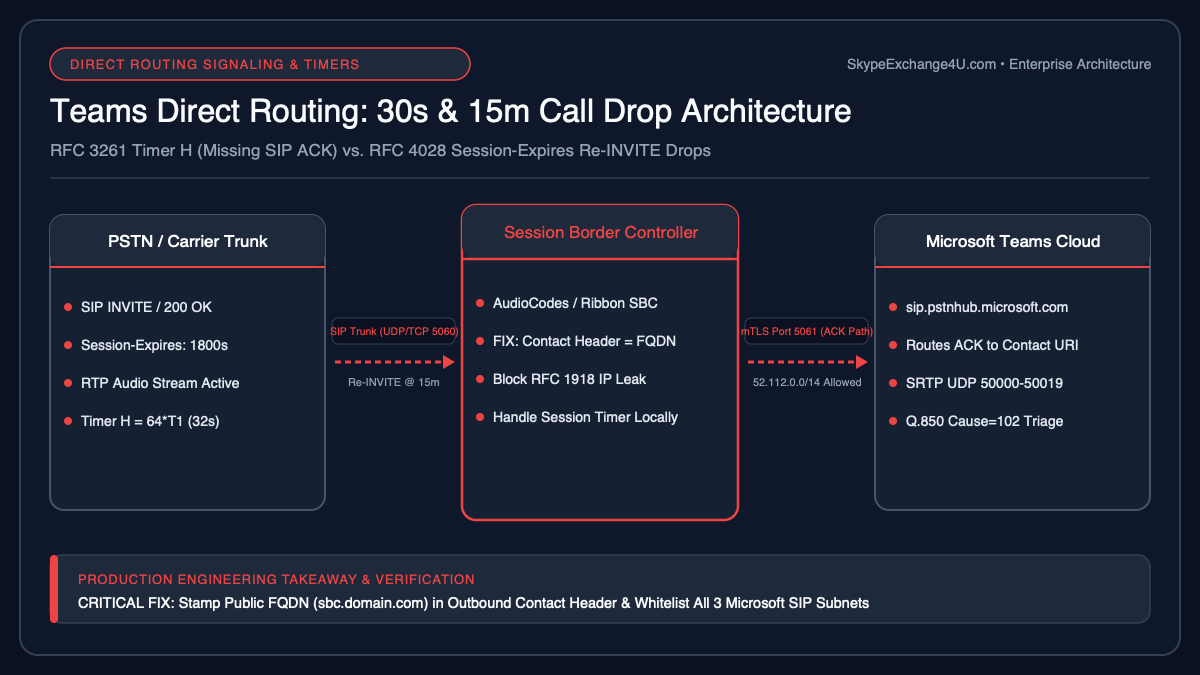
The Timed Call Drop Diagnostic Matrix (Stopwatch Triage)
Before capturing a single Wireshark or SBC syslog trace, measure the exact elapsed time from when the called party answers (SIP 200 OK) to when the call disconnects. The duration immediately isolates the failing protocol layer:
| Drop Timestamp | Failing Protocol Timer | Primary Root Cause | SIP Termination Code |
|---|---|---|---|
| 20 – 32 Seconds | RFC 3261 Timer H (64 × T1 = 32s) | Missing SIP ACK after 200 OK due to SBC Contact header private IP NAT leak or asymmetric firewall routing. |
BYE with Q.850;cause=102 (Recovery on timer expiry) |
| 30 – 60 Seconds (On Hold) | Firewall UDP Idle Timeout / SBC RTP Broken Connection | Firewall closes UDP 50000–50019 pinhole during Music on Hold or mute silence when RTCP keepalives are blocked. | BYE with Reason: RTP Broken Connection |
| 15 or 30 Minutes | RFC 4028 Session Timer (Session-Expires: 1800) |
Mid-call re-INVITE or UPDATE rejected with 488 / 491, or TCP 5061 TLS socket closed by firewall idle timeout. |
BYE at exactly 900s (15m) or 1800s (30m) |
1. Root Cause #1: The 30-Second Call Drop (Missing SIP ACK & Timer H Expiry)
Under the IETF RFC 3261 SIP Specification, a three-way handshake is mandatory to establish a call dialog: INVITE → 200 OK → ACK. Importantly, two-way SRTP voice media begins streaming as soon as the 200 OK SDP answer is processed—before the final ACK arrives.
If the party sending the 200 OK never receives the final ACK, RFC 3261 Timer G retransmits the 200 OK at exponentially doubling intervals (0.5s, 1s, 2s, 4s) until Timer H (64 × T1 = 32 seconds; configured to 20–30 seconds on some carrier trunks) expires and forcibly terminates the call with a BYE.
Why the SIP ACK Vanishes in Teams Direct Routing
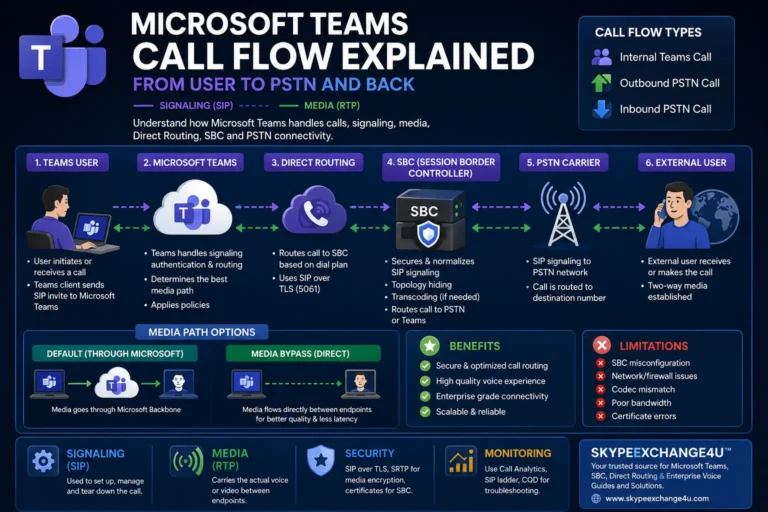
According to Microsoft’s official Teams Direct Routing SIP Signaling Protocol Specifications, the initial INVITE and 200 OK follow the Via header path, but the ACK for a 200 OK is routed directly to the URI specified in the Contact header (modified by any Record-Route headers).
Here is the exact failure sequence on an SBC deployed behind 1:1 NAT (such as in Azure VNet, AWS VPC, or behind a Palo Alto / Fortinet DMZ firewall):
[Broken SIP 200 OK Sent by Misconfigured SBC to Microsoft Teams]
SIP/2.0 200 OK
Via: SIP/2.0/TLS 52.114.75.24:5061;branch=z9hG4bK7a91f2
From: <sip:+14155550199@sip.pstnhub.microsoft.com:5061>;tag=1c8842
To: <sip:+12125550100@sbc1.contoso.com:5061>;tag=99102a
Contact: <sip:+12125550100@10.20.4.15:5061;transport=tls>   <-- FATAL: Private RFC 1918 IP instead of FQDN!
Record-Route: <sip:10.20.4.15:5061;transport=tls;lr>        <-- FATAL: Unroutable from Microsoft Cloud!
When Microsoft’s SIP proxy receives that 200 OK, it attempts to send the ACK to 10.20.4.15:5061 or to an IP literal instead of your certificate-backed FQDN sbc1.contoso.com:5061. The ACK never reaches your SBC, and at 32 seconds the call drops.
The Second 30-Second Trap: Asymmetric Multi-Datacenter Signaling Subnets
Even if your Contact header correctly displays sbc1.contoso.com, Microsoft Teams Direct Routing uses three primary FQDNs backed by entire CIDR blocks:
sip.pstnhub.microsoft.com(Global priority 1)sip2.pstnhub.microsoft.com(Secondary priority 2)sip3.pstnhub.microsoft.com(Tertiary priority 3)
Crucially, the INVITE may originate from 52.114.75.24, while the subsequent ACK or BYE may be dispatched from a completely different load-balanced IP within 52.112.0.0/14 or 52.122.0.0/15. If your firewall engineer whitelisted only the single resolved IP of sip.pstnhub.microsoft.com instead of the full Microsoft CIDR ranges, the firewall drops the incoming ACK on TCP 5061.
Fix for AudioCodes Mediant SBC (VE / CE / Hardware)
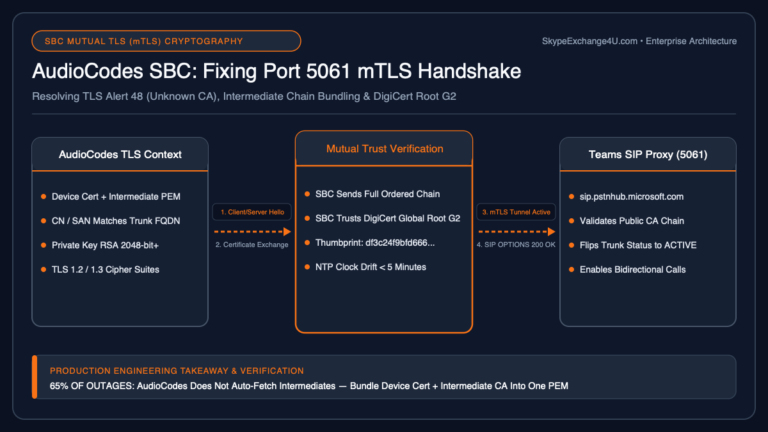
On AudioCodes Mediant SBCs (including AudioCodes Mediant CE in Azure and On-Premises AudioCodes SBCs), ensure the Teams IP Group stamps the public trunk FQDN in all outbound Contact and Record-Route headers:
- Navigate to Setup → Signaling & Media → Core Entities → IP Groups and select your Teams IP Group.
- Verify that Local Host Name is set explicitly to your public Direct Routing FQDN (e.g.,
sbc1.contoso.com). - Navigate to Setup → Signaling & Media → Core Entities → NAT Translation and verify the 1:1 NAT rule maps your WAN VLAN interface to your public IP—however, for Teams Direct Routing, Microsoft mandates an FQDN in the
Contactheader rather than a raw NAT IP. - Attach a Message Manipulation Set to the Teams IP Group outbound direction to enforce the FQDN in the
Contactheader if NAT Translation overrides it:
; AudioCodes INI Message Manipulation Rule: Force Public FQDN on Outbound Contact Header to Teams
[MessageManipulations]
MessageManipulations 1 = 1, "Force Teams Contact FQDN", 0, "header.contact.url.host", 2, "'sbc1.contoso.com'", 0
2. Root Cause #2: The 15-Minute or 30-Minute Call Drop (RFC 4028 SIP Session Timers)
If your calls survive the first 60 seconds without issue but disconnect like clockwork at 15 minutes (900 seconds) or 30 minutes (1,800 seconds), you are hitting an RFC 4028 SIP Session Timer failure.
To prevent “ghost calls” from tying up trunk channels forever when a client crashes, SIP endpoints negotiate a periodic session refresh interval via the Session-Expires header (typically Session-Expires: 1800;refresher=uac). At the halfway mark ($1800 / 2 = 900\text{ seconds}$, or 15 minutes), the designated refresher sends a mid-dialog re-INVITE or UPDATE.
The 3 Reasons Mid-Call Re-INVITEs Fail at 15 Minutes
- Firewall TCP 5061 Idle Session Timeout: Once a call is established at 0:00, RTP voice packets flow continuously over UDP, but zero SIP packets traverse TCP Port 5061 until the 15-minute mark. Many enterprise firewalls (Check Point, Palo Alto, Fortinet, Azure Firewall) have a default TCP idle timeout of 300 to 600 seconds (5–10 minutes) if TCP keepalives or SIP OPTIONS pings are not active on that socket. When the 15-minute
re-INVITEfires, the firewall silently drops the packet as an out-of-state TCP segment!- Fix: Enable
TLS Keep-Aliveand periodicSIP OPTIONSkeepalives every 60 seconds on the SBC SIP Interface, and raise the firewall TCP session timeout for port 5061 to 3,600 seconds.
- Fix: Enable
- Codec / Crypto Re-Negotiation Rejection (
SIP 488on Re-INVITE): When the upstream SIP trunk carrier sends a 15-minutere-INVITEwithout an SDP body (delayed offer) or with unencrypted RTP parameters, and the SBC forwards that rawre-INVITEstraight to Teams without media anchoring, Teams rejects it with SIP 488 Not Acceptable Here and terminates the call.- Fix: Configure the SBC to handle SIP Session Timer refreshes locally on each leg (Handle Locally in AudioCodes SIP Profile) so carrier session-timer
re-INVITEprobes are answered by the SBC without disturbing the Microsoft Teams mTLS dialog.
- Fix: Configure the SBC to handle SIP Session Timer refreshes locally on each leg (Handle Locally in AudioCodes SIP Profile) so carrier session-timer
- Glare / Pending Request Collision (
SIP 491 Request Pending): If both the carrier PBX and Teams attempt to refresh the session simultaneously because of mismatchedMin-SEtimers, the collision drops the call. SetMin-SE: 900andSession-Expires: 1800uniformly across both IP Profiles.
3. Root Cause #3: Call Drops After 30–60 Seconds When Placed on Hold
When a Teams user places an active PSTN call on hold, Teams sends a re-INVITE with SDP attribute a=inactive or a=sendonly. If Music on Hold (MoH) is disabled or handled client-side, bidirectional RTP packets stop flowing temporarily.
This creates two immediate hazards:
- SBC “Broken Connection” Watchdog: AudioCodes and Ribbon SBC 1000/2000 gateways include a feature called RTP Broken Connection Detection (or Disconnect on Broken Connection). If the carrier stops sending RTP packets during Mute or Hold and fails to send RTCP keepalive reports, the SBC assumes the endpoint crashed and sends a
BYEafter 30 seconds.- Fix on AudioCodes: In your Carrier IP Profile → Media Security / RTP settings, set Disconnect on Broken Connection to
Disable(or ensureIgnore RTCP on Hold = Yes).
- Fix on AudioCodes: In your Carrier IP Profile → Media Security / RTP settings, set Disconnect on Broken Connection to
- Stateful Firewall UDP NAT Pinhole Expiry: Standard enterprise firewalls expire UDP state translations after 30 seconds of silence. When the user clicks Resume in Teams after 45 seconds on hold, the return RTP stream is blocked, resulting in Teams Direct Routing One-Way Audio followed by the user hanging up. Set your firewall’s UDP idle timeout for Microsoft Media Processor subnets (
52.112.0.0/14,52.122.0.0/15) to ≥ 180 seconds, and verify your Local Media Optimization (LMO) network site mappings.
4. Automated PowerShell Diagnostic Script: Audit Timed Call Drops & SBC Headers
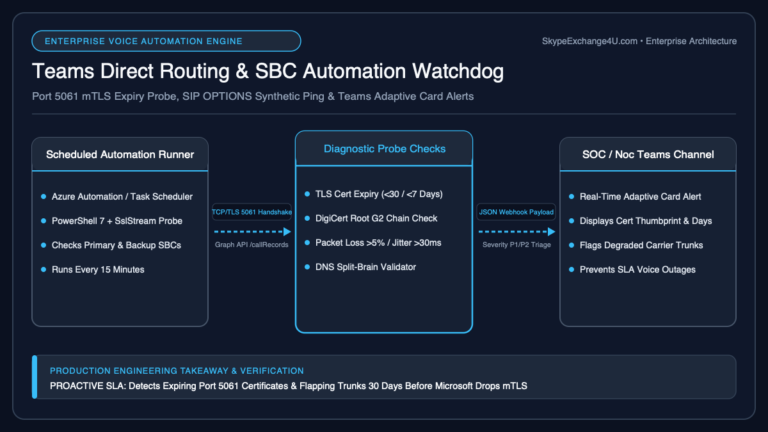
To quickly determine whether your 30-second or 15-minute call drops are originating from missing SIP ACKs, firewall CIDR gaps, or PSTN gateway flags, run the following diagnostic PowerShell script alongside our Teams Direct Routing & SBC Automation Runbook:
<#
.SYNOPSIS
    Audits Microsoft Teams Direct Routing PSTN Gateways for Timed Call Drop Vectors
    (30-Second ACK Timeouts, Media Bypass NAT Traps, and Signaling Reachability).
.NOTES
    Author: Satya Pathak | SkypeExchange4U.com
#>
[CmdletBinding()]
param (
    [Parameter(Mandatory = $false)]
    [string]$SbcFqdn
)

Write-Host "=== Teams Direct Routing Timed Call Drop Diagnostic ===" -ForegroundColor Cyan

# 1. Inspect Online PSTN Gateway Configuration in Teams Tenant
try {
    $Gateways = if ($SbcFqdn) {
        @(Get-CsOnlinePSTNGateway -Identity $SbcFqdn -ErrorAction Stop)
    } else {
        Get-CsOnlinePSTNGateway -ErrorAction Stop
    }

    foreach ($Gw in $Gateways) {
        Write-Host "`n[*] Auditing PSTN Gateway: $($Gw.Identity)" -ForegroundColor Yellow
        Write-Host "    Enabled              : $($Gw.Enabled)"
        Write-Host "    SipSignalingPort     : $($Gw.SipSignalingPort)"
        Write-Host "    MediaBypass          : $($Gw.MediaBypass)"
        Write-Host "    BypassMode           : $($Gw.BypassMode)"
        Write-Host "    ForwardCallHistory   : $($Gw.ForwardCallHistory)"
        Write-Host "    ForwardPai           : $($Gw.ForwardPai)"
        Write-Host "    SendSipOptions       : $($Gw.SendSipOptions)"

        if (-not $Gw.SendSipOptions) {
            Write-Warning "    [!] SendSipOptions is FALSE on $($Gw.Identity). Firewall TCP 5061 idle timeouts may drop calls at 15 minutes!"
        }
        if ($Gw.MediaBypass -and $Gw.BypassMode -eq "Always") {
            Write-Warning "    [!] BypassMode is set to 'Always' instead of 'OnlyForLocalUsers'. Remote VPN/home users may experience 30-second RTP/ACK timeouts!"
        }

        # 2. Verify Public DNS A-Record Resolution (Ensure no RFC 1918 Private IP Leak)
        $DnsRecords = Resolve-DnsName -Name $Gw.Identity -Type A -ErrorAction SilentlyContinue
        foreach ($Rec in $DnsRecords) {
            if ($Rec.IPAddress -match "^(10\.|172\.(1[6-9]|2[0-9]|3[0-1])\.|192\.168\.)") {
                Write-Error "    [CRITICAL] $($Gw.Identity) resolves to private RFC 1918 IP ($($Rec.IPAddress))! Microsoft SIP proxies will fail to deliver SIP ACK, causing 30-second call drops."
            } else {
                Write-Host "    [+] Public DNS A-Record Verified: $($Rec.IPAddress)" -ForegroundColor Green
            }
        }
    }
} catch {
    Write-Warning "Could not query Get-CsOnlinePSTNGateway. Ensure MicrosoftTeams module is connected (Connect-MicrosoftTeams)."
}

# 3. Verify Outbound Reachability to All 3 Microsoft Direct Routing SIP Proxies
$MsProxies = @(
    "sip.pstnhub.microsoft.com",
    "sip2.pstnhub.microsoft.com",
    "sip3.pstnhub.microsoft.com"
)

Write-Host "`n[*] Testing TCP 5061 Reachability to All Microsoft SIP Signaling Hubs..." -ForegroundColor Cyan
foreach ($Proxy in $MsProxies) {
    $Test = Test-NetConnection -ComputerName $Proxy -Port 5061 -WarningAction SilentlyContinue
    if ($Test.TcpTestSucceeded) {
        Write-Host "    [+] $Proxy (Remote IP: $($Test.RemoteAddress)) : TCP 5061 OPEN" -ForegroundColor Green
    } else {
        Write-Error "    [!] $Proxy : TCP 5061 BLOCKED! Asymmetric ACK/BYE packets from this hub will fail and drop calls at 30 seconds."
    }
}
Frequently Asked Questions (FAQ)
Why do inbound PSTN calls drop at 30 seconds, while outbound calls work fine?
On an inbound PSTN call, Microsoft Teams is the callee (UAS) sending the 200 OK, and your SBC is responsible for generating and routing the ACK back to Microsoft’s specific signaling IP. If your firewall only permits traffic to the primary IP of sip.pstnhub.microsoft.com and blocks secondary IPs in 52.112.0.0/14, the outbound ACK from your SBC is blocked. Conversely, if outbound calls drop at 30 seconds, your SBC is the UAS sending the 200 OK with a misconfigured private IP in the Contact header, preventing Microsoft from returning the ACK.
What does Q.850 Cause=102 mean in Microsoft Teams Call Analytics?
In Teams Admin Center Call Analytics and SBC syslogs, Reason: Q.850;cause=102;text="Recovery on timer expiry" indicates that a mandatory signaling timer (most commonly RFC 3261 Timer H waiting for a SIP ACK, or Timer B waiting for a final response, as detailed in our SIP 487 & 408 Timeout Troubleshooting Guide) expired before the handshake completed.
How do I prevent calls from dropping at 15 minutes on AudioCodes SBC?
Open Setup → Signaling & Media → Coders & Profiles → SIP Profiles, edit your Teams SIP Profile, set Session Expires to 1800, Minimum Session Expires to 900, and set Session Expires Method to Re-INVITE with Handle Locally = Enable. Finally, ensure your perimeter firewall TCP idle timeout on port 5061 is at least 3,600 seconds.