Teams Direct Routing SIP 503 Service Unavailable: Troubleshooting SBC & Trunk Outages
Short answer: A SIP 503 Service Unavailable error in Microsoft Teams Direct Routing indicates that a component in the call path—either the Microsoft SIP proxy, your Session Border Controller (SBC), or the upstream PSTN carrier—is temporarily unable to process the call. The most common causes are failed SIP OPTIONS heartbeats, TLS certificate issues, carrier trunk exhaustion (Q.850 cause 34/41), or SBC licensing/DSP limits.
Because a 503 is a temporary failure code, it often triggers automatic failover to secondary SBCs or alternate PSTN routes. However, if all available routes return 503, users experience dropped calls, fast-busy signals, or a “Number unavailable” tone in the Teams client.
In this guide, we walk through identifying which entity generated the 503, decoding the underlying Q.850 cause codes and SIP headers, and systematically resolving the root cause.
Reason header and the Microsoft diagnostic sub-code first. In over 80% of production cases, a 503 is generated by the local SBC or carrier and merely forwarded to Teams.
What Does SIP 503 Service Unavailable Mean in Teams?
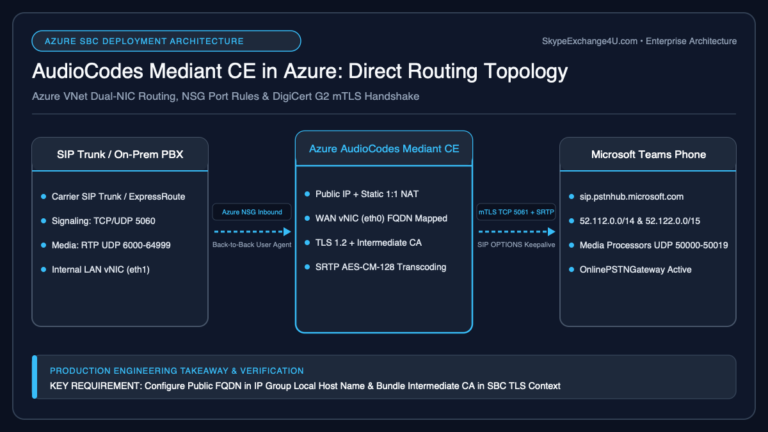
In the SIP protocol (RFC 3261), response code 503 Service Unavailable indicates that the server is undergoing temporary overloading or maintenance. In Teams Direct Routing, the call path involves three distinct hops:
A 503 can be generated at any of these boundaries:
- Microsoft Direct Routing generates 503: The Microsoft SIP proxy rejects the call before sending it to your SBC because the SBC is marked Inactive/Degraded (failed OPTIONS ping), or there is an active tenant routing misconfiguration.
- The SBC generates 503: The SBC rejects the call from Microsoft because all carrier channels are full, the carrier IP group is offline, DSP transcoding resources are exhausted, or an internal license limit was hit.
- The PSTN Carrier generates 503: The upstream telco rejects the call due to downstream network congestion, unallocated circuits, or provider outages, returning 503 through the SBC to Teams.
Step 1: Identify Who Generated the 503
To fix the issue rapidly, you must determine whether the response originated from Microsoft, your SBC, or the carrier.
1. Check the Microsoft Diagnostic Code (Teams Admin Center / CQD)
In the Teams Admin Center under Voice → Direct Routing → SBC Health, or in Teams Call Quality Dashboard (CQD) / Call Analytics, Microsoft records a 6-digit diagnostic code alongside the SIP code:
- 560503: A code beginning with 560 confirms that the final 503 response was generated by the SBC or the downstream carrier and sent back to Microsoft.
- 531xxx or 541xxx: Codes in these ranges usually indicate that Microsoft Direct Routing generated the response internally (for example, the SBC FQDN was marked down or unreachable).
2. Inspect the SIP Reason and Warning Headers
Capture the SIP ladder on your SBC (via AudioCodes Syslog, Ribbon LX, or Wireshark). Look at the headers in the SIP/2.0 503 Service Unavailable message:
SIP/2.0 503 Service Unavailable
Via: SIP/2.0/TLS sip.pstnhub.microsoft.com:5061;branch=z9hG4bK...
From: <sip:+15551234567@sip.pstnhub.microsoft.com:5061;user=phone>;tag=...
To: <sip:+15559876543@sbc.contoso.com:5061;user=phone>;tag=...
Call-ID: a8f492b1-3829-4b82-9382-38d928374920
CSeq: 1 INVITE
Reason: Q.850;cause=34;text="No circuit/channel available"
Retry-After: 30
Server: AudioCodes Mediant 1000B/v.7.40A
Content-Length: 0
The Q.850 cause code inside the Reason header is the ultimate indicator of why the call was dropped:
| Q.850 Cause | Description | Common Root Cause |
|---|---|---|
| Cause 34 | No circuit/channel available | Carrier trunk capacity reached or SBC concurrent session limit exceeded. |
| Cause 38 | Network out of order | Physical or transit network break between SBC and telco switch. |
| Cause 41 | Temporary failure | Normal call path congested or gateway restart in progress. |
| Cause 47 | Resources unavailable, unspecified | SBC DSP allocation failure or license cap. |
The 5 Most Common Causes of Direct Routing 503 & How to Fix Them
1. SBC Heartbeat (SIP OPTIONS) Failure
Microsoft Direct Routing sends periodic OPTIONS requests to every configured SBC gateway to verify availability. If your SBC fails to answer these OPTIONS requests within the required window, Microsoft marks the SBC as Inactive and immediately rejects all incoming user calls with a 503 Service Unavailable.
- Check Status: In Teams Admin Center, navigate to Voice → Direct Routing → SBCs. Check if your SBC is listed as Active, Warning, or Inactive.
- Fix: Verify that your SBC responds with
200 OKto all three Microsoft Direct Routing SIP proxy regional clusters:sip.pstnhub.microsoft.com(Worldwide)sip2.pstnhub.microsoft.com(Secondary)sip3.pstnhub.microsoft.com(Tertiary)
- Related Reading: See our detailed guide on Teams SBC Inactive After Certificate Renewal (OPTIONS Fix).
2. TLS Certificate Expiry or Cipher Negotiation Failure
Direct Routing strictly mandates mutual TLS (mTLS) over port 5061. If the SBC’s TLS certificate expires, or if the intermediate certificate authority (CA) chain is missing from the SBC keystore, Microsoft terminates the TLS handshake before SIP negotiation begins, resulting in a 503 error for callers.
- Verify that your public certificate Subject Alternative Name (SAN) contains your exact SBC FQDN (e.g.,
sbc.contoso.com). - Verify that your certificate was issued by an officially supported public CA (DigiCert, Sectigo, GlobalSign, etc.). Private corporate CAs are not supported by Microsoft Direct Routing.
3. Carrier Trunk Capacity & Channel Exhaustion (Cause 34)
If outbound calls fail with 503 during peak business hours, your SIP trunk provider may be enforcing a hard concurrent call path (CCP) limit.
In your SBC syslog, examine the carrier leg: if the carrier returns SIP 503 Reason: Q.850;cause=34, your organization has exceeded its purchased trunk capacity. You must either upgrade your concurrent call count with your carrier or configure secondary failover routing in your Teams Voice Routing Policy.
4. SBC Media Resource / DSP Depletion
When calls require codec transcoding (for example, transcoding between Microsoft SILK and a carrier’s G.729 trunk), the SBC utilizes hardware Digital Signal Processors (DSPs) or software transcoding licenses. If all DSP channels are occupied, the SBC cannot establish the media path and rejects new incoming INVITEs with 503.
- To avoid unnecessary transcoding, ensure your carrier supports G.711u / G.711a or configure Media Bypass vs Local Media Optimization so Teams media endpoints transmit audio directly without burdening SBC DSPs.
- For SDP-level media rejections, compare this with our Teams Direct Routing 488 Troubleshooting Guide.
5. DNS Resolution or Firewall IP Changes
Microsoft Direct Routing utilizes dynamic IP addresses within Microsoft 365 worldwide subnets. If your enterprise firewall restricts outbound traffic to static IP addresses instead of the official Microsoft 365 IP ranges, your SBC will fail to connect to secondary Microsoft proxies, returning 503.
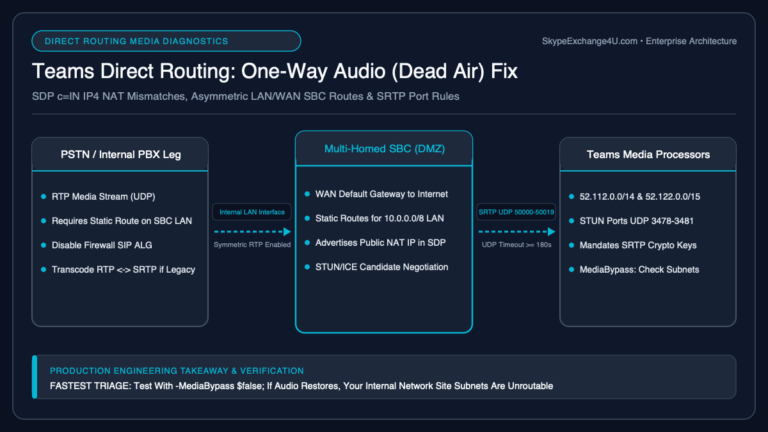
Ensure that outbound TCP/UDP port 5061 and RTP media ports (typically UDP 10000–20000 or 49152–65535 depending on SBC vendor) are unrestricted toward the Microsoft 365 Direct Routing subnets.
Verifying SBC Gateway Status with PowerShell
You can quickly inspect gateway health and failover metrics using the Microsoft Teams PowerShell module:
# Connect to Microsoft Teams PowerShell
Connect-MicrosoftTeams

# Inspect all configured Direct Routing PSTN Gateways
Get-CsOnlinePSTNGateway | Select-Object Identity, InService, Enabled, FailoverTimeMinutes, PingManagementSupported

# Verify specific gateway parameters
Get-CsOnlinePSTNGateway -Identity "sbc.contoso.com" | Format-List
Pay close attention to:
- InService: Must be
True. IfFalse, Microsoft Direct Routing is actively bypassing this SBC. - Enabled: Must be
True. - FailoverTimeMinutes: Defines how long Microsoft waits before routing traffic back to a recovered gateway (default is 10 minutes).
Vendor-Specific SBC Troubleshooting Notes
AudioCodes Mediant SBCs
- Syslog Tool: Open the AudioCodes Syslog Viewer and filter by
SIPandGW. - IP Group Down: If your SIP trunk IP Group state changes to “Blocked” or “Offline”, verify that your Proxy Set keep-alive settings have an OPTIONS interval between 60 and 120 seconds.
- License Limits: Check Status & Diagnostics → License Key to ensure Active SBC Sessions has not reached its peak ceiling.
Ribbon SBC Core / Edge (SBC 1000/2000/SWe)
- Signaling Groups: Check Monitoring → Signaling Groups. If the Microsoft Teams signaling group is marked Down, verify the TLS profile and mutual authentication checkbox.
- Call Routing Table: Ensure that your Call Routing Table contains a fallback entry pointing to an alternate signaling group or secondary carrier if the primary trunk returns 503.
Teams Direct Routing 503 Troubleshooting Checklist
- Check Teams Admin Center to see if the SBC status is Active or Inactive.
- Review the Microsoft diagnostic code (560xxx = SBC/Carrier fault; 531xxx = Microsoft fault).
- Inspect the SIP
Reasonheader for Q.850 cause codes (Cause 34 = Circuit congestion). - Verify that your SBC replies with
200 OKto MicrosoftOPTIONSrequests. - Check public TLS certificate validity and ensure the root/intermediate CA chain is installed.
- Confirm that concurrent call limits have not exceeded your carrier or SBC license allotment.
- Verify firewall rules for TCP/TLS 5061 and UDP RTP port ranges.
- Test gateway health using
Get-CsOnlinePSTNGatewayin PowerShell.
Frequently Asked Questions (FAQ)
What is the difference between SIP 503 and SIP 488 in Teams Direct Routing?
A SIP 503 Service Unavailable error indicates a temporary routing, availability, or capacity issue (such as an offline SBC, failed OPTIONS ping, or full carrier circuits). In contrast, a SIP 488 Not Acceptable Here error indicates that communication reached the destination, but the media session negotiation failed due to codec mismatches, missing SRTP, or invalid SDP attributes.
Why does Teams fail over to another SBC when receiving a 503?
Under SIP RFC 3261 standards, a 503 response signifies temporary unavailability. When Microsoft Direct Routing receives a 503 from an SBC, its voice routing engine automatically attempts the next priority gateway or route defined in your Teams Voice Routing Policy, ensuring high availability if a backup SBC is configured.
How do I fix Q.850 Cause 34 on Teams Direct Routing?
Q.850 Cause 34 (“No circuit/channel available”) means all channels on the SIP trunk are occupied. To resolve this, contact your SIP trunk carrier to increase your Concurrent Call Path (CCP) capacity, configure overflow routes to a secondary carrier, or check whether your SBC has hit its hardware session license limit.
Related Microsoft Teams Direct Routing Troubleshooting
- Teams Direct Routing 488 Not Acceptable Here: SDP, Codecs, SRTP
- Teams Direct Routing Inactive After Certificate Renew (OPTIONS Fix)
- Teams Direct Routing Troubleshooting: SBC Inactive, One-Way Audio, and SIP 403
- AudioCodes vs Ribbon vs anynode: Best SBC for Teams Direct Routing
- Media Bypass vs Local Media Optimization: When Teams Skips the SBC
- Teams Dial Plan vs Voice Routing Policy: Normalization Is Not Routing