Teams Direct Routing Troubleshooting: SBC Inactive, One-Way Audio, and SIP 403
Short answer: Treat Direct Routing failures as three different problems. Inactive is signaling: TLS 5061 and SIP OPTIONS never completed. One-way audio is media: RTP/SRTP is broken on Teams↔SBC or SBC↔PSTN. 403 Forbidden is identity: Contact is an IP, or the FQDN is not a verified domain. Do not change voice routes until you know which bucket you are in.
Start here: isolate before you change routes
A user who cannot call PSTN can look identical in all three cases. The gateway object tells you which one it is.
Get-CsOnlinePSTNGateway | Format-List Identity, Fqdn, SipSignalingPort, Enabled, SendSipOptions, MediaBypass
Then ask only these questions:
- Is the SBC Active in Teams admin center (Voice → Direct Routing → SBCs)?
- Does a test call produce a SIP INVITE on the SBC?
- If yes, what is the first failure code (403, 488, timeout), and is there RTP in both directions?
| You see | Bucket | Do not start with |
|---|---|---|
| SBC Inactive, no INVITE | Signaling (OPTIONS/TLS) | Dial plans, PSTN usages |
| INVITE + 200, one party silent | Media (NAT/SDP/bypass) | New certificates |
| INVITE + 403 | Contact / domain / license | Codec and transcoding |
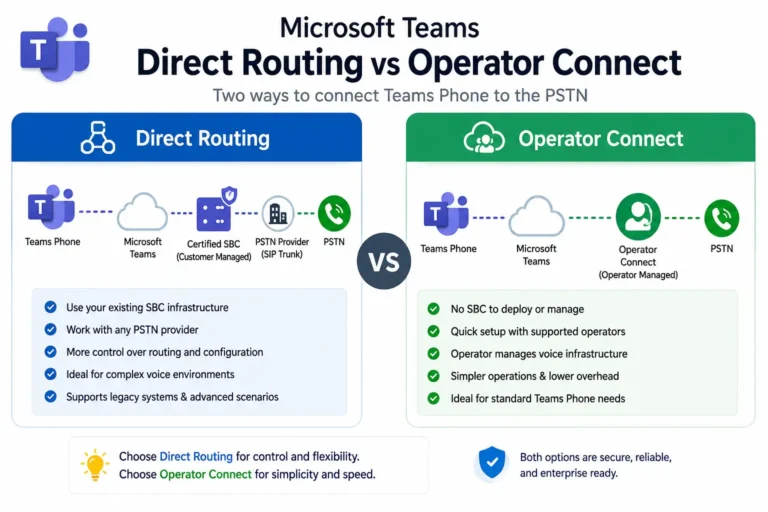
For architecture and the SIP/media split, see Direct Routing architecture, how an SBC works, and call flow.
1. SBC shows Inactive
Active only means a healthy OPTIONS exchange finished. Microsoft will not send you INVITEs until that is true.
What healthy requires:
- TLS to
sip.pstnhub.microsoft.com(andsip2/sip3) on port 5061. - SBC sends SIP OPTIONS.
- Microsoft returns 200 OK.
- Microsoft sends OPTIONS to the FQDN in your Contact header.
- SBC answers 200 OK.
Enabled must be $true. SendSipOptions must stay on. OPTIONS faster than every 60 seconds per trunk per endpoint can get throttled. Slower than 180 seconds looks dead.
Decision tree
Bucket A: no OPTIONS at all. TLS never came up.
- Allow TCP 5061 both ways to all Microsoft SIP signaling IPs, not one datacenter.
- Point the trunk at FQDNs, never pinned IPs. Use
sip.pstnhub.microsoft.com,sip2.pstnhub.microsoft.com, andsip3.pstnhub.microsoft.com.sip-all.pstnhub.microsoft.comresolves the full set. - TLS 1.2 or higher. Offer
TLS_ECDHE_RSA_WITH_AES_256_GCM_SHA384andTLS_ECDHE_RSA_WITH_AES_128_GCM_SHA256. - Confirm nothing in the path (firewall, IPS, SIP ALG) resets the session after Client Hello.
Bucket B: OPTIONS leave the SBC, no 200. TLS worked. Microsoft rejected the identity.
- Public CA cert, not self-signed. SAN equals the SBC FQDN.
*.contoso.commatchessbc.contoso.com. It does not matchcontoso.sbc.provider.com. - Contact / Record-Route is the FQDN, not an IP.
- Domain is a verified Microsoft 365 domain, not
*.onmicrosoft.com. After you add it, assign at least one Teams Phone licensed user on that domain. Activation can take up to 24 hours. - The FQDN matches
New-CsOnlinePSTNGateway -Fqdn.
Bucket C: 200 OK comes back, still Inactive. Microsoft accepted you, then OPTIONS toward the SBC failed.
- Inbound 5061 from all Microsoft signaling ranges.
- Contact FQDN resolves publicly to the signaling address.
- Hosted / derived trunks: only the carrier SBC sends OPTIONS. Derived trunks inherit health from the parent.
Intermittent Inactive is usually pinned IPs or a missing intermediate in the cert chain. Microsoft caches the chain, so a broken chain looks like it works after a reboot.
The 2026 certificate change
If Inactive started in 2026, check the SBC trust store before you rebuild the trunk.
Microsoft moved the Teams SIP interface onto new root CAs (browser dual-use EKU rules). SBC-side trust was required by the end of March 2026. New server-side chains started appearing from April, with a staged validation test around 30 June 2026.
Trust all seven roots, not only DigiCert Global Root G2:
- DigiCert Global Root CA
- DigiCert Global Root G2
- DigiCert Global Root G3
- DigiCert TLS ECC P384 Root G5
- DigiCert TLS RSA 4096 Root G5
- Microsoft ECC Root Certificate Authority 2017
- Microsoft RSA Root Certificate Authority 2017
Older AudioCodes firmware (before 7.4.600) and older CUBE trains often fail the G5 / 4096-bit chains.
Test endpoint (OPTIONS only, never voice): sip.g1.pstnhub.microsoft.com:5061. A 200 OK means the new CA is trusted. A 408 or TLS alert means fix trust and ciphers, then retest. Do not route calls to sip.g1.
Ignore leftover guidance that only says install Baltimore CyberTrust. That was the old Microsoft 365 chain.
Capture checkpoints (signaling)
- SYN/ACK on 5061.
- Client Hello offers TLS 1.2 and an ECDHE-RSA-AES-GCM cipher.
- Server Hello returns.
- SBC certificate SAN equals the trunk FQDN. Intermediate is in the same flight.
- First SIP frame is OPTIONS, not INVITE.
- Contact is
sip:sbc.yourdomain.com;transport=tls.
AudioCodes pairing steps: Configure AudioCodes SBC for Teams Direct Routing.
2. One-way audio
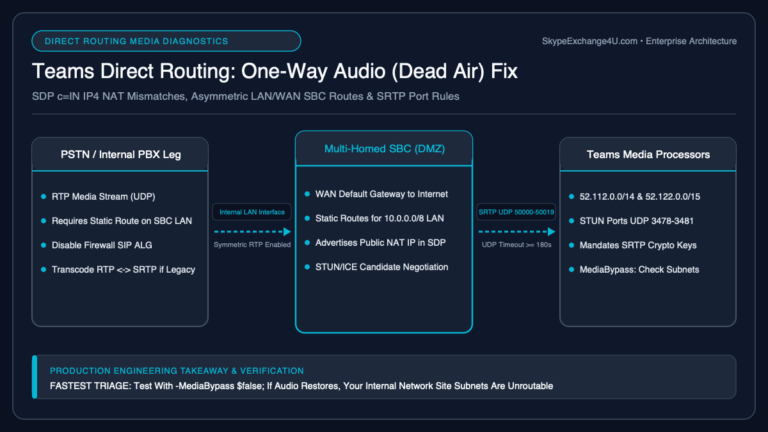
If the SBC is Active and the INVITE completes, signaling is done. One-way audio is RTP/SRTP.
Disable media bypass as a test. If audio is restored, the problem is ICE, hairpin, or split-tunnel VPN, not the PSTN trunk. If it stays one-way with bypass off, the broken leg is SBC↔PSTN or the SDP you advertised.
Which way is silent
- PSTN hears Teams, Teams hears nothing: media is not coming back to the Teams client (or to the SBC, if bypass is off). Look at NAT, private IP in
c=, SIP ALG, missing inbound RTP pinholes. - Teams hears PSTN, PSTN hears nothing: Teams→SBC or SBC→PSTN send path. Symmetric RTP, wrong destination port from SDP, or a codec you accepted but cannot send.
- Both silent after 200 OK: SRTP vs plain RTP. Teams will not do plain RTP. Confirm
RTP/SAVPand a crypto line.
SDP and NAT
The c= line must be an address the far end can reach. On non-bypass calls that is usually the SBC public IP. A RFC1918 address in c= toward Microsoft is a classic one-way.
SIP ALG on the firewall rewrites SDP and breaks SRTP. Turn it off for 5061 and the RTP range.
If you transcode to a G.729-only PBX, the SBC must have transcoding sessions licensed and applied. Otherwise you get 488 or a one-way after a mismatched answer. See SBC transcoding with a legacy PBX.
Capture checkpoints (media)
- After 200 OK, RTP in both directions.
- Destination IP/port matches the SDP.
- Bypass on vs off: if only bypass-on fails, stay in ICE/VPN. If both fail, stay on the SBC↔PSTN side.
3. SIP 403 Forbidden
403 means Microsoft understood the INVITE and refused the identity. It is not a codec problem (that is 488) and not a dead trunk (that is Inactive).
Read the 403 before you change the cert
Common causes, in the order they actually show up:
- Contact is an IP. Microsoft requires the SBC FQDN.
Bad:
Contact: <sip:203.0.113.10;transport=tls>
Good:
Contact: <sip:sbc.contoso.com;transport=tls>
- FQDN is not a verified domain in the tenant, or it is
something.onmicrosoft.com. - Hosted SBC / derived trunk: Contact must be
contoso.sbc.provider.com, the name you added as a derived trunk, with TXT verification on the customer tenant. OPTIONS still come from the carrier SBC only. - No Teams Phone user on that domain yet. Same activation rule as Inactive. The INVITE can 403 until the domain is live.
- User not enabled for Teams Phone or has no number. That can surface as 403 at the edge even when the trunk is Active.
Fix order for 403
- Contact header = SBC FQDN, transport=tls.
- Domain verified in Microsoft 365.
Get-CsOnlinePSTNGatewayFQDN matches Contact.- One licensed Teams Phone user on that domain.
- Then check the calling user: voice routing policy, number, Teams Phone license.
If Contact is already correct and the trunk is Inactive, you are still in section 1. Fix OPTIONS first.
Fix order for the whole incident
Get-CsOnlinePSTNGateway(enabled, 5061, OPTIONS on).- Trust store: seven 2026 roots. OPTIONS to
sip.g1.pstnhub.microsoft.com:5061. - Public cert, SAN = FQDN, full chain in the TLS Hello.
- OPTIONS to sip / sip2 / sip3 by FQDN.
- Contact header is the FQDN.
- Domain verified and activated.
- Inbound 5061 from all Microsoft signaling ranges.
- Only if the SBC is Active and you have an INVITE: media bypass test, SDP
c=line, SRTP, transcoding. - Only if the response is 403: Contact, domain, license, then the user.
If you start at voice routing, you will fix a route Microsoft never sends a call to.
Related Direct Routing guides
- Hosted SBC Direct Routing Domain
- Teams Direct Routing 488 Not Acceptable Here
- Media Bypass vs Local Media Optimization
- Direct Routing architecture
- What an SBC does in Teams Phone
- Direct Routing call flow
- Media bypass
- Voice routing policy
- SBC transcoding
- Configure AudioCodes SBC
- Direct Routing troubleshooting hub
- Teams Dial Plan vs Voice Routing Policy
- AudioCodes vs Ribbon vs anynode