Teams Voice Routing Policy Explained: PSTN Usage, Routes & SBC
Teams Voice Routing Policy Explained: PSTN Usage, Voice Routes & SBC
Short answer:
A Microsoft Teams Voice Routing Policy determines which
PSTN usages are available to a user. Those PSTN usages connect the user to
voice routes, which contain number patterns and PSTN gateways. In a Direct
Routing deployment, the selected gateway normally represents the SBC that
connects Teams to the external telephony environment.
If you are new to Microsoft Teams voice, the words
Voice Routing Policy, PSTN Usage,
Voice Route and Online PSTN Gateway can
sound like four different technologies.
They are not.
They are pieces of the same routing design.
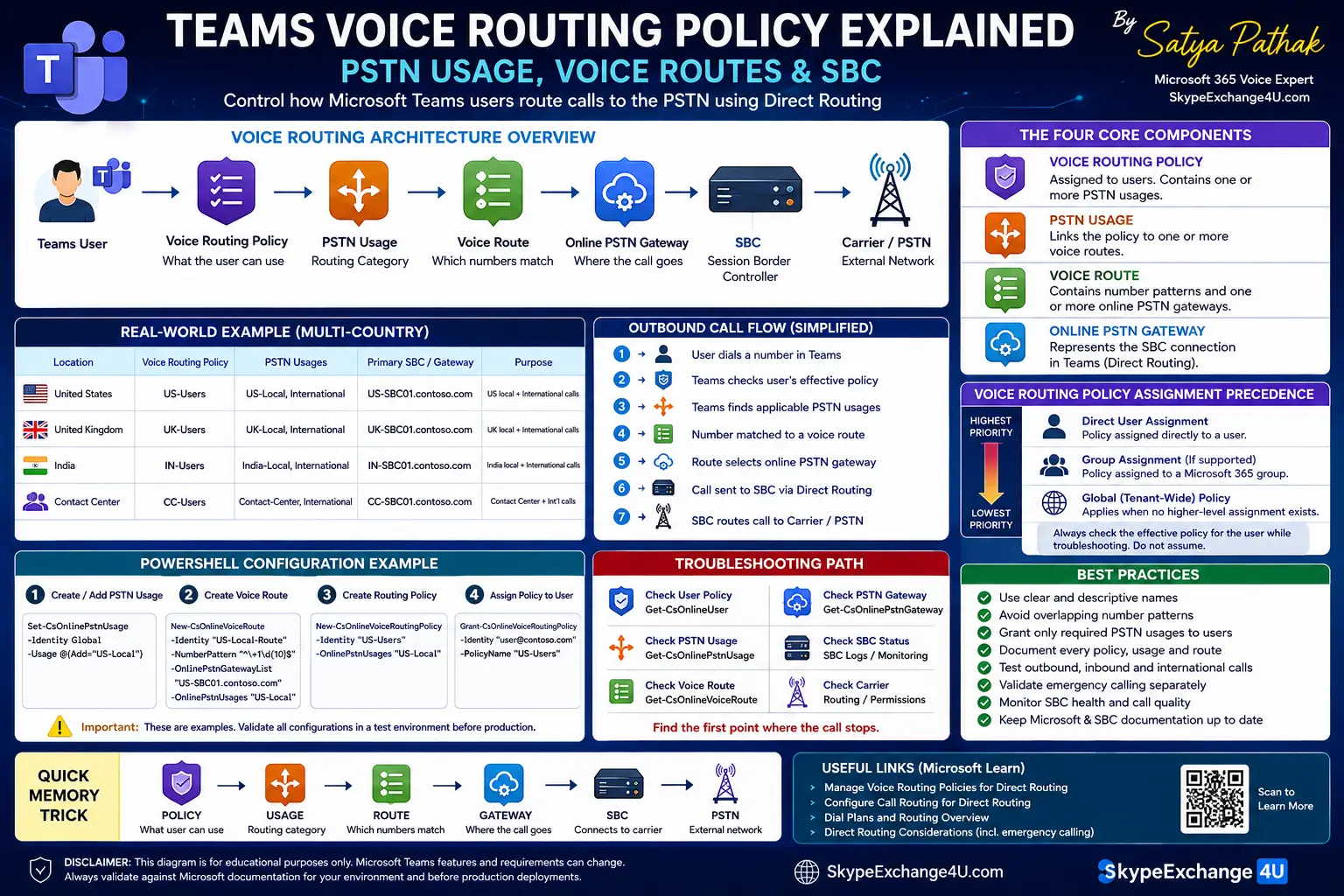
Voice Routing Policy
↓
PSTN Usage
↓
Voice Route
↓
Online PSTN Gateway
↓
SBC → Carrier → PSTN
Once you understand this chain, troubleshooting becomes much easier. Instead
of changing random Teams settings, you can follow the call through each
routing layer and find where the decision breaks.
Quick Answer: What Does a Teams Voice Routing Policy Do?
Think of the policy as a routing permission map.
It does not simply say:
“Send this user’s calls through SBC01.”
Instead, the policy gives the user access to one or more
PSTN usages. Those PSTN usages are associated with
voice routes. The routes contain number patterns and
PSTN gateways that determine where matching calls can be sent.
Microsoft documents this relationship as the core of Direct Routing voice
routing.
Why Do Organizations Need Voice Routing Policies?
A small organization might have one carrier and one simple calling route.
An enterprise environment is rarely that simple.
Consider a company operating in the United States, United Kingdom and India.
It might have:
- A different PSTN carrier in each country
- Regional SBCs
- Different international-calling rules
- Legacy PBX integrations
- Contact-center users
- Different calling permissions for different departments
You don’t want every user to have access to every route.
Voice routing policies allow administrators to give different users access to
the PSTN usages required by their role and location.
The Four Core Components
1. Voice Routing Policy
The voice routing policy is assigned to a user and contains PSTN usage
information.
Think of it as answering:
“What types of PSTN routing is this user allowed to use?”
2. PSTN Usage
A PSTN usage connects the policy to one or more voice routes.
Example names could be:
- US-Local
- UK-Local
- India-Local
- International
- Contact-Center
These names are administrator-defined. The name itself has no special
meaning to Teams; the configuration behind it is what matters.
3. Voice Route
A voice route contains a number pattern and one or more online PSTN gateways.
It determines which gateway can handle matching numbers.
For example, a route might match North American numbers:
^\+1\d{10}$
Your actual pattern should match your organization’s numbering strategy.
Do not copy a regular expression into production without testing it against
your dial plan.
4. Online PSTN Gateway
The online PSTN gateway represents the SBC connection configured in
Microsoft Teams Direct Routing.
The SBC then provides the connection between Microsoft’s voice environment
and the external PSTN, SIP trunk or other supported telephony infrastructure.
How the Routing Architecture Fits Together
Teams User
↓
Effective Voice Routing Policy
↓
PSTN Usage
↓
Voice Route
↓
Online PSTN Gateway
↓
SBC
↓
Carrier / PSTN
Real-World Enterprise Example
Let’s say Contoso has offices in three countries.
| Location | SBC | PSTN Usage |
|---|---|---|
| United States | US-SBC01 | US-Local, International |
| United Kingdom | UK-SBC01 | UK-Local, International |
| India | IN-SBC01 | India-Local, International |
A US employee therefore doesn’t need access to the UK or India local PSTN
route simply because those routes exist in the tenant.
The user’s effective voice-routing policy determines which PSTN usages are
available to that user.
What Happens When a User Makes an Outbound Call?
Imagine a US user dials:
A simplified flow is:
- Teams determines the user’s effective voice-routing configuration.
- The available PSTN usages are considered.
- The associated voice routes are evaluated.
- The dialed number is compared with route patterns.
- A matching route identifies the appropriate online PSTN gateway.
- Direct Routing sends the call toward the SBC.
- The SBC applies its own routing and interoperability rules.
- The carrier delivers the call to the PSTN destination.
Important troubleshooting idea:
If the call never reaches the SBC, don’t start by troubleshooting the
carrier. First verify the Teams routing objects.
How Is a Voice Routing Policy Assigned?
This is an important operational detail.
A user can receive an effective voice-routing policy through the supported
assignment mechanisms configured by the administrator. When troubleshooting
a user, don’t assume that the policy you are looking at is necessarily the
configuration that is affecting that user.
Microsoft provides PowerShell commands for inspecting and assigning online
voice-routing policies.
Check Available Policies
Get-CsOnlineVoiceRoutingPolicy
Check a User’s Voice Routing Policy
Get-CsOnlineUser -Identity user@contoso.com |
Select-Object DisplayName,OnlineVoiceRoutingPolicy
This is one of the first commands I would run when two users have different
calling behavior.
PowerShell Configuration Example
The following example shows the basic relationship between a PSTN usage,
voice route and voice-routing policy.
Step 1 — Create or Add the PSTN Usage
Set-CsOnlinePstnUsage `
-Identity Global `
-Usage @{Add="US-Local"}
Step 2 — Create the Voice Route
New-CsOnlineVoiceRoute `
-Identity "US-Local-Route" `
-NumberPattern "^\+1\d{10}$" `
-OnlinePstnGatewayList "US-SBC01.contoso.com" `
-OnlinePstnUsages "US-Local"
Step 3 — Create the Voice Routing Policy
New-CsOnlineVoiceRoutingPolicy `
-Identity "US-Users" `
-OnlinePstnUsages "US-Local"
Step 4 — Assign It to a User
Grant-CsOnlineVoiceRoutingPolicy `
-Identity "user@contoso.com" `
-PolicyName "US-Users"
Production warning:
These are examples, not a complete production deployment. Your SBC,
numbering plan, carrier requirements, tenant configuration and current
Teams PowerShell module version must be validated before applying changes.
The Most Important Troubleshooting Question: What Is the User Actually Using?
One of the easiest mistakes for a junior administrator is checking a policy
in the Teams admin center and assuming that the user must be using it.
Instead, start with the affected user.
Check the user
↓
Check the assigned voice-routing policy
↓
Check the policy’s PSTN usages
↓
Check the matching voice route
↓
Check the online PSTN gateway
↓
Check the SBC
↓
Check the carrier
This order prevents a common troubleshooting mistake: jumping directly to
the SBC or carrier when the call never reached that part of the architecture.
What If Multiple Routes Match?
Large deployments often contain multiple routes.
That is where voice-routing design can become complicated.
For example, one route might be designed for local numbers while another
handles international numbers.
If your number patterns overlap, however, you can create unexpected routing
behavior.
Senior administrator tip:
Avoid overlapping number patterns unless the overlap is deliberate and you
have documented exactly how the routing logic should behave.
Real Troubleshooting Scenario: Local Calls Work, International Calls Fail
Here’s a problem that is much more useful to understand than a list of
generic errors.
A user can call local numbers successfully, but every international call
fails.
Where Would You Start?
Don’t immediately restart the SBC.
Follow the routing chain:
- Check the user’s effective voice-routing policy.
- Confirm the policy contains the expected international PSTN usage.
- Check whether an international voice route exists.
- Check whether the international number matches that route’s pattern.
- Check the online PSTN gateway assigned to that route.
- Check whether the SBC permits the destination.
- Check the carrier’s international calling policy.
Teams routing → SBC routing → Carrier policy
Find the first point where the expected behavior stops.
Voice Routing Policy vs Teams Dial Plan
These concepts are frequently confused.
| Area | Dial Plan | Voice Routing Policy |
|---|---|---|
| Primary purpose | Number normalization | PSTN routing |
| Main question | “What should this number become?” | “Which PSTN route should handle this number?” |
| Typical use | Normalize user-entered numbers | Select available PSTN routes |
Emergency Calling Is a Separate Design Consideration
Emergency calling should not be treated as a normal international or local
PSTN route.
Microsoft provides dedicated emergency call-routing policies and additional
configuration considerations for Direct Routing deployments.
Important:
Emergency calling requirements vary by country and deployment. Validate the
current Microsoft guidance and your carrier/SBC requirements before
production deployment.
Advanced Enterprise Design: Multiple SBCs
A large organization may have several SBCs for geographic redundancy,
carrier separation or business requirements.
US Users
→ US-SBC01
→ US Carrier
UK Users
→ UK-SBC01
→ UK Carrier
India Users
→ IN-SBC01
→ India Carrier
Voice-routing policies help control which PSTN usages are available to each
user population. The voice routes then determine which gateway can handle
matching destinations.
Pros and Cons of Teams Voice Routing Policies
| Advantages | Challenges |
|---|---|
| Flexible PSTN routing | Configuration can become complex |
| Good fit for multi-country environments | Overlapping patterns can cause confusion |
| Supports different user groups | Requires good documentation |
| Works naturally with Direct Routing | Troubleshooting requires understanding several objects |
Best Practices for Production
1. Use descriptive names.
Use US-Local instead of Usage1.
2. Keep number patterns predictable.
Document what every pattern is designed to match.
3. Minimize unnecessary PSTN usages.
Don’t give users access to routes they don’t need.
4. Avoid accidental pattern overlap.
Overlapping routes make troubleshooting harder.
5. Test with one user first.
Validate the complete call flow before large-scale assignment.
6. Test inbound and outbound calls separately.
7. Test international calling separately.
8. Treat emergency calling as its own design.
9. Document the relationship between every policy, usage, route and gateway.
10. Keep Microsoft and SBC-vendor documentation aligned with your
current production versions.
Junior Administrator Checklist
☐ User has the required Teams Phone configuration
☐ Correct voice-routing policy is assigned
☐ Policy contains the expected PSTN usage
☐ PSTN usage is connected to a voice route
☐ Voice route matches the destination number
☐ Correct online PSTN gateway is configured
☐ SBC is connected and healthy
☐ Carrier routing is correct
☐ Outbound calling tested
☐ Inbound calling tested
☐ International calling tested where required
☐ Emergency calling validated separately
The 10-Second Memory Trick
Policy = What the user can use
PSTN Usage = Routing category
Voice Route = Which numbers match
Gateway = Where the call goes
Final Takeaway
A Teams Voice Routing Policy is not the route itself.
It is the mechanism that gives users access to the appropriate PSTN usages.
The actual routing decision becomes easier to understand when you follow the
chain:
USER
→
POLICY
→
PSTN USAGE
→
VOICE ROUTE
→
GATEWAY
→
SBC
→
PSTN
Once this model becomes familiar, Teams voice troubleshooting stops feeling
like guesswork.
You can identify where the call is supposed to go, determine where it
actually stops, and investigate that layer instead of changing unrelated
settings.
The practical rule:
Follow the call from the user to the PSTN, one routing object at a time.
Related Articles
→ Microsoft Teams Direct Routing Explained
→ Teams Direct Routing vs Operator Connect
→ How to Configure AudioCodes SBC for Microsoft Teams Direct Routing