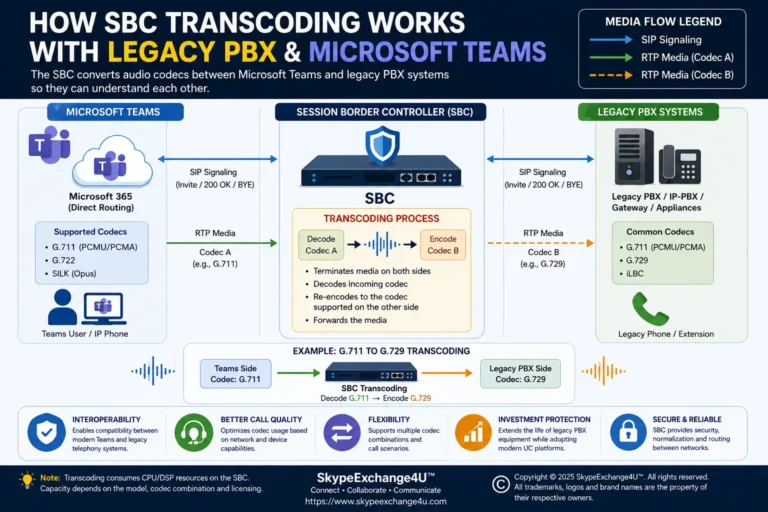
Teams Direct Routing 488 Not Acceptable Here: SDP, Codecs, SRTP
🚀 Updated Production Runbook: A comprehensive diagnostic guide with automated PowerShell auditing, vendor INI fixes (AudioCodes & Ribbon), and exact SDP warning headers is now available. Read the complete guide: Teams Direct Routing SIP 488 Not Acceptable Here: SDP Codec & SRTP Mismatch Fix.
Short answer: A 488 Not Acceptable Here response in Microsoft Teams Direct Routing usually means that the SIP session or media negotiation cannot be accepted. The cause can involve the SDP offer, supported codecs, SRTP, ICE/media bypass, SBC configuration, or the carrier side.
The important part is not to treat every 488 as the same problem. Microsoft currently documents several different 488 scenarios, including unsupported media, missing SRTP support, missing ICE candidates, and an invalid media address.
In this guide, we will walk through a practical way to investigate the error, identify who generated the 488, and then use the SIP/SDP information to narrow down the actual problem.
What Does 488 Not Acceptable Here Mean?
488 Not Acceptable Here is a SIP response indicating that the receiving side cannot accept the request in its current form.
With Teams Direct Routing, that can involve the media/session information exchanged between Microsoft Teams, the Direct Routing service, the SBC, and the PSTN carrier.
A simplified outbound call can look like this:
User
Microsoft
Session Border Controller
PSTN
Call flow: Teams → Direct Routing → SBC → Carrier. The carrier-side 488 response is then returned through the SIP path toward Teams.
The important question is: Which component actually generated the 488? That answer determines where you should investigate next.
Why You Should Not Immediately Change the Teams Dial Plan
When a call fails, it is tempting to change the dial plan, normalization rules, voice routes, or PSTN usages.
Sometimes those settings are involved. But a 488 should make you look closely at the SIP and media negotiation before changing unrelated configuration.
I prefer this troubleshooting sequence:
- Identify the failed call.
- Determine whether it is inbound or outbound.
- Find the SIP response.
- Identify who generated the 488.
- Inspect the SIP INVITE and SDP.
- Compare the successful and failed calls.
- Make one controlled configuration change.
- Test again.
This approach gives you evidence instead of guesswork.
Original SIP Call Flow
The following diagram shows a typical Teams Direct Routing call where the carrier returns a 488 response.
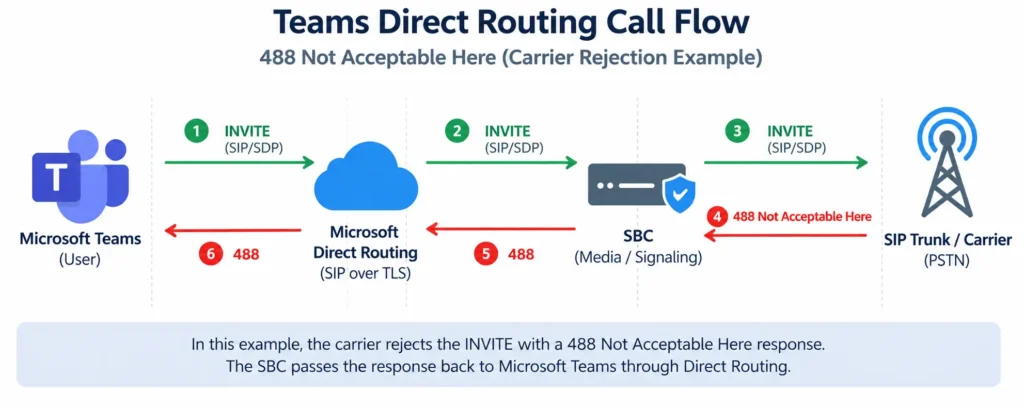
Important: The diagram is a simplified troubleshooting model. The exact SIP flow can vary depending on your SBC, media bypass configuration, carrier, and deployment design.
First Check: Who Generated the 488?
This is one of the most important steps.
Microsoft’s Direct Routing documentation explains that the Microsoft response code can help determine whether the final SIP response was generated by Microsoft or the SBC. A Microsoft response code beginning with 560 indicates that the final SIP response was generated by the SBC. For example, 560403 indicates that the SBC generated the SIP 403 response.
For a 488 investigation, therefore, don’t rely only on the three-digit SIP code. Look at the available Microsoft response information and then confirm the actual SIP transaction in the SBC logs.
Why this matters
Consider this call flow:
Call flow: Teams → SBC → Carrier → 488 Not Acceptable Here
Here, the SBC is not necessarily the root cause. It may simply be passing the carrier’s 488 response back toward Teams. That is very different from an SBC that generates the 488 itself.
Use Your SBC Trace as Evidence
This is where I recommend using your own production or lab evidence.
Do not publish raw traces containing customer information. Before uploading screenshots, redact:
- Public IP addresses
- Internal IP addresses
- Telephone numbers
- Usernames and email addresses
- Customer domains and Call-ID values
- Carrier account and authentication information
Example 1 — INVITE Sent from SBC to Carrier
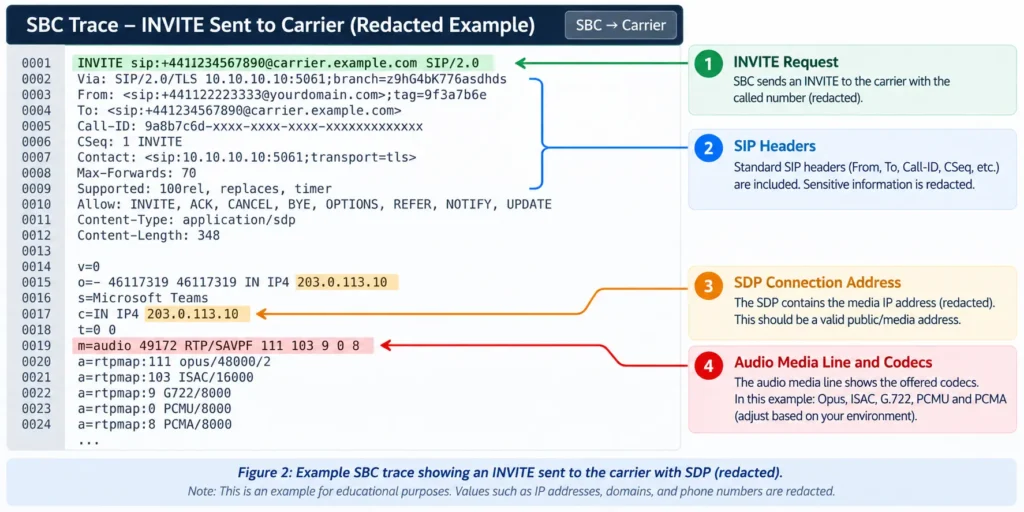
When reviewing the INVITE, pay particular attention to the SDP section. Look for:
- Audio media line
- Codec list and RTP information
- SRTP attributes
- Connection address and media ports
- ICE information where applicable
Example 2 — 488 Response
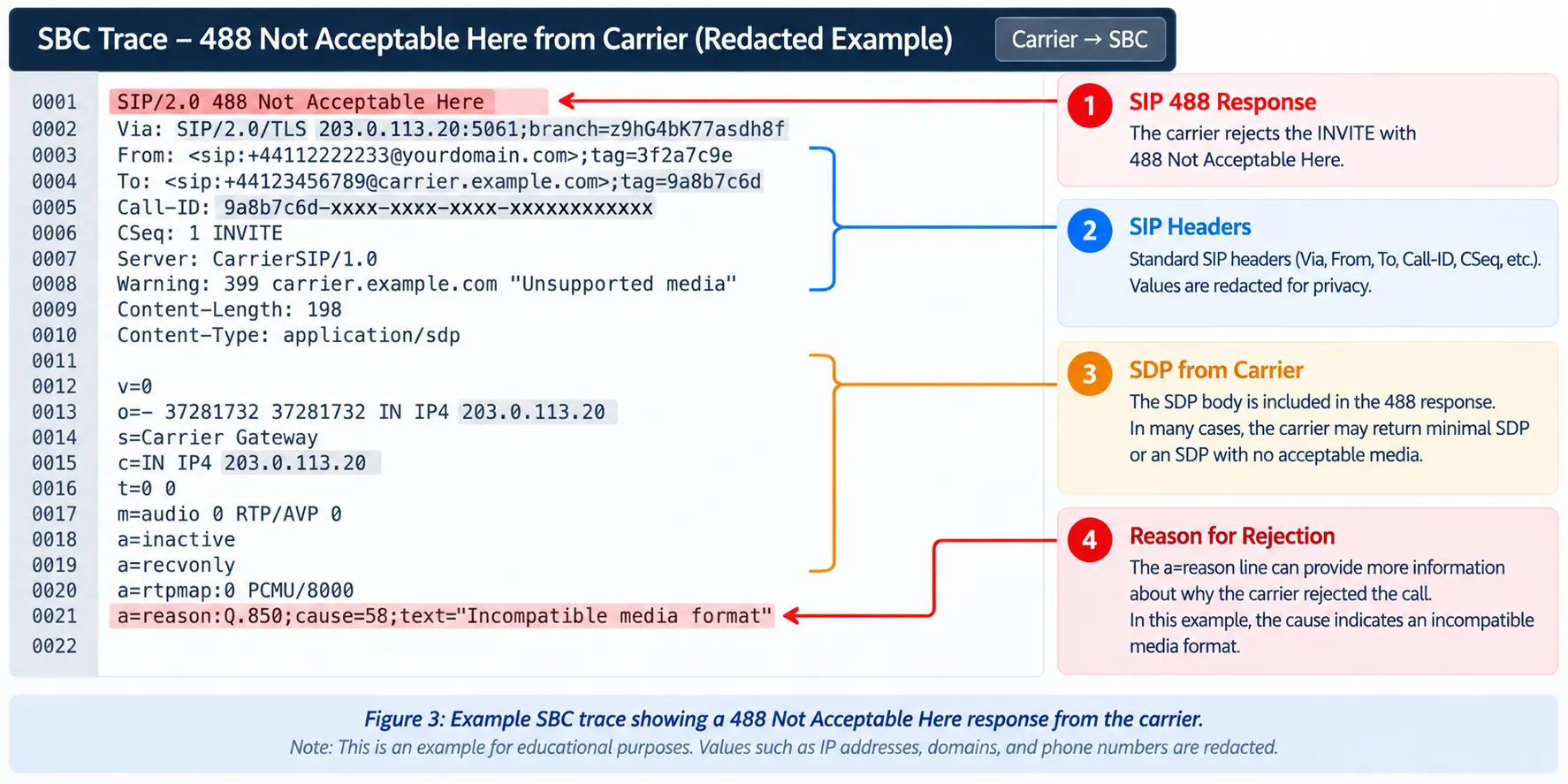
Now determine whether the 488 came from the carrier, the SBC, or another part of the call path. Don’t assume that the component displaying the error is necessarily the component that created it.
Screenshot 3 — 488 Passed Back Toward Teams
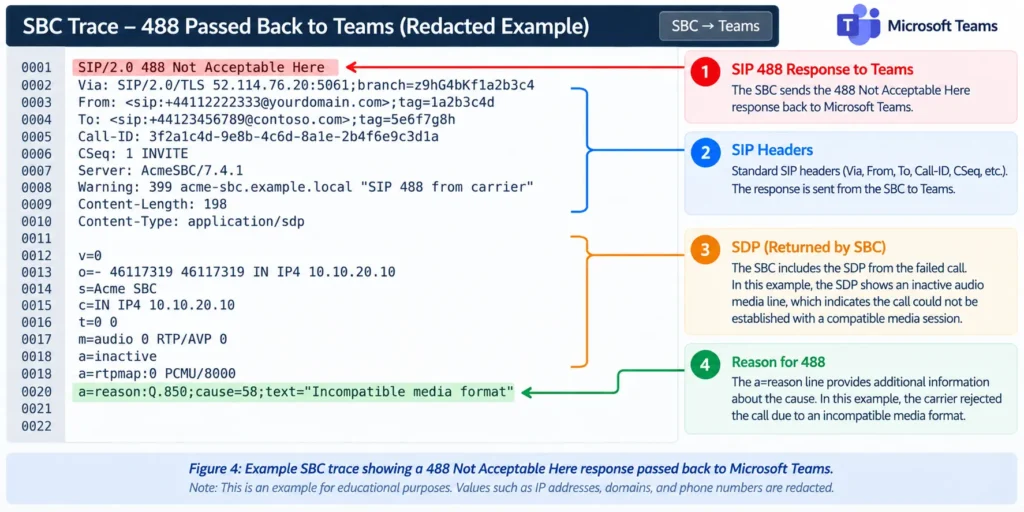
Common Causes of Teams Direct Routing 488
A 488 can have several causes. Microsoft’s current Teams documentation specifically identifies multiple 488 scenarios, so it is better to investigate the actual diagnostic information rather than assuming the problem is always a codec mismatch.
1. Unsupported or Invalid SDP
One common scenario is that the SDP offer does not contain media that the receiving side can accept.
Microsoft documents a 488 scenario with the diagnostic description CannotSupportAnyMedia, where the SDP offer does not contain acceptable media. Microsoft recommends checking the SBC configuration and supported codecs in this situation.
When troubleshooting, compare the SDP offered by each side:
User
Session Border
Controller
PSTN
SDP flow: Teams / Microsoft side → SBC → Carrier. The SDP offer is passed through the SBC toward the carrier during call setup.
The better question is: Does the complete media offer make sense to the device receiving it?
2. Codec Mismatch
Codec negotiation is another key area to investigate. For example, one side might offer a set of codecs that the other side does not support.
Do not assume that seeing a codec in the SBC configuration means that it will necessarily be used for every call. Check the actual SDP from the failed call and compare it with a successful call using the same route or carrier.
3. SRTP Requirement
Microsoft also documents a 488 scenario where the remote participant does not offer the required SRTP support. The recommended investigation is to check the SBC configuration and SRTP support.
This is particularly important when the failure begins after a change to media or security configuration. Check:
- Whether SRTP is enabled where required
- Whether the SBC is using the expected media security profile
- Whether the remote side offers compatible media security
- Whether the behavior changed after an SBC configuration update
4. ICE and Media Bypass
Another Microsoft-documented 488 scenario occurs when media bypass is being used but the SBC does not provide ICE candidates in its SDP offer.
Microsoft identifies this as response code 531027 and recommends checking the SBC configuration and ICE Lite configuration for the applicable media-bypass scenario. If your environment uses media bypass, check this rather than assuming every 488 is related to codecs.
5. SDP Contains a 0.0.0.0 Connection Address
Microsoft also documents a 488 scenario involving a connection address of 0.0.0.0 in the SDP. The corresponding Microsoft response code is 531052. Microsoft recommends checking the SBC configuration when this condition occurs.
Compare a Failed Call With a Successful Call
This is one of the most useful techniques when working with SIP traces. Take one failed call and one successful call using the same environment if possible.
| Item | Successful Call | Failed Call |
|---|---|---|
| INVITE | Accepted | Rejected |
| SDP | Supported media | Check for differences |
| Codecs | Common codec | Check negotiation |
| SRTP | Expected | Check offer |
| ICE | Expected where applicable | Check candidates |
| SIP response | 2xx | 488 |
Check the SBC Configuration
Once the SIP trace points toward the SBC, review the configuration involved in the affected call path:
- Codec profile & media profile
- SIP profile & SRTP configuration
- ICE / media bypass settings
- Transcoding & SDP manipulation
- SIP trunk routing & recent configuration changes
Check the Carrier Side
If the carrier is returning the 488, investigate the carrier-facing SIP leg:
- What exactly did the carrier reject?
- Does the carrier support the offered codec?
- Does the carrier require a specific media profile or plain RTP vs SRTP?
- Did the carrier recently change its SIP trunk configuration?
Check Microsoft Teams Configuration
Teams configuration should still be checked as part of the complete call path:
- Voice routing policy & PSTN usages
- Voice routes & dial plans
- Direct Routing gateway configuration
- Call records and diagnostics in Teams Admin Center
PowerShell Checks
PowerShell helps verify configuration directly rather than relying solely on the Teams admin center:
# Verify Teams Direct Routing Voice Routes, Policies, and Gateways
Get-CsOnlineVoiceRoute
Get-CsOnlineVoiceRoutingPolicy
Get-CsOnlinePstnUsage
Get-CsOnlinePstnGateway
A Real-World Troubleshooting Example
Imagine an organization has two SBCs:
Teams
  |
  +---- SBC01 ---- Carrier (Fails with 488)
  |
  +---- SBC02 ---- Carrier (Success)
Users routed through SBC01 receive a 488, while calls through SBC02 work normally. Instead of changing tenant-wide Teams settings, compare the two SBC paths for codec profiles, SRTP settings, SDP manipulation, and firmware versions.
Teams Direct Routing 488 Troubleshooting Checklist
- Identify the failed call direction (inbound vs outbound).
- Check Microsoft 365 Service Health for Direct Routing advisories.
- Identify who generated the 488 (check for 560xxx Microsoft response code).
- Review the SIP INVITE and examine the SDP media offer.
- Check codec negotiation (SILK, G.711A, G.711u, G.722, G.729).
- Verify SRTP encryption requirements.
- Check ICE candidates if Media Bypass is enabled (Code 531027).
- Check for invalid 0.0.0.0 connection address (Code 531052).
- Compare the failed call side-by-side with a successful call.
- Make one controlled change and test again.
Frequently Asked Questions (FAQ)
Why does Teams Direct Routing return SIP 488 Not Acceptable Here?
Teams returns SIP 488 when the Session Description Protocol (SDP) media offer cannot be negotiated. The most common causes are incompatible audio codecs (such as G.729 without DSP transcoding), missing SRTP encryption, ICE candidate mismatches during media bypass, or an invalid connection address (such as c=0.0.0.0).
How do I know whether Microsoft or the SBC generated the 488 response?
Check the Microsoft diagnostic response code in Teams call analytics or SBC syslog traces. Microsoft internal error codes starting with 560 (such as 560488) indicate the SIP response originated from the SBC or carrier, whereas 4xx/5xx codes starting with 531 (e.g., 531027 for missing ICE or 531052 for 0.0.0.0 SDP) are generated directly by Microsoft Direct Routing.
What audio codecs does Microsoft Teams Direct Routing support?
Microsoft Teams natively supports SILK, G.711A (PCMA), G.711u (PCMU), and G.722 over SRTP. If your PSTN carrier only supports G.729 or AMR, your Session Border Controller (SBC) must have DSP transcoding enabled to translate between the carrier and Teams.
Final Thoughts
A 488 Not Acceptable Here response is a clue, not a complete diagnosis.
The biggest mistake is to see the number 488 and immediately start changing Teams voice routes or dial plans.
Instead, follow the call:
Where did the call start?
        ↓
Where did it go?
        ↓
Who generated the 488?
        ↓
What did the INVITE contain?
        ↓
What did the SDP offer?
        ↓
What did the receiving side accept?
        ↓
Where is the mismatch?
For enterprise Teams Direct Routing, the most useful troubleshooting habit is simple: Evidence first. Configuration second.