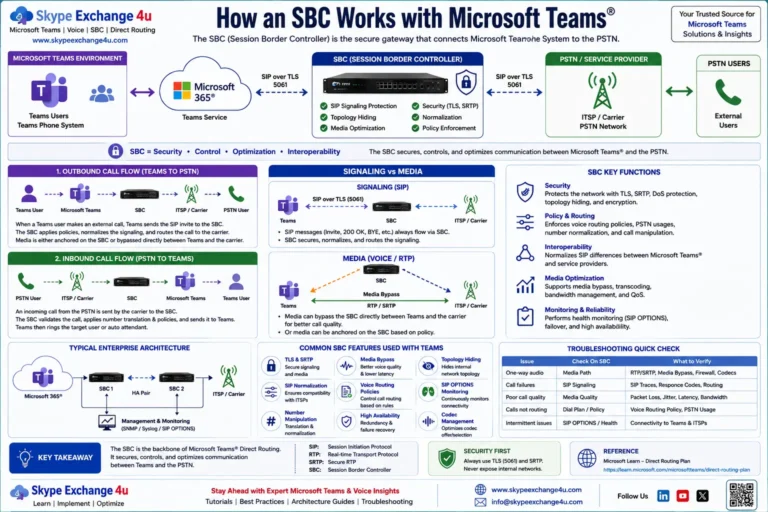
Teams Direct Routing SIP 403 Forbidden: Fixing Regex, PSTN Usage & SBC FQDN Mismatches
When Microsoft Teams Direct Routing throws a SIP 403 Forbidden, call setup is dead on arrival. Unlike a 503 error—which triggers route failover—a 403 is a hard rejection. The server is telling you: “I received your INVITE, I understood it, and I refuse to process it.”
In production enterprise voice deployments, 403 errors split into two completely separate worlds based on call direction:
- Inbound (PSTN → SBC → Teams): Microsoft Direct Routing generates the 403. 95% of the time, this is caused by an SBC FQDN mismatch in the
Contactheader, a missing custom domain validation in the M365 tenant, or Entra ID directory synchronization latency after assigning a number. - Outbound (Teams → SBC → Carrier): The upstream telco or the SBC generates the 403. This is almost always an unallocated Caller ID rejected by carrier STIR/SHAKEN anti-spoofing filters, an unmapped
P-Asserted-Identity(PAI) header, or an ACL mismatch on the SBC.
sip.Status-Code == 403 || (sip.CSeq.method == “INVITE” && sip.Call-ID == “PASTE_CALL_ID_HERE”)
Part 1: Inbound 403 (Microsoft Rejects the Call)
You see an incoming call hit the SBC from the carrier, the SBC sends an INVITE over TLS port 5061 to sip.pstnhub.microsoft.com, and Microsoft immediately replies with SIP/2.0 403 Forbidden.
Here is what the raw rejection packet looks like in a Wireshark capture:
SIP/2.0 403 Forbidden
Via: SIP/2.0/TLS 198.51.100.25:5061;branch=z9hG4bK...;received=198.51.100.25
From: <sip:+14155550199@sbc01.contoso.com>;tag=1c123456
To: <sip:+14155550100@sip.pstnhub.microsoft.com>;tag=7a89b0cd
Call-ID: 4d2e9f1a-b3c8-4721-9e12-88f72a129034
CSeq: 1 INVITE
Server: Microsoft.PSTNHub.SIPProxy v.2026.9.15.4
X-MS-Diagnostic: 560403;reason="Gateway not found in tenant configuration";source="sip.pstnhub.microsoft.com"
Content-Length: 0
Notice the X-MS-Diagnostic header. Microsoft explicitly tells you why it killed the session. Let’s break down the three primary failure modes:
1. The “Contact Header FQDN” Trap (Gateway Not Found)
Microsoft Direct Routing does not identify your tenant by the IP address of your SBC. It identifies your tenant by looking at the FQDN inside the SIP Contact header of the incoming INVITE.
Look at your SBC’s outbound INVITE toward Microsoft. If it looks like this:
Contact: <sip:+14155550199@198.51.100.25:5061;transport=tls> <-- FAILS WITH 403Microsoft will reject it instantly with "Gateway not found". Direct Routing rejects raw IP addresses in the Contact header.
It must contain the fully qualified domain name registered in your tenant:
Contact: <sip:+14155550199@sbc01.contoso.com:5061;transport=tls> <-- ACCEPTSThe Tenant Domain Validation Prerequisite:
The domain suffix of your SBC (e.g., contoso.com in sbc01.contoso.com) must be an Active, Verified Domain inside your Microsoft 365 Admin Center under Settings → Domains. Even if all your users have email addresses ending in contoso.com, if the SBC FQDN uses a subdomain like sbc.voice.contoso.com, that exact subdomain must exist as a verified domain in your tenant. You must also assign at least one licensed user a UPN under that domain to fully activate the domain in Azure AD / Entra ID.
2. The "Replication Latency" Trap (UserNotLicensed / UserNotFound)
Every voice engineer has run into this: You assign a phone number and a Teams Phone Standard license to a new hire using PowerShell:
Set-CsPhoneNumberAssignment -Identity "sarah@contoso.com" -PhoneNumber "+14155550100" -PhoneNumberType DirectRouting
Set-CsPhoneNumberAssignment -Identity "sarah@contoso.com" -EnterpriseVoiceEnabled $true
The cmdlet returns success. The Teams Admin Center shows the number assigned. You dial the number immediately from your mobile phone—and get a SIP 403 Forbidden with X-MS-Diagnostic: reason="User not licensed" or "User not found".
The Reality: While Entra ID updates instantly, Microsoft's regional SIP Proxy infrastructure (sip.pstnhub.microsoft.com) caches directory routing data. It can take anywhere from 15 minutes to 4 hours for a newly assigned LineURI or Enterprise Voice entitlement to replicate across all edge voice proxies worldwide. Do not start reconfiguring your SBC dial plans if a newly provisioned user gets a 403 within the first hour of assignment.
3. E.164 Normalization Failure in Request-URI
Direct Routing routes incoming calls to users by matching the destination number against Entra ID directory objects. The matching engine strictly requires **E.164 format**:
INVITE sip:+14155550100@sip.pstnhub.microsoft.com$\rightarrow$ Matches user, rings Teams.INVITE sip:4155550100@sip.pstnhub.microsoft.com(Missing+1) $\rightarrow$ 403 Forbidden.INVITE sip:04155550100@sip.pstnhub.microsoft.com(Local trunk prefix) $\rightarrow$ 403 Forbidden.
If your PSTN carrier hands off calls with 10 digits or national formatting, configure an Inbound Manipulation table on your SBC to prepend the leading + or country code before pushing the INVITE to Microsoft.
Part 2: Outbound 403 (Carrier or SBC Rejects the Call)
A Teams user attempts an outbound call to a PSTN number. The Teams client immediately flashes "Call dropped" or "Your call could not be connected". In the SBC syslog, Microsoft successfully handed off the call to the SBC, but the carrier leg rejected the transaction with 403.
1. Carrier Anti-Spoofing & PAI (P-Asserted-Identity) Rejection
With global enforcement of STIR/SHAKEN and telecom anti-spoofing regulations, Tier-1 carriers will drop an outbound call with 403 if the Caller ID presented does not belong to the provisioned SIP trunk account.
By default, if a Teams user does not have a dedicated DID (or if a voice route is misconfigured), Teams might transmit an empty P-Asserted-Identity or use the user's internal Office 365 identity:
From: <sip:sarah@contoso.onmicrosoft.com>;tag=...
P-Asserted-Identity: <sip:sarah@contoso.onmicrosoft.com>  <-- CARRIER DROPS WITH 403
The telco switch cannot validate this identity against its billing database and drops the call with:
Reason: Q.850;cause=21;text="Call rejected" or SIP/2.0 403 Forbidden.
The Fix (SBC Header Manipulation):
Configure your SBC to rewrite the From and P-Asserted-Identity headers before forwarding outbound traffic to the carrier. If the Teams user's caller ID does not match an authorized DID block, fall back to your primary billing telephone number (BTN):
P-Asserted-Identity: <sip:+14155550100@sbc.contoso.com;user=phone>
Privacy: none
2. The Voice Route Regex & PSTN Usage Pitfall
If the 403 occurs inside Teams before an INVITE ever hits the SBC, check the user's assigned Voice Routing Policy and the matching Voice Route Number Pattern.
# Verify which voice routes exist and their regex patterns
Get-CsOnlineVoiceRoute | Select-Object Name, NumberPattern, PstnUsages, PstnGatewayList
A common error is restrictive regex. For example, if your route uses:
^\+1(415\d{7})$Calls to San Francisco (415) work, but calls to San Jose (408) or international numbers receive an immediate client-side call failure because no matching gateway was authorized for that PSTN Usage.
Vendor-Specific Configuration Fixes
AudioCodes Mediant SBCs (Web GUI)
- Force FQDN in Contact: Go to Signaling & Media → SIP Definitions → Proxy Sets. Select your Microsoft Teams Proxy Set. Open Proxy Address and ensure the Contact header mode is set to Use FQDN.
- Classification Table Match: Go to Signaling & Media → SBC → Routing → Classification. If an incoming INVITE from Microsoft does not match any entry, AudioCodes generates an internal 403. Ensure your Source IP Group maps
sip.pstnhub.microsoft.comwith Destination matching your Teams routing table. - Message Manipulation (PAI Fix): Under Message Manipulations, create an outbound rule on the carrier IP group:
Header Name: P-Asserted-IdentityAction: Modify / AddValue: '<sip:' + Param.Value.Header.From.URL.User + '@carrier.com>'
Ribbon SBC Core / Edge (SBC 1000/2000/SWe)
- Contact Header FQDN: Navigate to SIP → Profiles → [Teams SIP Profile]. Under Contact Header, set the mode to Custom FQDN and enter your validated SBC FQDN (e.g.,
sbc01.contoso.com). - Transformation Tables: Under Call Routing → Transformation, verify that incoming numbers have normalization rules to map 10-digit dials into E.164 (
+1) before routing to the Teams Signaling Group. - Signaling Group Admin State: Ensure the Teams Signaling Group has Mutual Auth checked and uses the valid TLS profile with your public DigiCert/Sectigo certificate.
The 5-Minute 403 Triage Checklist
- Check the Call Direction: Did the 403 come from Microsoft (inbound call) or the carrier (outbound call)?
- Inspect the Contact Header: Does the SBC send its registered FQDN (
@sbc01.contoso.com) instead of a bare IP address? - Check Tenant Domain Status: Is the domain suffix active and verified in M365 Admin Center?
- Validate User Licensing: Does
Get-CsOnlineUsershowEnterpriseVoiceEnabled = True? - Account for Sync Lag: Was the number assigned within the last 2 hours? If so, wait for Microsoft SIP proxy cache invalidation.
- Verify E.164 Format: Does the inbound Request-URI contain the leading
+sign? - Carrier PAI Check: For outbound calls, is the presenting number an authorized DID on the carrier SIP trunk?
Frequently Asked Questions (FAQ)
Why does Teams return 403 Forbidden after assigning a new phone number?
When you assign a phone number or license in PowerShell, Entra ID records the change immediately, but Microsoft's worldwide Direct Routing SIP proxies (sip.pstnhub.microsoft.com) run on distributed caching layers. It frequently takes between 15 minutes and 4 hours for the new LineURI to replicate across all edge proxies, causing temporary 403 rejections.
What does "Gateway not found in tenant configuration" mean?
This error occurs when the FQDN specified in the incoming SIP Contact header does not match any gateway listed under Get-CsOnlinePSTNGateway in your tenant. It also occurs if your SBC is configured to send its raw public IP address instead of its FQDN, or if the domain name is not verified in the Microsoft 365 Admin Center.
How do I fix outbound 403 Forbidden from my carrier?
Carriers reject outbound calls with 403 under STIR/SHAKEN anti-spoofing rules if the presenting Caller ID is unallocated or unverified. Configure your SBC to inject your trunk's primary Billing Telephone Number (BTN) into the P-Asserted-Identity (PAI) header and ensure numbers are formatted in full E.164.
Related Microsoft Teams Direct Routing Troubleshooting
- Teams Direct Routing SIP 503 Service Unavailable: Troubleshooting SBC & Trunk Outages
- Teams Direct Routing 488 Not Acceptable Here: SDP, Codecs, SRTP
- Teams Direct Routing Inactive After Certificate Renew (OPTIONS Fix)
- Teams Direct Routing Troubleshooting: SBC Inactive, One-Way Audio, and SIP 403
- Teams Dial Plan vs Voice Routing Policy: Normalization Is Not Routing
- AudioCodes vs Ribbon vs anynode: Best SBC for Teams Direct Routing