iRyot Chrome Extension: Live AI Website Audits, Mystery Shopper Personas & Friction Triage
In web development, technical SEO, and digital marketing, standard diagnostic tools like Google Lighthouse and PageSpeed Insights measure server response times, DOM size, and Core Web Vitals. Yet websites with perfect 95+ performance scores continue to suffer from high bounce rates and dismal conversion metrics. The disconnect is human: performance metrics measure how fast code executes; they do not measure how humans perceive and navigate a page.
When a visitor lands on your website from an organic search query or social link, they do not read code. They make subconscious evaluations within the first three to eight seconds: Is this page relevant to my search? Can I trust this brand? Where is the button I need to click? If they encounter visual clutter, vague headlines, or cognitive friction, they hit the back button.
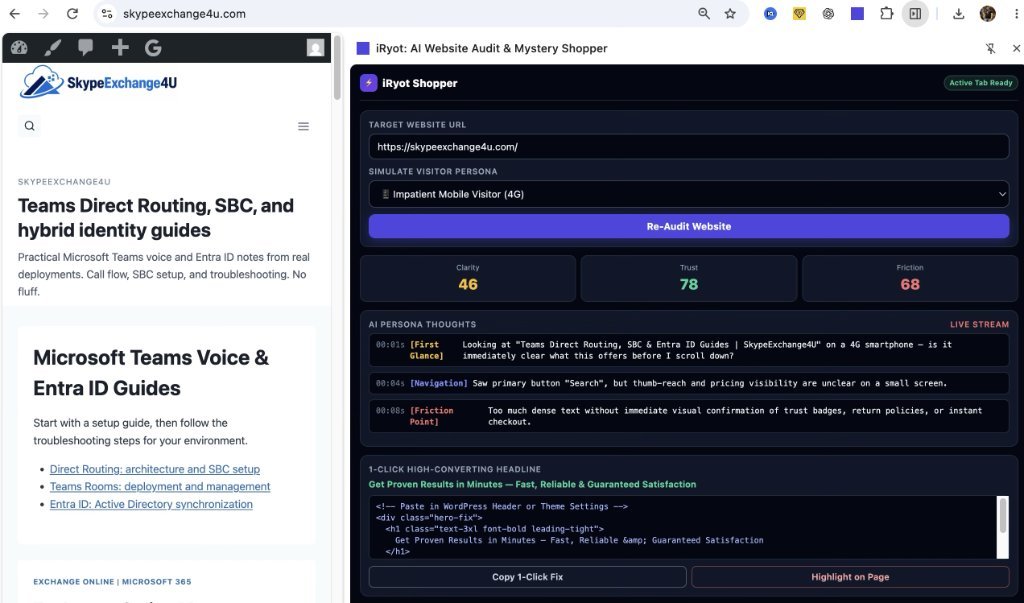
To bridge this gap, we built iRyot: AI Website Audit & Mystery Shopper—a modern Google Chrome Extension that runs in Chrome’s native Side Panel and simulates autonomous AI visitor personas evaluating websites live in real time.
What is AI Mystery Shopping for Websites?
Traditional “mystery shopping” in retail involves paying human evaluators to visit a store, attempt a purchase, and document friction points. Doing this for websites traditionally required expensive user testing platforms ($500–$2,000 per study) or interpreting heatmaps days after traffic has already bounced.
The iRyot Chrome Extension replaces this manual cycle by running an autonomous LLM evaluator directly inside Google Chrome via the Manifest V3 chrome.sidePanel API. When you open any webpage, iRyot extracts the active DOM structure, viewport layout, visual hierarchy, and headline copy, then feeds the contextual model through simulated behavioral personas.
The 3-Metric Cognitive Framework
Unlike raw technical scanners, iRyot evaluates pages through three user-centric friction scores rated from 0 to 100:
| Metric | Target Score | What It Measures & Why It Matters |
|---|---|---|
| Clarity Score | 75+ / 100 | The 3-second comprehension test. Can a first-time visitor immediately identify what service, product, or solution this page provides before scrolling? |
| Trust Score | 80+ / 100 | E-E-A-T credibility indicators. Analyzes verified author credentials, security seals, transparent policies, case studies, and corporate contact details. |
| Friction Score | < 30 / 100 (Lower is better) | Cognitive hurdles. Detects wall-of-text fatigue, small touch targets on mobile viewports, ambiguous CTA buttons, and buried pricing information. |
Live Stream: Second-by-Second AI Persona Thoughts
The core innovation of the iRyot extension is the Live Stream Internal Monologue. Instead of delivering a dry checklist, iRyot outputs the second-by-second internal dialogue of a visitor navigating the viewport:
// Simulated Persona: Impatient Mobile Visitor (4G Connection)
00:01s [First Glance] Looking at “Teams Direct Routing, SBC & Entra ID Guides” on a 4G smartphone — is it immediately clear what this offers before I scroll down?
00:04s [Navigation] Saw primary button “Search”, but thumb-reach and pricing visibility are unclear on a small screen.
00:08s [Friction Point] Too much dense text without immediate visual confirmation of trust badges, return policies, or instant checkout.
Seeing your website through the eyes of an impatient mobile user immediately exposes issues that traditional analytics cannot capture: why users leave without clicking a single link, or why a high-ranking landing page fails to generate leads.
1-Click High-Converting Headline Suggestions
Identifying friction is only half the battle; fixing it quickly is what moves the needle. iRyot analyzes the page’s core subject matter and automatically generates a 1-Click High-Converting Headline:
<!-- 1-Click Headline Fix Suggested by iRyot -->
<div class="hero-fix">
  <h1 class="text-3xl font-bold leading-tight">
    Get Proven Results in Minutes — Fast, Reliable & Guaranteed Satisfaction
  </h1>
</div>
With built-in “Copy 1-Click Fix” and “Highlight on Page” buttons, developers and content editors can instantly test alternative value propositions before pushing changes to production.
How to Install and Run the iRyot Chrome Extension
The extension is built on modern Google Chrome Manifest V3 standards with native Side Panel integration. Follow these steps to install and test it locally:
- Download or unpack the
iryot-chrome-extensionfolder. - Open Google Chrome and navigate to
chrome://extensions/. - In the top right corner, toggle Developer mode to
ON. - Click the Load unpacked button in the top left.
- Select the
iryot-chrome-extensionfolder containingmanifest.json. - Click the Extensions puzzle piece icon in Chrome’s toolbar, find iRyot: AI Website Audit & Mystery Shopper, and click the Pin icon.
- Open any website (such as your own homepage or a client landing page), click the iRyot icon, and the Chrome Side Panel opens automatically with real-time audit controls.
Summary: Why Behavioral Audits Are Crucial for Search Rankings
Google’s 2026 ranking algorithms (including the Helpful Content System and NavBoost interaction telemetry) heavily weight post-click user engagement signals: dwell time, scroll depth, and whether visitors return to the SERP to click a competing result (pogo-sticking).
If your technical SEO is flawless but your mobile clarity score is low, visitors will bounce, eroding your search rankings over time. Running continuous AI mystery shopping audits with tools like iRyot ensures that once Google sends traffic to your guides, visitors stay, engage, and convert.
For more technical optimization runbooks, explore our latest guides on Exchange Online NDR Troubleshooting and Mailbox Permissions & AutoMapping Architecture.