-
-
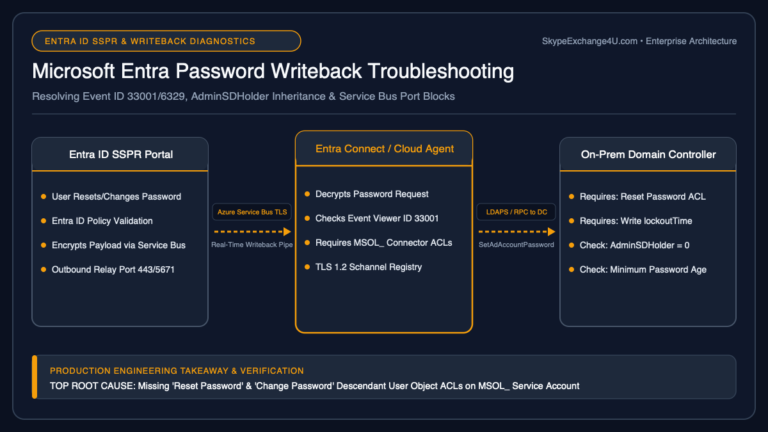
Microsoft Entra Password Writeback Failure: Troubleshooting SSPR, Event IDs, AdminSDHolder & TLS Gotchas
Deploying Self-Service Password Reset (SSPR) in Microsoft Entra ID (formerly Azure AD) is a major milestone for enterprise IT helpdesks. Users can reset their forgotten passwords from a web browser or the Windows login screen without calling support. However, in hybrid environments where Active Directory Domain Services (AD DS) remains the authoritative identity source, this…
-
Master Microsoft Teams Auto Attendants Call Queues Architecture Free Resource Account Licensing Outbound Pstn Transfer Fixes And Agent Routing Gotchas — Complete Step-by-Step Guide (2026)
In enterprise voice deployments, an organization’s front-line telephony relies entirely on two core building blocks in Microsoft Teams Phone: Auto Attendants (AA) for automated interactive voice response (IVR) and directory navigation, and Call Queues (CQ) for intelligent call distribution across customer service, helpdesk, and sales teams. While Microsoft provides a graphical wizard in the Teams…
-
Microsoft Entra Connect Sync Errors: Fixing Duplicate ProxyAddresses & ImmutableID Mismatches
When directory synchronization fails between on-premises Active Directory and Microsoft Entra ID (Azure AD), user provisioning grinds to a halt. Passwords stop syncing, newly hired employees cannot access their cloud mailboxes or Microsoft Teams, and administrators are flooded with automated emails: “Synchronization Error: AttributeValueMustBeUnique” or “Identity synchronization error report”. The vast majority of Entra Connect…
-
How to Connect to Exchange Online PowerShell: Step-by-Step Guide
Short answer: You can connect to Exchange Online PowerShell by installing the ExchangeOnlineManagement module and then running Connect-ExchangeOnline. The connection uses modern authentication and supports accounts protected with MFA. Exchange Online PowerShell is one of the most useful tools for Microsoft 365 administrators. The Microsoft 365 admin center is excellent for everyday management, but PowerShell…
-
Exchange Online PowerShell in 2026: The Commands You Actually Need
From Exchange Server to Microsoft 365 Moving from Exchange Server to Exchange Online changes more than where your mailboxes are hosted. The biggest change is the administration model. Exchange Server → Servers → Databases → DAGs → Queues → Mailboxes Exchange Online → Users → Mailboxes → Permissions → Groups → Mail Flow → Policies…