SBC Transcoding with Microsoft Teams & Legacy PBX
How SBC Transcoding Works with Legacy PBX Systems and Microsoft Teams
A practical, vendor-neutral guide to codec negotiation, media transcoding, Direct Routing, legacy PBX integration, configuration strategy and troubleshooting.
Updated: August 2026 • Reading time: 12–15 minutes
Connecting Microsoft Teams to a legacy PBX is rarely difficult because of one protocol. The challenge is that modern cloud voice and older telephony platforms may make different assumptions about codecs, SIP signaling, media transport, number formats, encryption and network topology.
That is where an SBC becomes useful. It can act as the controlled voice boundary between Microsoft Teams and an existing PBX, gateway or carrier environment—and, when required, provide codec transcoding.
This guide moves from basic concepts to codec negotiation, RTP media, Direct Routing, transcoding resources, configuration methodology, enterprise examples and troubleshooting. The configuration approach is intentionally vendor-neutral; individual SBC platforms use different names, licenses, menus and commands.
🔎 Quick Answer: What Is SBC Transcoding?
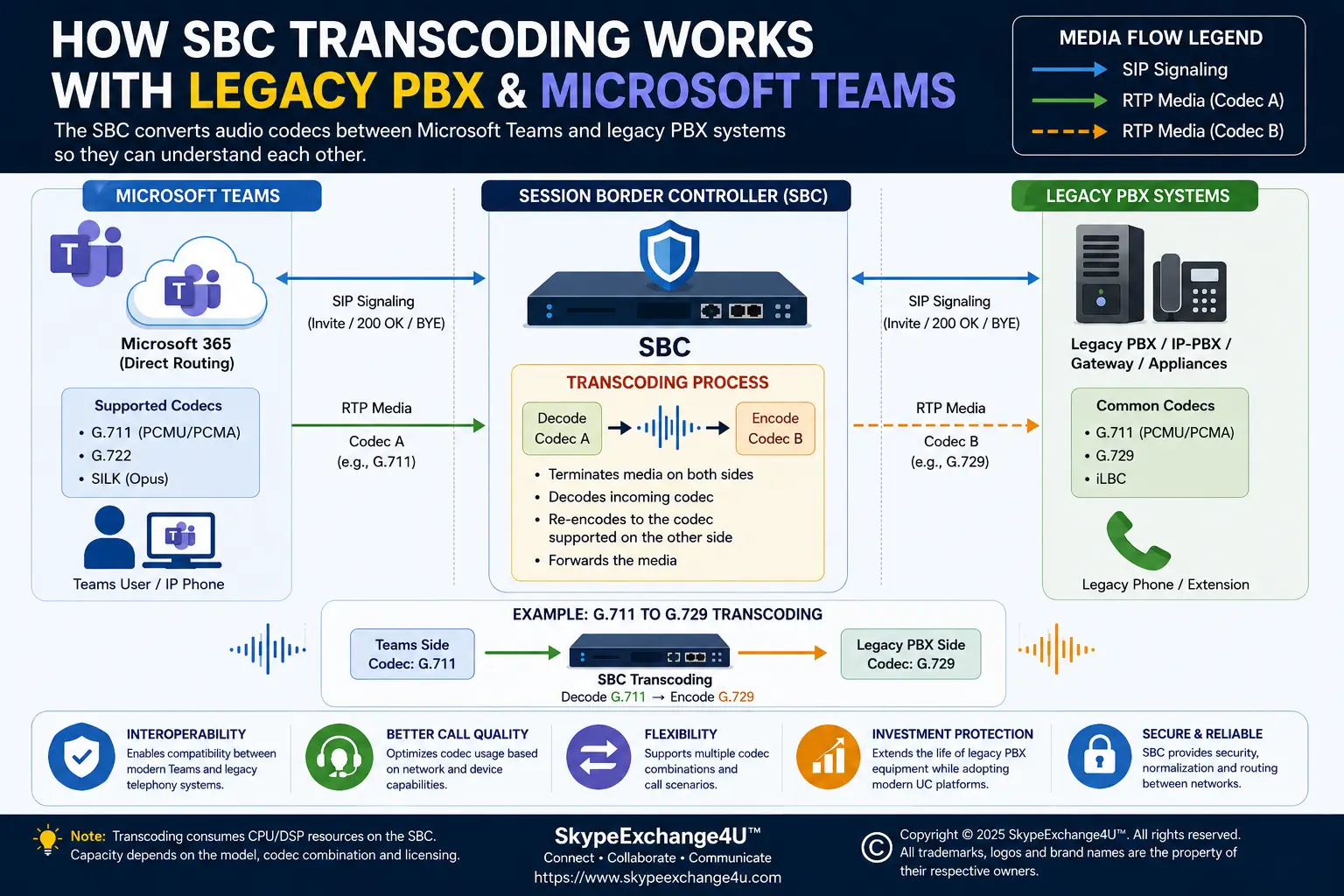
SBC transcoding is the conversion of an audio stream from one codec to another inside the SBC.
Codec A → SBC
Decode → Re-encode → Legacy PBX
Codec B
For example, if one call leg uses G.711 and the other requires G.729, the SBC may decode G.711 audio and re-encode it as G.729. The reverse direction performs the opposite conversion.
Important: transcoding is not always required. If both sides can negotiate a suitable common codec, the SBC may pass media without codec conversion. Transcoding should normally be introduced because the media legs need it—not simply because the SBC has the feature.
🧰 What You’ll Need
- A Microsoft-supported/certified SBC appropriate for the Direct Routing design.
- Microsoft Teams Phone / Direct Routing configuration.
- Details of the legacy PBX, gateway or telephony appliance.
- The codecs supported by each side.
- Knowledge of SIP, SDP and RTP/SRTP.
- Firewall and NAT information.
- SBC media-resource and licensing information.
- Test numbers and a known-good test user.
- Access to SIP traces, SBC logs and Teams call diagnostics.
1️⃣ Step 1 — Understand Codecs Before You Configure Anything
A codec (coder-decoder) determines how audio is represented and transported during a voice session. Different codecs can have different bandwidth, quality, packetization and processing characteristics.
| Codec | Where you may encounter it | Engineering consideration |
|---|---|---|
| G.711 | Enterprise/PSTN and legacy voice | Common interoperability codec; higher bandwidth than compressed codecs. |
| G.722 | Wideband enterprise voice | Support must exist on both relevant media legs. |
| G.729 | Some legacy environments | Availability and licensing vary by platform. |
| SILK | Microsoft Teams media scenarios | Teams-side selection is controlled by Microsoft’s media architecture. |
Microsoft’s Direct Routing planning documentation lists SILK, G.711, G.722 and G.729 for the SBC-to-Cloud Media Processor leg in non-media-bypass scenarios and for the SBC-to-Teams-client leg when media bypass is enabled. Microsoft also notes that the Teams client-to-Cloud Media Processor leg in non-bypass mode uses SILK or G.722 based on Microsoft’s algorithms.
2️⃣ Step 2 — Understand Codec Negotiation
Before transcoding happens, the endpoints normally establish what media formats can be used. In SIP environments, Session Description Protocol (SDP) carried in SIP messages describes media parameters, including offered codecs.
Offer:
G.711
G.729
G.722

Answer:
G.711
If both sides accept G.711, there is no reason to transcode simply because the SBC supports transcoding.
Teams / SBC Leg: G.711
Legacy PBX:       G.729 only
Common codec:     None
Result:           SBC transcoding may be required
3️⃣ Step 3 — What Happens Inside the SBC?
- The SBC receives RTP/SRTP media using Codec A.
- The SBC terminates that media leg.
- The SBC decodes the audio into an internal audio representation.
- The SBC encodes the audio using Codec B.
- The SBC sends the resulting media toward the other call leg.
Transcoding can consume media-processing resources. Capacity depends on the specific SBC, codec pair, hardware/software resources, licensing and concurrent media workload. Do not use a generic “calls per SBC” number.
4️⃣ Step 4 — Microsoft Teams Direct Routing Call Flow
↓
Microsoft Teams / Direct Routing
↓
Customer SBC
↓
Legacy PBX / Gateway
↓
Legacy Phone
Microsoft’s Direct Routing architecture separates SIP signaling from media. SIP signaling uses the Microsoft SIP proxy, while media can use different paths depending on whether media bypass is enabled.
This matters because codec transcoding is a media operation. A SIP call can be established successfully while media negotiation or the media path still fails.
5️⃣ Step 5 — Real-World Example: Teams to a Legacy PBX
Scenario: An organization is migrating users to Teams but still has a legacy PBX supporting an older application. The PBX accepts G.729, while the Teams-facing media leg uses G.711.
Call leg B: SBC ↔ Legacy PBX = G.729
SBC function: G.711 ↔ G.729 transcoding
Outbound direction
Teams
  │ G.711
  ▼
SBC
  │ Decode G.711
  │ Encode G.729
  ▼
Legacy PBX
  │ G.729
  ▼
Legacy application / phone
Return direction
Legacy PBX
  │ G.729
  ▼
SBC
  │ Decode G.729
  │ Encode G.711
  ▼
Teams
  │ G.711
  ▼
Teams user6️⃣ Step 6 — Do You Actually Need Transcoding?
✅ No transcoding needed
Teams
G.711
 ↓
SBC
G.711
 ↓
Legacy PBX

Common codec exists → no codec conversion required
🔄 Transcoding required
Teams
G.711
 ↓
SBC
G.711 → G.729
 ↓
Legacy PBX
G.729

No common codec → conversion may be required
Unnecessary transcoding adds processing and another variable to the media path. Prefer a suitable common codec where practical and use conversion when interoperability requires it.
7️⃣ Step 7 — Vendor-Neutral Configuration Method
There is no single universal SBC command for transcoding. Vendors may use terms such as codec group, coder group, media profile, codec policy, voice class or similar constructs.
- Inventory both legs. Document codecs offered and accepted by Teams/Direct Routing and the legacy side.
- Identify the common codec. If one exists and meets the design requirements, transcoding may not be necessary.
- Identify the required conversion. Example: G.711 ↔ G.729.
- Create or select the SBC codec/coder policy.
- Associate it with the correct trunk, IP group, IP profile, dial peer or equivalent object.
- Enable transcoding according to the vendor’s design.
- Verify media resources and licensing.
- Check packetization and media-security requirements.
- Make a controlled test call.
- Inspect SDP and RTP on both call legs.
- Test both directions and multiple call scenarios.
8️⃣ Step 8 — Microsoft Teams-Side Checks
# Inspect the online user
Get-CsOnlineUser -Identity user@contoso.com |
Format-List DisplayName,UserPrincipalName,LineURI

# Inspect Direct Routing gateways
Get-CsOnlinePSTNGateway |
Format-List Identity,Fqdn,SipSignalingPort,Enabled,MediaBypass

# Test basic TCP reachability to the SBC
Test-NetConnection sbc1.contoso.com -Port 5061
These checks are not a complete transcoding test. A successful TCP test only confirms basic connectivity to that port. Codec negotiation and media require call-level evidence.
9️⃣ Step 9 — Verify SDP, Not Just Call Status
When a call fails, “failed” is not enough. Inspect the SDP offered and answered on each relevant SIP leg.
- Codec payload types and names
- RTP/RTCP ports
- Media IP addresses
- SRTP/SDES or other security parameters where applicable
- Packetization settings
- ICE candidates in media-bypass scenarios
“What codec did Teams offer? What codec did the legacy PBX accept? What codec did the SBC finally select on each leg?”
🚨 Common SBC Transcoding Problems
| Symptom | Possible cause | First check |
|---|---|---|
| Call fails before answer | Codec negotiation / SIP routing | SIP trace and SDP |
| 488 Not Acceptable Here | Unsupported media format or other SDP/media condition | Codec offer and Microsoft response details |
| Call connects, no audio | RTP/media path | Media IP, ports, firewall, NAT |
| One-way audio | Asymmetric RTP/media path | RTP direction on both legs |
| Only legacy calls fail | Codec or interworking mismatch | Legacy SDP and SBC policy |
| Some calls transcode, others fail | Different call legs or resource conditions | Call-by-call codec/resource evidence |
🔧 Troubleshooting Decision Tree
1. Did SIP signaling establish? → If no, investigate routing, certificates, SIP connectivity and signaling configuration.
2. Did SDP negotiation produce a usable media arrangement? → If no, compare codecs and media parameters on both legs.
3. Did media start? → If no, check RTP/SRTP addresses, ports, firewall, NAT and media interfaces.
4. Did audio work both ways? → If no, trace RTP independently in each direction.
5. Is quality acceptable? → If no, check packet loss, jitter, latency, codec choice and SBC media resources.
📞 Real-World Scenario: Legacy Contact Center Appliance
An enterprise may move most users to Teams while retaining a legacy contact-center appliance for a business-critical workflow. The SBC can act as the controlled interoperability point between Teams and the legacy environment.
↓
Direct Routing
↓
SBC
↙ ↘
Legacy PBX PSTN Carrier
If the legacy appliance requires a codec that is not shared with the Teams-facing media leg, the SBC can provide the required conversion if the platform supports the codec pair and has sufficient licensed media resources.
⚖️ Pros and Cons of SBC Transcoding
✅ Advantages
- Helps integrate incompatible media environments.
- Supports phased legacy-PBX migration.
- Allows different codec policies on different call legs.
- Can keep legacy systems operational while Teams adoption grows.
- Provides a controlled media-interworking point.
❌ Trade-offs
- Consumes SBC media-processing resources.
- May require platform-specific licensing.
- Adds another troubleshooting variable.
- Codec combinations can have different resource requirements.
- Configuration is vendor- and firmware-dependent.
🏆 Best Practices
- Prefer a common codec when practical. Do not transcode merely because you can.
- Document each call leg separately.
- Use certified SBC platforms for Teams Direct Routing.
- Check licensing and media-resource capacity before production.
- Keep a known-good test call.
- Capture exact timestamps.
- Inspect SDP before changing codec policies.
- Test both call directions.
- Test internal, remote, transfer and conference scenarios where relevant.
- Do not confuse signaling success with media success.
- Change one production variable at a time.
- Use current Microsoft and SBC-vendor documentation.
🔐 Security and Media Considerations
Transcoding should not be treated as an isolated codec setting. The media path may also involve RTP/SRTP, firewall rules, NAT, certificates and the Direct Routing media architecture.
Microsoft’s Direct Routing documentation specifies SRTP requirements and additional ICE/ICE Lite requirements for supported media-bypass scenarios. Media bypass can also change the path between Teams endpoints and the SBC, so network design must be validated before enabling it.
❓ Frequently Asked Questions
What is SBC transcoding?
SBC transcoding is the conversion of an audio stream from one codec to another inside a Session Border Controller so that two otherwise incompatible media legs can communicate.
Does Microsoft Teams always require SBC transcoding?
No. Transcoding is needed when the relevant media legs cannot use a suitable common codec or when the architecture intentionally requires conversion.
Can an SBC convert G.711 to G.729?
Many enterprise SBC platforms support common codec conversions, but support depends on the specific model, software, licensing and media resources. Validate the exact codec pair with the vendor.
Does transcoding happen in SIP signaling?
No. Codec transcoding is a media-processing function. SIP and SDP negotiate media characteristics, while the SBC processes the audio when conversion is required.
Why would a legacy PBX need transcoding with Teams?
A legacy PBX may support a codec that is not selected or accepted on the Teams-facing media leg. An SBC can provide media interoperability when the platform supports the required codecs.
Can transcoding cause poor call quality?
Codec conversion is not automatically a quality problem, but codec choice, packetization, network conditions and SBC media resources can affect quality.
How do I know whether transcoding is happening?
Compare the selected codec on each media leg using SBC diagnostics and SIP/SDP evidence. Different selected codecs on the two legs indicate that media conversion is required if the call is successfully bridged.
What does SIP 488 mean in Teams Direct Routing?
A 488 response can have several causes. Microsoft documents examples involving unsupported media formats, SRTP requirements and media-bypass/ICE conditions. Check the diagnostic details and SBC SDP instead of assuming every 488 is a codec mismatch.
🔗 Related SkypeExchange4U™ Articles
Understand SBC architecture, SIP, Direct Routing and media flow.
Microsoft Teams Call Flow Explained
Follow signaling, media, Direct Routing, SBC and PSTN call paths.
Microsoft Teams Voice Troubleshooting Guide
Diagnose call failures, audio problems and Direct Routing issues.
🎯 Conclusion
SBC transcoding is media interoperability. When Microsoft Teams and a legacy PBX can use a suitable common codec, transcoding may not be necessary. When they cannot, an appropriately configured SBC can decode the media from one leg and re-encode it for the other.
The strongest design is not the one with the most codec conversions. It is the one that uses the simplest compatible media path, preserves voice quality, meets security and supportability requirements, and has enough SBC media resources for expected load.
For a Teams migration, think of the SBC as more than a SIP gateway. It can be the controlled interoperability layer between modern cloud voice and legacy telephony—but its exact capabilities, codecs, licenses and resource limits must be validated against the specific platform.
📚 Authoritative Sources
- Microsoft Learn — Plan Direct Routing
- Microsoft Learn — Teams Phone Direct Routing: Definitions and RFC standards
- Microsoft Learn — Microsoft Teams call flows
- Microsoft Learn — Certified SBCs for Direct Routing
- Microsoft Learn — Direct Routing media protocols
- Microsoft Learn — Configure media bypass
- Microsoft Learn — SIP 488 and Microsoft response codes
- IETF RFC 3264 — Offer/Answer Model with SDP
- IETF RFC 3261 — SIP