Entra Connect vs Cloud Sync (2026): Comparison Matrix & Migration Guide
Short answer: Entra Connect vs Cloud Sync is about how you synchronize on-premises Active Directory to Microsoft Entra ID. Entra Connect (Connect Sync) is the full-featured Windows server sync engine for complex forests, advanced attribute flows, and many hybrid scenarios. Entra Cloud Sync is a lightweight agent-based sync for simpler topologies and as a stepping stone or complement. Stay on Connect when you need depth (multi-forest complexity, custom sync rules, device writeback and other features Cloud Sync does not cover for you). Move to or add Cloud Sync when the feature matrix fits and you want less server footprint. Migration is a planned cutover of scopes and authoritative sync — not a checkbox rename.
What each product is
Microsoft Entra Connect Sync (still widely called Azure AD Connect / Entra Connect) installs on a Windows server joined to your environment. It runs a sync engine, rules editor, optional Staging Mode, and connects to Entra ID. It remains the workhorse for large and complex hybrid identity.
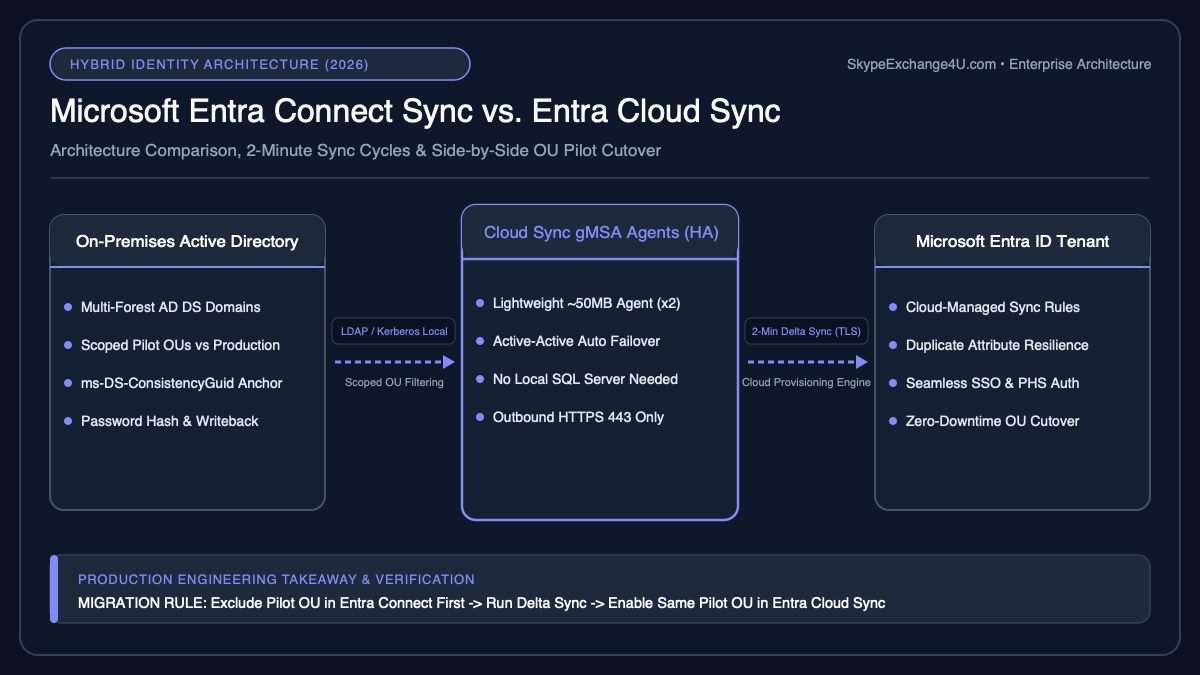
Microsoft Entra Cloud Sync uses a lightweight provisioning agent. Configuration lives more in the cloud. It is aimed at simpler sync needs, mergers/acquisitions with isolated forests, and high availability of the agent model without a full sync server farm.
Both feed the same directory: Microsoft Entra ID. Authentication choices (Password Hash Sync, Pass-through Authentication, federation) are related but not identical to “which sync product.” Read the broader architecture in Microsoft 365 Hybrid Identity Explained.
When to stay on Entra Connect
Keep Connect Sync when any of these are true:
- Complex multi-forest or multi-domain sync rules you already maintain in the Sync Rules Editor
- Features you rely on that Cloud Sync does not support for your scenario (verify the current Microsoft feature comparison before you promise a migration date — the matrix changes)
- Heavy customized attribute flows, joins, or filtering logic built over years
- You need Staging Mode servers and a mature connect-server operations practice that already works
- Hybrid scenarios that still document Connect as the required sync path for a dependency you cannot drop
Staying is cheaper than a failed migration. Inventory actual sync rules and writeback features in use — not the features someone might want someday.
When Cloud Sync is enough
Cloud Sync is a good fit when:
- Topology is relatively simple (or each forest can be an isolated Cloud Sync configuration)
- You want agent-based HA without full Connect server pairs for that scope
- You are onboarding an acquired AD forest quickly and do not want to rebuild a monolith Connect topology on day one
- Your required attributes and group scoping match what Cloud Sync supports
- Password Hash Sync (or supported auth) meets the security model for those users
Cloud Sync is not “Connect Junior for every customer.” If your Connect deployment exists only because of custom rules and writeback you still need, Cloud Sync will not erase that work.
Entra Connect vs Cloud Sync — comparison
| Topic | Entra Connect Sync | Entra Cloud Sync |
|---|---|---|
| Footprint | Full sync server (often HA pair + staging) | Lightweight agents |
| Configuration | Sync rules on the server + wizard | Cloud configuration + agent |
| Complex custom rules | Strong | Limited vs Connect — check matrix |
| Multi-forest | Common, carefully designed | Often multiple configurations / agents |
| Ops model | Patch Windows, protect ADSync DB, staging cutovers | Agent health, cloud config, less server sync engine |
| Best default for greenfield simple AD | Sometimes overkill | Often enough |
| Best default for deep hybrid estates | Usually yes | Only after feature gap analysis |
Migration path (Connect → Cloud Sync) without heroics
- Feature gap analysis. Export Connect sync rules, OU filtering, exchange hybrid attributes, group writeback, device writeback, and any extensions. Map each to Cloud Sync support. Blockers stay on Connect (or stay mixed).
- Clean source AD. Fix duplicate proxyAddresses, invalid userPrincipalName, missing mail nicknames, and orphaned linked mailboxes before you add another sync path. Garbage in still means garbage in Entra ID.
- Pilot OU / group scope. Move a non-critical scope first. Prefer users who can tolerate a login incident window.
- Avoid dual authority. Two engines must not fight over the same objects as authoritative sync. Microsoft guidance for coexistence and cutover must be followed for your exact scenario — plan which engine owns which objects on which day.
- Soft match / hard match plan. Know how objects join to existing cloud users (soft match on proxyAddresses / UPN patterns, hard match on sourceAnchor / immutableId). Wrong match = disabled accounts, duplicate users, or broken licenses.
- Auth cutover separate from sync cutover. Switching sync tooling is not the same as moving from federation to PHS/PTA. Schedule them deliberately.
- Rollback. Keep Connect staging or a documented re-enable path until the pilot is boring.
Common traps
Soft match surprises
A cloud-only user already exists with the same proxyAddress or UPN. Sync tries to take over or fails. Symptom: “user exists” errors, or a sync takeover you did not intend. Resolve cloud vs on-prem ownership before enabling the scope.
sourceAnchor / immutableId mismatches
Rebuilds, domain migrations, and previous failed cutovers leave immutableId values that no longer match. Hard match fails; duplicates appear. Document the anchor strategy before migration day.
Attribute flow assumptions
Connect rules that stamped extension attributes, msExch*, or custom claims dependencies may not exist in Cloud Sync the same way. Applications that read those attributes break after cutover even when sign-in works.
Cloud authentication while sync is mid-flight
Password Hash Sync latency, PTA agent health, and federation endpoints are independent failure domains. Users will blame “the sync migration” for MFA or PTA outages. Monitor auth separately.
OU filtering drift
Admin moves users into an OU the new sync does not cover. They vanish from expected cloud updates. Align OU design with the new configuration, not tribal memory of the old wizard screenshots.
Mixed engines without a ownership map
Connect still syncing an object Cloud Sync also scopes is how you get ping-pong attributes and support tickets that cannot be reproduced.
Recommended decision
- Complex production Connect today, features in use beyond Cloud Sync: stay on Connect; revisit yearly against Microsoft’s comparison table.
- Simple single-forest, standard attributes, PHS: Cloud Sync is often enough for new designs.
- M&A forest: Cloud Sync agent for the acquired forest can be faster than folding into a giant Connect topology on week one — still plan identity collisions.
- Migration: pilot → ownership map → cutover → decommission Connect only when nothing authoritative remains there.
Related hybrid identity guides
2026 Technical Comparison Matrix: Microsoft Entra Connect Sync vs. Cloud Sync
Before migrating your production hybrid identity topology, evaluate how Microsoft Entra Connect Sync (heavy on-premises SQL sync engine) compares against Microsoft Entra Cloud Sync (lightweight cloud-provisioned gMSA agent) across enterprise architecture requirements:
| Architecture Capability | Microsoft Entra Connect Sync | Microsoft Entra Cloud Sync (2026) |
|---|---|---|
| Sync Engine Location | On-premises Windows Server + SQL Server Express/Full | 100% Cloud-managed in Entra ID (Lightweight ~50MB local agent) |
| High Availability (HA) | Requires passive Staging Mode server & manual failover | Active-Active multi-agent automatic failover out of the box |
| Synchronization Interval | Every 30 minutes | Every 2 minutes (Users/Passwords) |
| Disconnected Multi-Forest AD | Requires network line-of-sight/VPN to all AD forests | Supported without forest trusts or cross-forest VPNs (Ideal for M&A) |
| Hybrid Exchange & Device Sync | Full support (Hybrid Entra Join, Exchange Hybrid Writeback) | Exchange Hybrid Attributes supported; Device Objects still require Connect Sync |
Pre-Flight PowerShell Audit Before Cutover
Before piloting Cloud Sync on a scoped Organizational Unit (OU), export your current custom synchronization rules and verify there are no orphaned ImmutableId or duplicate proxyAddresses conflicts (see our Entra Connect Duplicate ProxyAddresses & ImmutableId Fix and Microsoft 365 & Entra ID PowerShell Automation Runbook):
# Verify current Entra Connect scheduler status and custom sync rules (Priorities < 100)
Import-Module ADSync
Get-ADSyncScheduler
Get-ADSyncRule | Where-Object { $_.Precedence -lt 100 } | Select-Object Name, Direction, Precedence, Identifier
Official Microsoft Documentation Citations:
Microsoft Learn: What is Entra Cloud Sync? |
Official Tutorial: Migrate from Entra Connect to Cloud Sync