Hosted SBC Direct Routing Domain: Carrier Base, Customer Subdomain, Contact
Short answer: A hosted SBC Direct Routing domain is the carrier base FQDN plus a unique customer subdomain under it (for example contoso.sbc1.carrier.com). You verify that subdomain in the customer tenant, activate it with a licensed user whose UPN uses that FQDN, put a wildcard cert on the SBC for the base, and send that same subdomain in the SIP Contact header so Microsoft knows which tenant to look up. Skip this and you get Inactive trunks, 403s, or calls landing in the wrong org.
What “hosted SBC domain” actually means
You’re not pairing one SBC FQDN to one customer tenant the classic way. You’re running a carrier (or MSP) SBC that serves many Microsoft 365 tenants from one box.
Microsoft’s model needs two layers of DNS names:
- Base domain in the carrier tenant (example:
sbc1.adatum.biz) - Customer subdomain under that base, registered in each customer tenant (example:
woodgrovebank.sbc1.adatum.biz)
That customer subdomain is what people mean when they say “hosted SBC domain.” It is not the customer’s email domain (woodgrovebank.us). It is a slice of the carrier’s base that lives inside the customer’s Microsoft 365 Domains list.
If you’re a single-tenant shop with your own SBC on sbc.contoso.com, you don’t need this article. Use a normal verified domain and Direct Routing setup. This guide is for multi-tenant hosting.
Why Microsoft invented this shape
On inbound SIP to Teams, Direct Routing does not pick the tenant by dialed number alone. Numbers can overlap across customers. It uses the FQDN in the Contact header to find the tenant, then looks up the user by number inside that tenant.
So if your SBC Contact says contoso.sbc1.adatum.biz, Microsoft must find that exact name (or its parent domain walk) registered as a domain in Contoso’s tenant. Wrong Contact → wrong tenant or a hard fail. You’ll feel that as SIP 403 or “user not found” long before you get to codecs. See the identity bucket in Direct Routing troubleshooting and 488 Not Acceptable Here when media is the separate problem.
Name map you can put on a whiteboard
| Who | Default M365 domain | Hosted / additional domain | Contact header on SIP to Teams |
|---|---|---|---|
| Carrier (Adatum) | adatum.biz | sbc1.adatum.biz (base) | N/A for end users |
| Customer A | woodgrovebank.us | woodgrovebank.sbc1.adatum.biz | woodgrovebank.sbc1.adatum.biz |
| Customer B | contoso.com | contoso.sbc1.adatum.biz | contoso.sbc1.adatum.biz |
Rules that bite people:
- Subdomain FQDN on the trunk, Contact header, and DNS A/AAAA (or CNAME) for that name must match.
- You cannot use
*.onmicrosoft.comfor any SBC FQDN. - The wildcard cert on the SBC is usually
*.sbc1.adatum.biz(covers every customer subdomain under the base).
Carrier side: base domain + wildcard cert
- In the carrier Microsoft 365 admin center (Global Admin), add the base FQDN as a domain (example
sbc1.adatum.biz) and finish Setup complete. - Activate it: create at least one Teams-licensed user or resource account whose UPN uses that exact base FQDN (example
sbc-activate@sbc1.adatum.biz). Domain stays “half dead” until something licensed sits on it. - On the SBC, load a public cert with CN/SAN
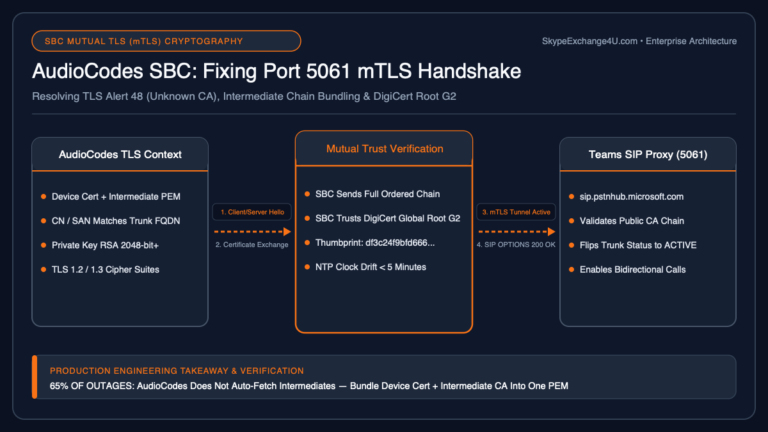
*.sbc1.adatum.biz(or include each customer FQDN if your CA won’t do wildcards). Teams matches Contact FQDN to CN/SAN on the TLS handshake. - Public DNS: resolve the base (and later each derived customer FQDN) to the SBC’s public IP.
- Pair the carrier trunk once in the carrier tenant:
New-CsOnlinePSTNGateway -FQDN sbc1.adatum.biz -SipSignalingPort 5061 -ForwardPAI $true -Enabled $true
Port and TLS details follow your vendor note. Keep Media Bypass / LMO decisions conscious; multi-tenant media paths get messy fast. Background: Media Bypass vs Local Media Optimization.
Customer side: subdomain, TXT, activate
For every customer tenant you’ll host:
- Global Admin in the customer tenant → Domains → Add domain → enter the unique subdomain (example
contoso.sbc1.adatum.biz). - Verify with the TXT record Microsoft gives you. That TXT lives in the carrier’s DNS zone (you own
sbc1.adatum.biz), not in Contoso’s public website DNS. Don’t send the customer a random A record and call it done. - Finish the wizard with “I’ll add DNS records myself,” clear mail/Teams/SharePoint checkboxes you don’t need, leave status Setup complete.
- Activate: licensed user or Teams Phone resource account with UPN on that subdomain (example
dr-activate@contoso.sbc1.adatum.biz). No activation → gateway pairing and derived trunk logic fail in weird ways.
You’ll see tickets where “domain is verified” but OPTIONS never go Active because nobody activated the name. Check users on that domain before you rebuild certs.
Carrier trunk vs derived trunk
Modern hosting should use:
- Carrier trunk: one
New-CsOnlinePSTNGatewayon the base FQDN in the carrier tenant. OPTIONS health and most gateway settings live here. - Derived trunk: the customer subdomain FQDN. You do not run
New-CsOnlinePSTNGatewayin every customer tenant for the new model. You enroll that FQDN on the customer’s voice routes (Teams admin center → Voice → Direct Routing → Voice routes → Add SBCs as derived trunk, or PowerShell):
Set-CsOnlineVoiceRoute -Identity "Outbound-All" -OnlinePstnGatewayList @{add="contoso.sbc1.adatum.biz"}
Derived trunks inherit carrier trunk settings (port, bypass flags, drain). Change the carrier trunk once; customers follow. Number translation rules on the carrier trunk do not apply to derived trunks — put those per customer tenant if you need them.
Legacy deployments still have a full PSTN gateway object in every customer tenant. If you still manage fifty identical Set-CsOnlinePSTNGateway calls, plan a migration: keep the carrier trunk, remove per-customer gateways with Remove-CsOnlinePSTNGateway, and move routes to derived FQDNs.
Routing still needs dial plans and voice routing policies in the customer tenant. Domain work does not replace that. See Teams dial plan vs voice routing policy.
SBC Contact header (the ticket you will get at 2am)
Vendor docs call this out for a reason. For each customer signaling group / tenant binding:
- Contact URI host = that customer’s hosted subdomain FQDN
- Not the base alone, not the customer’s email domain, not an IP
- Not a neighbor customer’s subdomain (copy-paste configs are how you cross tenants)
Microsoft refuses Contact hostnames that are bare IPs with 403. Cert must cover the Contact FQDN (wildcard under the base is the usual fix). Call flow context: Direct Routing call flow and how an SBC works with Teams.
Failover pattern
For multi-SBC resilience, give each customer two subdomains on two bases (or two SBCs), for example contoso.sbc1.carrier.com and contoso.sbc2.carrier.com, both verified/activated, both on the voice route’s SBC list. Don’t invent a second name that isn’t in Domains.
Checklist before you open a Sev
- Base domain verified + activated in carrier tenant?
- Wildcard (or SAN) cert matches
*.baseand is trusted? - Customer subdomain verified (TXT in carrier DNS) + activated in customer tenant?
- DNS for base and customer FQDNs point at the SBC?
- Carrier trunk exists; customer route lists the derived FQDN?
- SBC Contact for that tenant = customer subdomain exactly?
- OPTIONS Active on the carrier trunk before you chase dial plans?
If Active is red, stay on TLS/DNS/cert/Contact. Don’t start with number patterns. Operator Connect is a different product path if you’re comparing hosting models: Direct Routing vs Operator Connect.