Microsoft Entra ID Certificate-Based Authentication (CBA) for Teams Phones & SIP Gateway: Complete Setup Runbook
Enterprise Identity & Voice Architecture
Traditional username/password sign-in on voice endpoints introduces operational friction, recurring password reset cycles, and vulnerability to token replay and phishing. This technical runbook details how to design, deploy, and enforce Microsoft Entra ID Certificate-Based Authentication (CBA) across native Android Microsoft Teams IP Phones (Poly CCX, Yealink MP, AudioCodes C-Series) and legacy SIP Gateway endpoints (Cisco MPP, Poly VVX).
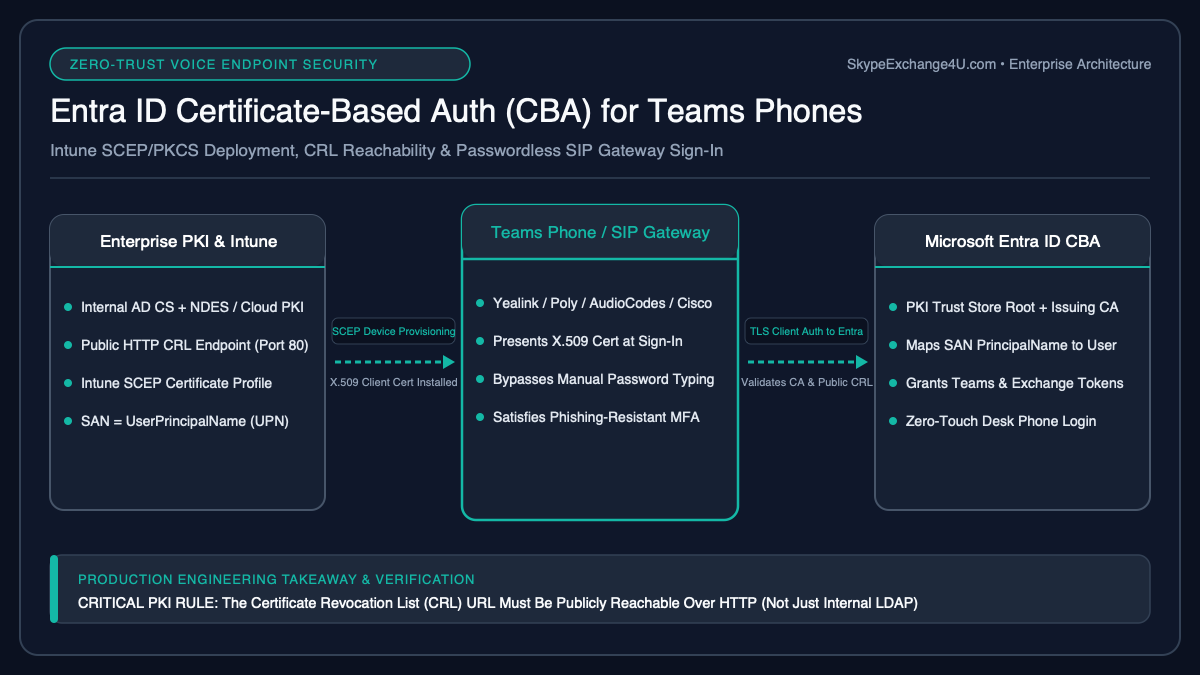
1. Why Passwords Fail on Voice Endpoints & The CBA Advantage
Enterprise communications administrators face a fundamental challenge: desk phones and room appliances are physical IoT endpoints located in hallways, conference areas, call center cubicles, and executive suites. Securing them with conventional interactive authentication introduces severe trade-offs:
- Password Rotation Chaos: When corporate password expiration policies trigger every 90 days, hundreds of common area phones (CAP) and user desk phones simultaneously disconnect, flooding the IT service desk with sign-in tickets.
- MFA Impedance: Desk phone firmware cannot easily present continuous FIDO2 WebAuthn prompts, nor can unattended common area phones answer push notifications on the Microsoft Authenticator app.
- Credential Stuffing & Spraying: Hardcoded service accounts or user passwords cached in telephony endpoints represent prime targets for lateral network movement if an endpoint is tampered with physically.
- Zero Trust Non-Compliance: Traditional password-based sign-in fails the Executive Order 14028 and CISA requirements for Phishing-Resistant Multi-Factor Authentication.
Microsoft Entra ID Certificate-Based Authentication (CBA) solves this by allowing voice devices to authenticate directly against Entra ID using an X.509 client certificate provisioned via SCEP (Simple Certificate Enrollment Protocol). The private key remains protected within the device’s hardware-backed keystore, enabling silent certificate renewal, phishing-resistant security, and zero user disruption.
2. End-to-End PKI, SCEP, & Entra ID Architectural Topology
To deploy Certificate-Based Authentication across Android Teams phones (such as the Poly CCX series covered in our Poly Studio Android guide and Yealink MP units) or SIP Gateway endpoints, four architectural tiers must integrate synchronously:
Enterprise Root CA & Issuing Sub-CA (AD CS / Cloud PKI)
│
├──► Issues CRL to Public HTTP Endpoint (http://crl.contoso.com/pki/root.crl)
└──► Issues Device/User Client Auth Template to SCEP Gateway (NDES)
│
[ MDM / Ingestion Tier ] │ (Certificate Request via SCEP/NDES)
Microsoft Intune ◄────────┘
├──► Trusted Root & Intermediate Profile ──► Pushed to Android Teams Phones
└──► SCEP Client Auth Profile (SAN=UPN) ──► Provisioned to Device Keystore
│
[ Authentication Tier ] │ (Mutual TLS Authentication Handshake)
Microsoft Entra ID ◄──────┘
├──► Validates Client Cert against Uploaded CA Public Key Chain
├──► Downloads & Verifies Public CRL (HTTP only; must not be behind auth)
├──► Extracts SAN (PrincipalName) & Maps to Target Entra ID Account
└──► Evaluates Conditional Access (Phishing-Resistant MFA Grant Satisfied)
│
[ Teams Voice Cloud ] │ (Issues OAuth Access & Refresh Tokens)
Microsoft Teams & SIP Gateway Provisioning Engine (pstnhub.microsoft.com)
3. Step 1: AD CS / PKI Certificate Template & SAN Specification
Whether using on-premises Active Directory Certificate Services (AD CS), Microsoft Cloud PKI, or an external provider like SCEPman or DigiCert, the certificate template must adhere to strict Entra ID cryptographic parameters. Misconfigured Extended Key Usages (EKU) or Subject Alternative Names (SAN) are the single most common cause of silent authentication failures.
Certificate Template Cryptographic Parameters
- Template Type: Duplicate the default
UserorComputertemplate (V3/Windows Server 2012+ or V4/Windows Server 2016+). - Key Specifications: Minimum
RSA 2048-bit(RSA 4096-bit recommended for Root CA). Cryptographic Service Provider (CSP) or Key Storage Provider (KSP) set to Microsoft Software Key Storage Provider. - Hash Algorithm:
SHA-256or higher. MD5 and SHA-1 are rejected by Entra ID. - Extended Key Usage (EKU): Must explicitly include Client Authentication (OID:
1.3.6.1.5.5.7.3.2). Server authentication or any-purpose EKUs should be omitted. - Subject Name: Supplied in the request by Intune/NDES (do not build from Active Directory).
- Subject Alternative Name (SAN): Must contain either:
PrincipalName(UPN OID:1.3.6.1.4.1.311.20.2.3) mapping to the user’suserPrincipalName.RFC822Name(Email) mapping to the user’smailattribute.
- Key Usage:
Digital SignatureandKey Encipherment(Critically required for TLS client authentication).
Architectural Tip for Common Area Phones: For shared or common area phones (CAP accounts like conf-lobby@contoso.com), the SCEP profile should map the SAN PrincipalName directly to the resource account UPN. This binds the physical phone to the CAP object without requiring interactive user enrollment.
4. Step 2: Configuring Entra ID Certificate Authorities & Username Binding
Entra ID must be configured to trust your Public Key Infrastructure. This involves uploading the entire certificate chain (Root CA and all Subordinate/Issuing CAs) and defining the binding rules that map incoming certificate attributes to Entra ID directory objects.
Step 2A: Public CRL Verification Requirement
Before uploading your CA files to Entra ID, ensure that every Certificate Revocation List (CRL) Distribution Point (CDP) specified in your certificates meets these non-negotiable rules:
- Protocol: Must be plain
HTTP(e.g.,http://pki.contoso.com/crl/corp_sub_ca.crl). Entra ID does not support HTTPS for CRL endpoints due to mutual-dependency recursion. - Accessibility: The URL must be publicly resolvable and accessible across the public internet without basic authentication, IP geofencing, or VPN tunnels.
- Size Limit: The CRL file size must not exceed 45 MB (base CRL) or 5 MB (delta CRL).
Step 2B: Upload Certificate Authorities via Microsoft Graph PowerShell
While CA certificates can be uploaded via the Entra Admin Center, executing the configuration via Microsoft Graph PowerShell ensures consistent, scriptable binding priority and policy enforcement:
# Connect to Microsoft Graph with Directory & Policy administration rights
Connect-MgGraph -Scopes "Policy.ReadWrite.AuthenticationMethod", "Directory.ReadWrite.All"

# Load the Issuing Subordinate CA certificate
$SubCACert = New-Object System.Security.Cryptography.X509Certificates.X509Certificate2("C:\PKI\Contoso_Issuing_CA.cer")
$CertBytes = $SubCACert.RawData

# Define the Certificate Authority Trust Anchor
$CaParams = @{
    certificateData = $CertBytes
    isRootAuthority = $false
    crlDistributionPoint = "http://crl.contoso.com/pki/Contoso_Issuing_CA.crl"
    deltaCrlDistributionPoint = "http://crl.contoso.com/pki/Contoso_Issuing_CA_Delta.crl"
}

# Create Certificate Authority trust in Entra ID
New-MgOrganizationCertificateBasedAuthConfiguration -BodyParameter $CaParams
Step 2C: Configure Username Binding Rules
In the Entra Admin Center (Protection > Authentication methods > Certificate-based authentication > Configure), establish the username binding precedence:
Critical MFA Setting: Under “Authentication binding”, map your CA to Multi-factor authentication (not Single-factor authentication). If left at Single-factor, any Conditional Access policy that enforces “Require MFA” or “Require Phishing-Resistant MFA” will immediately reject the desk phone upon sign-in.
5. Step 3: Microsoft Intune Trusted Root & SCEP Profile Deployment
Native Teams Android IP Phones (such as AudioCodes C450HD, Yealink MP56/MP58, and Poly CCX 400/500/600) enroll into Microsoft Intune via Android Open Source Project (AOSP) device management or Android Enterprise. You must push two distinct configuration profiles to these endpoints:
Phase 1: Trusted Certificate Profile (Root & Intermediate)
- In the Microsoft Intune Admin Center, navigate to Devices > Manage devices > Configuration > Create.
- Select Platform: Android (AOSP) or Android Enterprise depending on your device enrollment mode.
- Profile Type: Trusted certificate.
- Upload the Root CA
.cerfile and set destination store toComputer certificate store - Root. - Repeat this step to deploy your Intermediate / Issuing CA certificate. Assign these profiles to an Entra ID dynamic device group targeting Teams IP Phones:
(device.deviceModel -contains “CCX”) -or (device.deviceModel -contains “MP5”) -or (device.deviceModel -contains “C450”)
Phase 2: SCEP Certificate Profile Configuration
Create a new configuration profile of type SCEP certificate with the following explicit values:
6. Step 4: Microsoft Teams SIP Gateway CBA Integration (Cisco MPP & Poly)
For organizations preserving legacy hardware via the Microsoft Teams SIP Gateway (such as Cisco 7800/8800 MPP series, Polycom VVX 300/400/500/600, or Yealink T4/T5 series), Certificate-Based Authentication works via mutual TLS (mTLS) between the hardware device and Microsoft’s regional SIP Gateway onboarding servers.
Step 4A: Provisioning Server Regional Endpoints
Deploy DHCP Option 66 (or Option 160) across your voice VLAN to point legacy IP phones to Microsoft’s regional provisioning URLs:
- Americas:
http://noam.pstnhub.microsoft.com - EMEA:
http://emea.pstnhub.microsoft.com - APAC:
http://apac.pstnhub.microsoft.com
Step 4B: Device Certificate Onboarding via TAC
SIP Gateway endpoints enroll their client certificates during the initial provisioning sequence:
# Verify SIP Gateway Provisioning Status via Microsoft Teams PowerShell
Import-Module MicrosoftTeams
Connect-MicrosoftTeams

# Check SIP Gateway device profile state
Get-CsTeamsSIPGatewayConfiguration

# Verify device pairing for a Cisco 8851 MPP Common Area Phone
Get-CsOnlineUser -Identity "cap-cisco8851@contoso.com" | Select-Object DisplayName, UserPrincipalName, LineURI, EnterpriseVoiceEnabled
When the Cisco MPP or Poly VVX phone boots up:
- The device contacts the regional provisioning server via HTTP and receives its vendor-specific XML configuration file.
- The configuration instructs the phone to generate an internal keypair and submit a certificate request to the corporate SCEP endpoint, or uses the device’s factory-installed device certificate (MIC – Manufacturer Installed Certificate) verified against Microsoft’s trusted vendor list.
- The phone initiates SIP signaling over port
5061tosip.pstnhub.microsoft.comusing TLS with Client Certificate Authentication. - Microsoft SIP Gateway validates the certificate against the Entra ID CBA configuration and maps the SIP REGISTER request to the target user/CAP account.
7. Step 5: Enforcing Phishing-Resistant MFA via Conditional Access
Once SCEP certificates are successfully issuing to endpoints, lock down your voice perimeter using Microsoft Entra Conditional Access. This ensures that compromised passwords cannot be used from unauthorized PCs or mobile apps to access telephony accounts.
Conditional Access Policy Specification
Avoid Policy Clashes: Ensure you do NOT combine “Require Terms of Use” or “Require compliant app protection policy” within the same grant control on IP phone accounts. IP phone ROMs cannot parse MAM Intune App Protection SDK policies, which will result in an unresolvable AADSTS53000 error loop.
8. Production Troubleshooting Matrix & Deep Diagnostic Logs
When Certificate-Based Authentication fails on hardware phones, the endpoint display often displays a generic message such as “Couldn’t connect to sign in” or “Company portal unavailable”. Use the following diagnostic matrix to pinpoint the failure layer:
Validating Entra ID Sign-In Logs for CBA Success
To confirm that an endpoint successfully authenticated using its SCEP X.509 certificate rather than a cached OAuth refresh token or password:
# Query Microsoft Entra Sign-in Logs for Certificate-Based Authentication Events
Get-MgAuditLogSignIn -Filter "userPrincipalName eq 'lobby-phone@contoso.com'" -Top 10 | ForEach-Object {
    [PSCustomObject]@{
        CreatedDateTime       = $_.CreatedDateTime
        AppDisplayName        = $_.AppDisplayName
        ClientAppUsed         = $_.ClientAppUsed
        AuthMethod            = $_.AuthenticationDetails.AuthenticationMethod
        AuthRequirement       = $_.AuthenticationRequirement
        ConditionalAccessStat = $_.ConditionalAccessStatus
        ErrorCode             = $_.Status.ErrorCode
        FailureReason         = $_.Status.FailureReason
    }
} | Format-Table -AutoSize
In a successful transaction, the output will show AuthMethod: X.509 Certificate and AuthRequirement: multiFactorAuthentication, confirming full compliance with your zero trust conditional access policy.
Enterprise Voice Architecture Consulting
Need to Modernize Your Enterprise Telephony Fleet?
Whether designing multi-tier SCEP/NDES infrastructures for thousands of desk phones, configuring Direct Routing Session Border Controllers, or deploying meeting room ecosystems with Logitech Rally Bars, our certified UC and identity architects ensure zero-downtime migrations.
9. Frequently Asked Questions (FAQ)
Can Entra ID CBA use an internal HTTPS CRL endpoint?
No. Microsoft Entra ID strictly requires plain HTTP for Certificate Revocation List (CRL) distribution points. HTTPS creates an unresolvable recursive loop because the cloud authentication engine would need to authenticate the TLS certificate of the CRL web server before verifying the revocation status of the client certificate. The HTTP CDP must be publicly reachable over the internet without authentication.
Does Certificate-Based Authentication work on common area phones (CAP)?
Yes, CBA is the industry recommended architecture for Common Area Phones. By deploying Intune SCEP profiles mapped to the shared account’s User Principal Name (UPN), the hardware phone authenticates silently upon boot without requiring human interaction, SMS OTP codes, or periodic password resets.
Does Entra ID CBA satisfy Phishing-Resistant MFA requirements?
Yes. When configured in Entra ID Authentication Methods with the binding set to “Multi-Factor Authentication”, CBA satisfies the highest tier of Authentication Strengths (“Phishing-resistant MFA”), placing it on par with FIDO2 hardware security keys while requiring zero physical touches from users.
What happens when a device certificate expires?
If properly configured with an Intune SCEP profile, the device initiates an automated renewal request when the certificate reaches its renewal threshold (typically at 20% remaining lifespan). If the certificate expires completely, the endpoint loses mTLS authentication with Entra ID and cannot register with Teams until a new certificate profile is deployed.