Teams Dial Plan vs Voice Routing Policy: Normalization Is Not Routing
Short answer: The usual mix-up is Teams dial plan vs voice routing policy. A dial plan only changes the digits into a standard form, usually E.164. A voice routing policy does not rewrite digits. It lists PSTN usages, those usages point at voice routes, and the route’s number pattern (matched after normalization) selects the SBC. If the route regex is written for 022… and the dial plan already turned the number into +9122…, the call never leaves Teams.
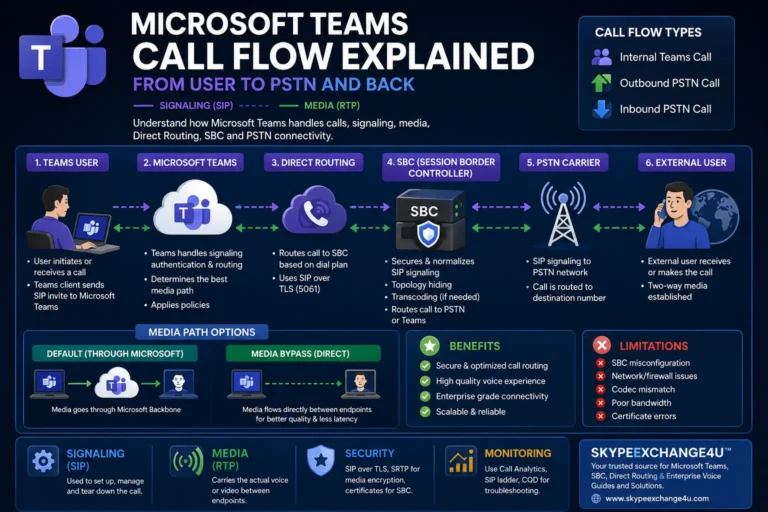
Teams dial plan vs voice routing policy in one call
User in Mumbai, Direct Routing, outside line is not required. They type 02212345678 and hit call.
- Effective dial plan (user dial plan, else tenant Global, else the Microsoft service plan for their usage location) runs normalization rules.
- A rule such as
^0(\d+)$→+91$1produces+912212345678. - Teams looks up that number internally (Reverse Number Lookup). No Teams user owns it, so this is PSTN.
- The user’s online voice routing policy is evaluated. PSTN usages are tried top to bottom.
- Usage
IN-Nationalis tied to a voice route whose pattern is^\+91\d+$and whose gateway issbc.contoso.com. - The SBC receives an INVITE for
+912212345678. That is how an SBC works with Teams, not the dial plan.
If step 2 never happens, the route in step 5 is matching the wrong string. If step 5 has no matching usage, the SBC is healthy and the user still cannot call PSTN. Those are different tickets.
What a dial plan is
A dial plan is a named set of normalization rules. Each rule is a regex plus a translation. The Teams client applies the user’s effective dial plan to every outbound dial, including numbers taken from call history and tel: links.
Three scopes exist:
| Scope | Who edits it | Role |
|---|---|---|
| Service (country) | Microsoft | Always applied for the user’s usage location. You cannot edit it. |
| Tenant Global | You | Merged with the service plan if no user dial plan is assigned. |
| User dial plan | You | Assigned per user. Replaces tenant Global in the merge. Cannot stack with Global at the same time. |
Priority for a given dialed string: user dial plan, then tenant Global, then service. You only need tenant/user rules for patterns the service plan does not already cover (short codes, 0+STD, 9+outside line, extensions).
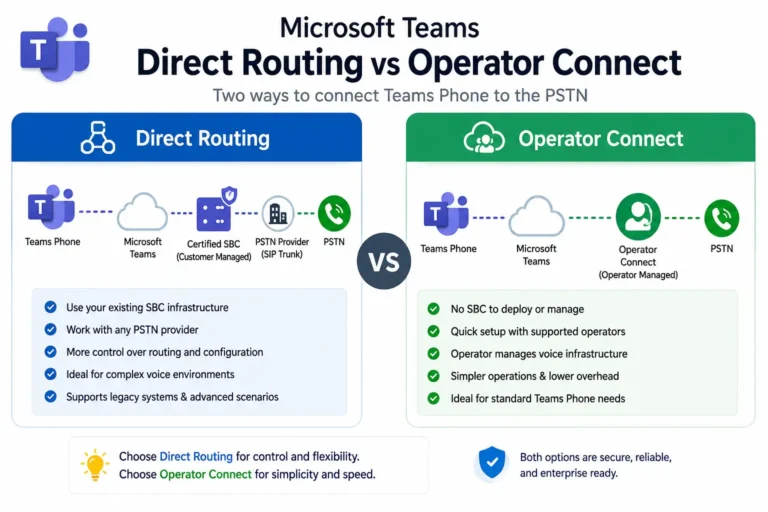
Calling Plan and Operator Connect users usually keep the service dial plan and dial as they would on a mobile in that country. Direct Routing and extension dialing are where you create tenant or user plans.
Dial plans do not select an SBC. Route-level translation (New-CsOnlineNumberTranslationRule) is a later, different step for SBC interop. Do not put SBC digit manipulation in the dial plan unless you intend every client to see that rewrite.
What a voice routing policy is
A voice routing policy is a list of PSTN usage names, in order. That is all.
The rest of the chain:
- PSTN usage – a label you reuse across policies (
IN-National,IN-Mobile,Emergency). - Voice route – a number pattern plus one or more PSTN gateways (your SBC FQDNs).
- Online PSTN gateway – the Direct Routing SBC object.
Admin center: Voice → Voice routing policies, Voice routes, Direct Routing. PowerShell sketch:
Set-CsOnlinePstnUsage -Identity Global -Usage @{Add="IN-National"}
New-CsOnlineVoiceRoute -Identity "IN-National-SBC1" `
  -NumberPattern '^\+91\d+$' `
  -OnlinePstnGatewayList @{Add="sbc.contoso.com"} `
  -OnlinePstnUsages @{Add="IN-National"}
New-CsOnlineVoiceRoutingPolicy "IN-Users" -OnlinePstnUsages @{Add="IN-National"}
Grant-CsOnlineVoiceRoutingPolicy -Identity user@contoso.com -PolicyName "IN-Users"
Assigning the policy does not enable PSTN by itself. The user still needs a number, Teams Phone, and a working gateway. See voice routing policy explained for the usage → route → gateway detail.
If the called number has ;ext=, the route pattern is applied to the number without the extension. +14255550100;ext=123 is matched as +14255550100.
The failure that looks like “Direct Routing is down”
Symptom: SBC is Active, OPTIONS are fine, user has a voice routing policy, outbound PSTN fails or never hits the SBC.
Cause: The route pattern was written for the digits the human typed, not the digits after the dial plan.
| User types | After dial plan | Route pattern that misses | Route pattern that hits |
|---|---|---|---|
02212345678 |
+912212345678 |
^0 or ^022 |
^\+91 |
91234567890 (0 missing) |
maybe unchanged | ^\+91 |
A dial-plan rule, or a second route |
9 + local PBX habit |
depends on your 9+ rule | ^9 on the route |
Strip 9 in the dial plan, route on ^\+ |
Fix the dial plan so everything that should go PSTN becomes E.164. Then write every voice route against ^\+…. Do not maintain two brains, one for “what they typed” and one for “what Teams sent.”
Other misses that are not regex:
- Policy assigned, PSTN usage list empty, or usage name does not match the route.
- Usage order: first matching usage wins. A catch-all
.*route on a usage listed first will steal emergency or on-net numbers. - Global (Org-wide default) voice routing policy edited so Calling Plan users accidentally match a Direct Routing pattern. Microsoft warns this explicitly. Use a custom policy and assign it. Do not dump
.*into Global. - User has Calling Plan and a Direct Routing policy: Teams checks the DR patterns first. Match → SBC. No match → Calling Plan. That is useful for a contact-center trunk. It is a surprise if Global contains
.*.
How to check a single user
Get-CsOnlineUser -Identity user@contoso.com |
  Select-Object DisplayName, LineURI, TenantDialPlan, OnlineVoiceRoutingPolicy, TeamsCallingPolicy

Get-CsTenantDialPlan -Identity "Mumbai"
Get-CsOnlineVoiceRoutingPolicy -Identity "IN-Users"
Get-CsOnlineVoiceRoute
On a test call, confirm in this order:
- Teams client actually normalized the number (call history shows
+91…, not022…). - SBC receives an INVITE (if not: policy, usage, or pattern).
- SBC receives the normalized number (if it still sees
022, you have extra translation on the route or the SBC, which may be intended).
If the SBC is Inactive, stop here and use Direct Routing troubleshooting. Routing policy will not fix OPTIONS.
Practical design
- One normalization story: users dial like they always did. Dial plans emit E.164.
- Voice routes only see
+. Patterns per country or per trunk (^\+91,^\+441,^\+911for emergency if you route it). - Separate PSTN usages for emergency, national, international, and any dedicated contact-center SBC.
- Put emergency usage first in the policy.
- Do not use the same regex in the dial plan and the route.