Teams Dynamic Emergency Calling (E911): Complete RAY BAUM’S Act & Kari’s Law Guide
In enterprise cloud voice, emergency calling is not just another routing feature—it is a strict federal legal mandate backed by heavy FCC fines and civil liability. In the United States, two federal laws govern every enterprise telephony deployment:
- Kari’s Law: Requires direct 911 dialing without any trunk access code (no dialing
9for an outside line) and mandates an instant, simultaneous notification (via email, Teams alert, or call bridge) to on-site security when an emergency call is initiated. - RAY BAUM’S Act (Section 506): Mandates that all emergency calls must convey a validated “Dispatchable Location” to the Public Safety Answering Point (PSAP)—meaning first responders must receive the exact street address, building, floor, suite, or quadrant for both fixed desk phones and nomadic laptop users.
If an employee working on the 4th floor dials 911 from a laptop and paramedics arrive at the 1st floor lobby with no further information, your organization is legally non-compliant.
This deployment guide covers the complete engineering blueprint for Microsoft Teams Dynamic E911: configuring the Location Information Service (LIS), handling all five deployment scenarios (wired, Wi-Fi, subnet, remote WFH, and local SBC breakout), executing automated 933 test calls, and passing PIDF-LO XML bodies across Direct Routing trunks.
Location Discovery: LLDP-MED, Wi-Fi BSSID, Subnet | Location Format: RFC 5139 (PIDF-LO XML) | Testing Endpoint: 933 Auto-Attendant | Direct Routing Handoff: Multipart MIME
How Dynamic E911 Works in Microsoft Teams
──(Sniffs Switch Port / BSSID / Subnet)──►
Teams LIS Cloud Service
──►
Teams Voice Core
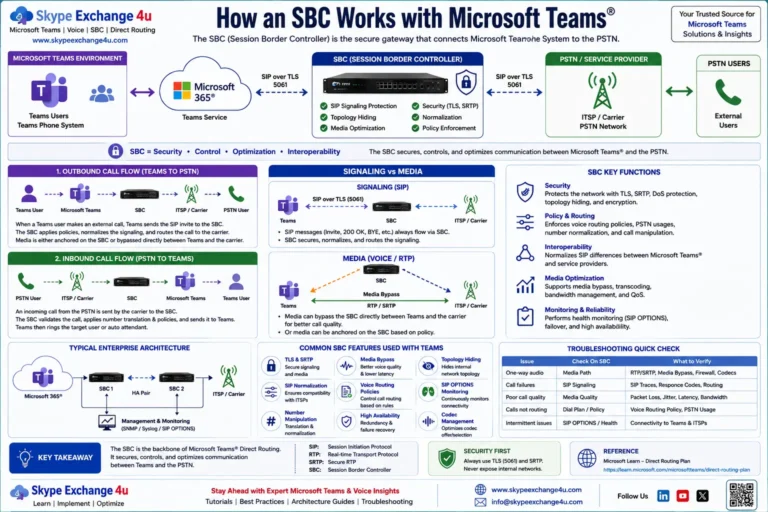
──(SIP INVITE + PIDF-LO XML)──►
SBC / ERSP Trunk
──►
Local 911 PSAP
──(Kari’s Law Simultaneous Notification)──►
On-Site Security Desk Alert (Listen-Only Bridge)
The 5 Real-World Scenarios (How Teams Discovers Location)
| Scenario | Network Discovery Mechanism | Location Precision & Practical Reality |
|---|---|---|
| 1. On-Premises Wired Desktop | LLDP-MED (Chassis ID + Port ID) | Highest Precision: Identifies the exact desk cubicle or wall jack. Requires managed switches with LLDP enabled. |
| 2. On-Premises Nomadic Laptop | Wi-Fi BSSID (Access Point MAC) | High Precision: Identifies the nearest corporate wireless access point (e.g., “Conference Room B, 3rd Floor”). |
| 3. Corporate Subnet Fallback | Internal IPv4 Subnet | Medium Precision: Used if switch ports or APs are unmapped. Resolves to a specific floor or building wing. |
| 4. Remote / Work From Home (WFH) | User-Confirmed Residential Prompt | Teams detects an untrusted external IP and prompts the user to enter their home address, caching it for 911 calls. |
| 5. Multi-Site Branch with Local SBC | Direct Routing + Local ELIN / PRIs | For sites without cloud ERSPs, the SBC swaps the caller ID to an Emergency Location Identification Number (ELIN) tied to local PSAP databases. |
Phase 1: Building the LIS Database in PowerShell
To populate your tenant’s Location Information Service, define the Master Civic Address and map granular sub-locations:
# 1. Connect to Microsoft Teams PowerShell
Connect-MicrosoftTeams

# 2. Define the Master Street Address (Validated against MSAG database)
$civicAddress = New-CsOnlineLisCivicAddress `
  -CompanyName "Contoso Enterprises" `
  -Address "100 Tech Center Parkway" `
  -City "Chicago" `
  -StateOrProvince "IL" `
  -PostalCode "60606" `
  -CountryOrRegion "US" `
  -Description "Chicago Corporate HQ"

# 3. Create Granular Dispatchable Locations (Floors / Wings)
$floor3West = New-CsOnlineLisLocation `
  -CivicAddressId $civicAddress.CivicAddressId `
  -Location "Building A - Floor 3 - West Wing"

# 4. Map Internal Corporate Subnets
Set-CsOnlineLisSubnet `
  -Subnet "10.40.3.0" `
  -Description "HQ 3rd Floor Wired & Wi-Fi Subnet" `
  -LocationId $floor3West.LocationId

# 5. Map Wi-Fi Access Points (BSSID / MAC Address)
Set-CsOnlineLisWirelessAccessPoint `
  -BSSID "00-1B-67-89-AB-CD" `
  -Description "AP-Floor3-West-Exec" `
  -LocationId $floor3West.LocationId

# 6. Map Managed Switch Ports (For Desktop IP Phones & Docks)
Set-CsOnlineLisPort `
  -ChassisID "00-26-98-12-34-56" `
  -PortID "GigabitEthernet1/0/24" `
  -Description "Desk-304-Ethernet" `
  -LocationId $floor3West.LocationId
Phase 2: Kari’s Law Notification & Emergency Routing Policies
# 1. Configure Kari's Law On-Site Notification Policy
New-CsTeamsEmergencyCallingPolicy -Identity "Policy-E911-Corporate" `
  -Description "Mandatory Kari's Law Security Bridge" `
  -NotificationGroup "security-team@contoso.com" `
  -NotificationDial "15551234567" `
  -NotificationMode "ConferenceMuted" `
  -ExternalLocationLookupMode "Enabled"

# 2. Configure Emergency Call Routing Policy (Direct Routing)
# Maps emergency dial strings 911 and 933 to your certified ERSP PSTN Gateway
$route911 = New-CsTeamsEmergencyCallRoute -EmergencyDialString "911" -OnlinePstnUsages "E911-Usage"
$route933 = New-CsTeamsEmergencyCallRoute -EmergencyDialString "933" -OnlinePstnUsages "E911-Usage"

New-CsTeamsEmergencyCallRoutingPolicy -Identity "Policy-ECRP-Bandwidth" `
  -EmergencyCallRoutes @($route911, $route933)

# 3. Assign Policies to Users
Grant-CsTeamsEmergencyCallingPolicy -Identity "user@contoso.com" -PolicyName "Policy-E911-Corporate"
Grant-CsTeamsEmergencyCallRoutingPolicy -Identity "user@contoso.com" -PolicyName "Policy-ECRP-Bandwidth"
Why ConferenceMuted is the Gold Standard:
When an emergency call begins, Teams instantly dials the security desk number and bridges them into the call in a listen-only state. Security guards hear the nature of the emergency and immediately unlock building access doors for paramedics—without talking over or interrupting the 911 dispatcher.
Phase 3: The PIDF-LO SIP Body & SBC Configuration
When an emergency call routes out a Direct Routing trunk, Microsoft Teams packages the user’s location into an RFC 5139 PIDF-LO XML document inside a multipart MIME SIP INVITE:
INVITE sip:911@sbc01.contoso.com:5061;user=phone SIP/2.0
Via: SIP/2.0/TLS sip.pstnhub.microsoft.com:5061;branch=z9hG4bK...
Content-Type: multipart/mixed;boundary=boundary-teams-e911
From: <sip:+14155550199@sip.pstnhub.microsoft.com:5061;user=phone>;tag=...
To: <sip:911@sbc01.contoso.com:5061;user=phone>
Call-ID: e911-call-4a8b-91c2-33219082
CSeq: 1 INVITE

--boundary-teams-e911
Content-Type: application/sdp
...
--boundary-teams-e911
Content-Type: application/pidf+xml

<?xml version="1.0" encoding="utf-8"?>
<presence xmlns="urn:ietf:params:xml:ns:pidf"
          xmlns:ca="urn:ietf:params:xml:ns:pidf:geopriv10:civicAddr">
  <tuple id="emergency">
    <status>
      <geopriv xmlns="urn:ietf:params:xml:ns:pidf:geopriv10">
        <location-info>
          <ca:civicAddress>
            <ca:country>US</ca:country>
            <ca:A1>IL</ca:A1>
            <ca:A3>Chicago</ca:A3>
            <ca:RD>Tech Center</ca:RD>
            <ca:STS>Parkway</ca:STS>
            <ca:HNO>100</ca:HNO>
            <ca:LOC>Building A - Floor 3 - West Wing</ca:LOC>
          </ca:civicAddress>
        </location-info>
      </geopriv>
    </status>
  </tuple>
</presence>
--boundary-teams-e911--
SBC Requirements:
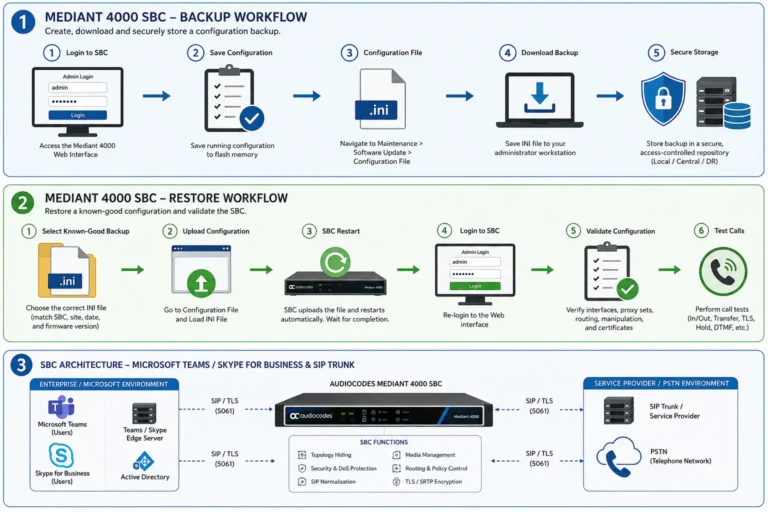
- AudioCodes Mediant: Under Signaling & Media → SIP Definitions → SIP Interfaces, set Body Pass-Through to
Enabledso the Mediant passes the multipart MIME payload untouched to your Emergency Routing Service Provider (ERSP). Check our AudioCodes Mediant Teams Configuration Guide. - Ribbon SBC 1000/2000: Under SIP Profiles, enable MIME Body Pass-Through and configure the
911route at Priority 1 with zero channel restrictions. Check our Ribbon SBC 1000/2000 Guide.
Testing Without Calling the Police: The 933 Automated Bot
Need Help Auditing or Deploying Teams E911 Compliance?
Our Microsoft-certified voice infrastructure architects specialize in multi-building LIS switch-port mapping, Bandwidth/Intrado ERSP integration, and full Kari’s Law & RAY BAUM’S Act legal audits across global enterprises.
Frequently Asked Questions (FAQ)
What is the penalty for non-compliance with Kari’s Law and RAY BAUM’S Act?
The Federal Communications Commission (FCC) can levy regulatory fines exceeding $10,000 per violation, with recurring daily fines for ongoing non-compliance. In addition, enterprises face severe civil liability, catastrophic wrongful death judgments, and corporate reputational damage if first responders are delayed due to missing location data.
How does Teams handle 911 calls for remote / work-from-home users?
When Teams detects an untrusted external IP address (e.g., home broadband or a public coffee shop), the client prompts the user to enter or confirm their current residential address. This address is validated against the national postal database and packaged into the PIDF-LO XML body if an emergency call is dialed.
Can a standard local SIP trunk handle Dynamic E911 in Teams Direct Routing?
Traditional PSTN SIP trunks bind one static billing address to a phone number and cannot parse dynamic PIDF-LO XML bodies. To support dynamic nomadic emergency calling, enterprises deploy an Emergency Routing Service Provider (ERSP) like Bandwidth or Intrado that dynamically maps the PIDF-LO location payload directly to the nearest PSAP.
What is the 933 test number in Microsoft Teams?
Dialing 933 connects the caller to an automated verification service provided by emergency carriers. An automated text-to-speech voice reads back your presenting telephone number, street address, and granular dispatchable location, allowing voice engineers to verify dynamic LIS resolution without alerting emergency dispatchers.
Related Microsoft Teams Enterprise Architecture & Hardware Guides
- Ribbon SBC 1000/2000 Configuration for Teams Direct Routing: Step-by-Step Guide
- AudioCodes Mediant SBC Configuration for Teams Direct Routing: Tenant to First Call
- Deploying Teams Survivable Branch Appliance (SBA): Offline Calling Architecture
- Direct Routing vs Operator Connect vs Teams Phone Mobile: 2026 Architecture Guide
- Media Bypass vs Local Media Optimization: When Teams Skips the SBC
- Teams Direct Routing SIP 503 Service Unavailable: Troubleshooting SBC & Trunk Outages
- Teams Direct Routing SIP 403 Forbidden: Packet Traces, FQDN Gotchas & Carrier Fixes