Microsoft 365 Hybrid Identity Explained: AD, Entra ID, Sync & Authentication
Microsoft 365 Hybrid Identity Explained: Active Directory, Entra ID, Sync & Authentication
A practical guide to Microsoft 365 hybrid identity, Active Directory, Microsoft Entra ID, synchronization, authentication, Cloud Sync, Entra Connect and troubleshooting.
Updated: August 2026 • Reading time: 10–12 minutes
Microsoft 365 hybrid identity connects an organization’s on-premises
Active Directory environment with Microsoft Entra ID
so users can access Microsoft 365 and other cloud services while the organization
continues to use its existing identity infrastructure.
If your organization has been using Active Directory for years and is now moving
toward Microsoft 365, you have probably encountered the term
hybrid identity.
At first, the concept sounds simple: synchronize users from Active Directory to
Microsoft Entra ID.
In a real enterprise environment, however, hybrid identity involves much more:
identity synchronization, authentication, security, device identity,
multiple domains, multiple forests, legacy applications and recovery planning.
This guide explains the architecture from beginner to advanced level so you can
understand not only what hybrid identity is, but also how it works and
how to troubleshoot it when something goes wrong.
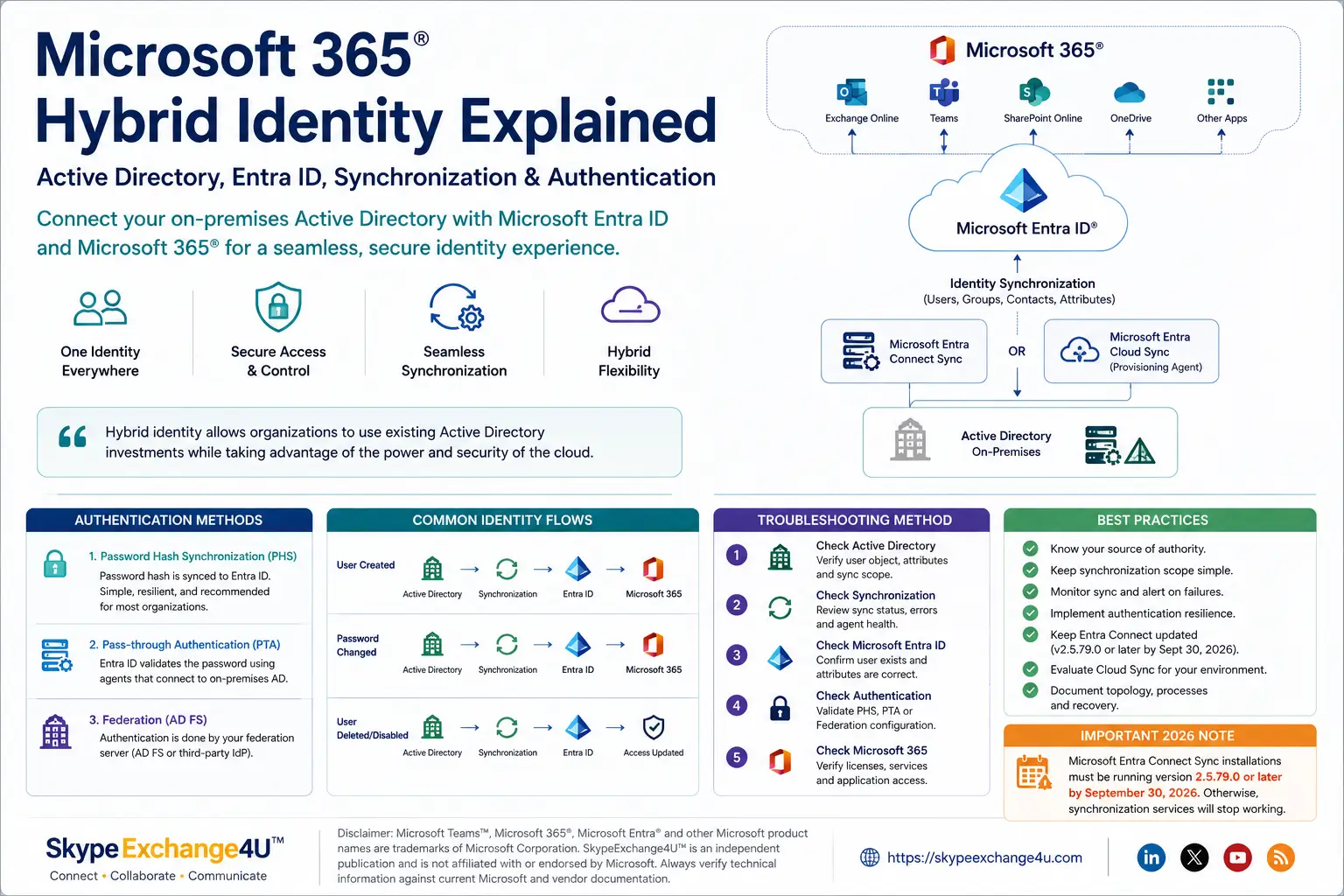
Active Directory → Synchronization → Microsoft Entra ID → Microsoft 365
🔎 What Is Microsoft 365 Hybrid Identity?
Microsoft 365 hybrid identity is an identity architecture that
connects an organization’s on-premises Active Directory environment with
Microsoft Entra ID, Microsoft’s cloud identity platform.
The objective is to provide a coordinated identity experience across
on-premises resources and cloud services.
Microsoft describes hybrid identity as an architecture that connects
on-premises and cloud identities so users can access resources across both
environments.
⚡ Quick Answer
A Microsoft 365 hybrid identity environment normally allows an organization to:
- Synchronize users and groups from Active Directory to Microsoft Entra ID.
- Use a consistent organizational identity across cloud and on-premises resources.
- Choose an appropriate authentication model.
- Connect Microsoft 365 services to an existing Active Directory environment.
- Move workloads to the cloud gradually.
Synchronization and authentication are related, but they are
not the same thing. A user can successfully synchronize to
Microsoft Entra ID while still having an authentication problem.
🏢 Why Do Organizations Use Hybrid Identity?
Many enterprises already depend heavily on Active Directory. Replacing that
environment overnight is rarely practical.
Hybrid identity provides a bridge between existing infrastructure and cloud
services.
Existing Windows infrastructure
- Domain controllers
- Organizational Units
- Group Policy
- Windows domain-joined computers
- File servers
- Legacy applications
Microsoft 365 adoption
- Exchange Online
- Microsoft Teams
- SharePoint Online
- OneDrive
- Microsoft 365 applications
- Other Microsoft Entra-integrated applications
Hybrid identity allows these environments to coexist while the organization
develops its longer-term cloud strategy.
🆚 Active Directory vs Microsoft Entra ID
| Capability | Active Directory | Microsoft Entra ID |
|---|---|---|
| Environment | On-premises | Cloud |
| Domain controllers | Yes | No traditional domain controllers |
| LDAP | Native | Different cloud identity architecture |
| Kerberos / NTLM | Native | Not traditional AD authentication |
| Microsoft 365 | Indirect | Native cloud integration |
| Conditional Access | No | Yes |
| Cloud applications | Limited | Strong integration |
🔄 How Microsoft 365 Hybrid Identity Works
At a high level, identity flows through the environment like this:
User created in Active Directory
              |
              v
      Synchronization
              |
              v
     Microsoft Entra ID
              |
              v
        Microsoft 365
              |
              v
       User signs in
The synchronization layer can be provided by
Microsoft Entra Cloud Sync or
Microsoft Entra Connect Sync, depending on the organization’s
requirements.
Microsoft currently positions Cloud Sync as its strategic direction for
hybrid identity synchronization while Connect Sync remains relevant for
supported scenarios where its capabilities are required.
📦 What Gets Synchronized?
Depending on the configuration, organizations can synchronize identity
objects and attributes such as:
- Users
- Groups
- Contacts
- Selected directory attributes
- Password-related authentication information in supported configurations
- Other supported synchronization data
However, not every Active Directory object automatically becomes a
Microsoft Entra object.
Synchronization rules, filtering and scope determine which objects and
attributes are synchronized.
If a user does not appear in Microsoft Entra ID, do not immediately assume
the synchronization service is broken. First check whether the object is
actually inside the configured synchronization scope.
☁️ Microsoft Entra Connect vs Cloud Sync
This is one of the most important decisions for organizations building or
modernizing a hybrid identity environment.
Microsoft Entra Connect Sync
Microsoft Entra Connect Sync uses an on-premises synchronization component to
synchronize identity information between Active Directory and Microsoft Entra ID.
Microsoft Entra Cloud Sync
Cloud Sync uses a lightweight Microsoft Entra provisioning agent on-premises,
while synchronization configuration and orchestration are managed through the
cloud service.
| Area | Entra Connect Sync | Entra Cloud Sync |
|---|---|---|
| Management model | On-premises synchronization component | Cloud-managed architecture |
| On-premises footprint | Larger | Lightweight provisioning agent |
| Synchronization | Yes | Yes |
| Cloud management | More dependent on local configuration | Core architecture |
| Strategic direction | Existing supported deployments | Microsoft’s strategic direction |
Microsoft Entra Cloud Sync is Microsoft’s strategic direction as functional
parity is reached, but organizations should evaluate their actual topology
and feature requirements before migrating from Connect Sync.
🚨 Important 2026 Entra Connect Requirement
Organizations still operating Microsoft Entra Connect Sync should review their
current version carefully.
Microsoft states that synchronization services will stop working on
September 30, 2026 if the installation is not running at least
version 2.5.79.0.
Before upgrading or migrating, review:
- Current Entra Connect version
- Server operating system
- .NET and prerequisite requirements
- Synchronization configuration
- Authentication method
- Backup and recovery procedures
- Change-management requirements
🔐 Hybrid Identity Authentication Methods
Synchronization determines how identity information moves between environments.
Authentication determines how a user proves their identity.
The major hybrid authentication approaches are:
- Password Hash Synchronization (PHS)
- Pass-through Authentication (PTA)
- Federation
1️⃣ Password Hash Synchronization
With Password Hash Synchronization, password-derived hash
information is synchronized from Active Directory to Microsoft Entra ID.
The user’s clear-text password is not synchronized to Microsoft Entra ID.
✅ Why organizations like PHS
- Relatively simple architecture
- Fewer on-premises authentication dependencies
- Strong cloud resilience
- Simple operational model
- Works well with Microsoft Entra security capabilities
Microsoft describes PHS as the simplest and most resilient hybrid
authentication option for many organizations.
2️⃣ Pass-through Authentication
Pass-through Authentication (PTA) allows Microsoft Entra ID
to validate a user’s password through authentication agents operating in the
organization’s environment.
User
 |
 v
Microsoft Entra ID
 |
 v
PTA Agent
 |
 v
Active Directory
 |
 v
Authentication result
The model can be useful when password validation needs to remain against the
on-premises Active Directory environment.
The trade-off is an additional dependency on on-premises infrastructure and
connectivity.
3️⃣ Federation
Federation uses a trusted identity provider to perform authentication.
A common example is Active Directory Federation Services (AD FS).
User
 |
 v
Microsoft Entra ID
 |
 v
Federation Service
 |
 v
Active Directory
Federation can be useful for organizations with specific authentication
requirements or an existing federation investment.
However, federation generally introduces additional infrastructure and
operational complexity compared with cloud authentication approaches.
⚖️ PHS vs PTA vs Federation
| Area | PHS | PTA | Federation |
|---|---|---|---|
| Authentication | Cloud | On-premises validation | Federation service |
| On-premises dependency | Low | Yes | Yes |
| Complexity | Low | Medium | High |
| Infrastructure | No PTA agents required | Authentication agents | Federation infrastructure |
🔄 What Happens When a User Changes Their Password?
A password change can be understood as a sequence:
Password changed
      |
      v
Active Directory
      |
      v
Synchronization
      |
      v
Microsoft Entra ID
      |
      v
Microsoft 365
With Password Hash Synchronization, the relevant password-derived information
is synchronized to Microsoft Entra ID.
The important troubleshooting lesson is that a password problem does not
automatically mean Active Directory is broken. You must determine whether the
failure is in AD, synchronization, authentication or the Microsoft 365
application.
👤 What Happens When a User Is Created?
Suppose an administrator creates a user in Active Directory.
Active Directory
       |
       v
Synchronization rules
       |
       v
Microsoft Entra ID
       |
       v
Microsoft 365
The synchronization process evaluates the object against configured rules and
scope.
If the object is inside the configured synchronization scope, it can be
provisioned to Microsoft Entra ID.
If it is outside the scope, it will not simply appear in Microsoft 365 because
it exists in Active Directory.
🗑️ What Happens When a User Is Deleted?
Deletion is one of the areas where hybrid identity requires careful planning.
User deleted or disabled
        |
        v
Synchronization detects change
        |
        v
Microsoft Entra object changes
        |
        v
Microsoft 365 access changes
Organizations should maintain appropriate controls around accidental
deletions, synchronization scope and recovery procedures.
A synchronization mistake can propagate identity changes from on-premises
infrastructure into cloud services. Treat synchronization infrastructure as
security-sensitive infrastructure.
🧭 Hybrid Identity Sign-In Flow
A simplified sign-in architecture looks like this:
                 User
                   |
                   v
          Microsoft Entra ID
                   |
          +--------+--------+
          |        |        |
          v        v        v
         PHS      PTA   Federation
          |        |        |
          v        v        v
        Cloud     AD    Federation
      validation validation service
The exact sign-in flow depends on the authentication configuration for the
tenant and domain.
A synchronization problem and an authentication problem can produce similar
user complaints, but they require different troubleshooting paths.
🚨 Common Microsoft 365 Hybrid Identity Problems
| Problem | Possible cause | First check |
|---|---|---|
| User missing in Entra ID | Scope or synchronization issue | AD object and sync scope |
| Wrong user attributes | Attribute flow/configuration | Source and target attributes |
| Password fails | Authentication or synchronization | Configured auth method |
| Duplicate identity | Matching/source identity issue | Object matching and history |
| Groups missing | Scope or synchronization rule | Group scope |
| Sync stopped | Agent/service/configuration issue | Service and synchronization status |
🔧 Hybrid Identity Troubleshooting Method
When something breaks, troubleshoot in a predictable order instead of
randomly restarting services.
Step 1 — Check Active Directory
- Is the object enabled?
- Is it in the correct Organizational Unit?
- Are the required attributes populated?
- Is the object inside synchronization scope?
Step 2 — Check Synchronization
Look for:
- Import errors
- Export errors
- Provisioning failures
- Attribute errors
- Agent availability
Step 3 — Check Microsoft Entra ID
- Does the user exist?
- Are the attributes correct?
- Is the object in the expected state?
- Are required licenses assigned?
Step 4 — Check Authentication
Determine whether the environment uses:
- Password Hash Synchronization
- Pass-through Authentication
- Federation
Step 5 — Check Microsoft 365
Once identity and authentication are confirmed, move deeper into the specific
Microsoft 365 workload.
AD → Synchronization → Entra ID → Authentication → Application.
Follow that chain before making unrelated changes.
🔐 Security Considerations
Hybrid identity creates a security relationship between on-premises and cloud
environments.
Microsoft notes that hybrid infrastructure introduces additional dependencies
and security considerations, making resilience and security important parts of
the architecture.
Recommended security practices
- Protect domain controllers.
- Protect synchronization servers and agents.
- Use least privilege.
- Enable MFA where appropriate.
- Use Conditional Access.
- Monitor risky sign-ins.
- Maintain emergency access procedures.
- Keep synchronization components updated.
- Document authentication dependencies.
- Test recovery procedures.
☁️ Should You Move from Entra Connect to Cloud Sync?
Not automatically.
The correct decision depends on your current topology, required features and
operational goals.
Current AD environment
        |
        v
Current Entra Connect configuration
        |
        v
Required features
        |
        v
Cloud Sync compatibility
        |
        v
Migration readiness
        |
        v
Pilot
        |
        v
Production migration
Microsoft provides migration guidance for organizations evaluating a move from
Entra Connect Sync to Cloud Sync.
Compare your actual requirements with Microsoft’s current feature support
and migration guidance first.
⚖️ Pros and Cons of Hybrid Identity
✅ Advantages
- Reuses existing Active Directory infrastructure.
- Supports gradual Microsoft 365 adoption.
- Provides a coordinated identity experience.
- Allows gradual cloud migration.
- Supports cloud authentication options.
- Integrates with Microsoft Entra security capabilities.
❌ Challenges
- More components to manage.
- Synchronization failures can affect cloud identity.
- Authentication dependencies require planning.
- Incorrect rules can create identity problems.
- Legacy federation can add operational complexity.
- Recovery requires careful planning.
🏆 Best Practices for a Healthy Hybrid Identity Environment
-
Know your source of authority.
Before changing an attribute, determine whether Active Directory or
Microsoft Entra ID is authoritative. -
Keep synchronization simple.
Synchronize what the business actually needs. -
Monitor synchronization.
Treat synchronization failures as operational events rather than waiting
for users to report them. -
Build authentication resilience.
Evaluate PHS and other supported resilience strategies against your
organization’s requirements. -
Keep Entra Connect updated.
If you still operate Entra Connect Sync, review the 2026 minimum-version
requirement. -
Evaluate Cloud Sync.
Compare your environment against Microsoft’s current feature and migration
guidance. -
Document everything.
Record synchronization topology, domains, forests, authentication methods,
agents, servers, service accounts and recovery procedures.
💡 Architect’s rule: Keep identity simple, authentication resilient,
synchronization controlled and recovery tested.
🏢 Real-World Enterprise Example
Consider an organization with:
- Two Active Directory forests
- 3,000 users
- Existing Windows infrastructure
- Microsoft Teams
- Exchange Online
- SharePoint Online
- Several legacy applications
A simplified architecture could look like this:
                 Microsoft 365
                       |
                       v
                Microsoft Entra ID
                       |
                       v
             Identity Synchronization
                       |
             +---------+---------+
             |                   |
             v                   v
        AD Forest A         AD Forest B
             |                   |
             v                   v
       Domain Controllers   Domain Controllers
             |                   |
             v                   v
        Legacy Apps         Legacy Apps
The architectural questions are more important than the diagram itself:
- Which identity source is authoritative?
- Which objects need synchronization?
- Which authentication method is appropriate?
- Can Cloud Sync support the topology?
- What happens if synchronization fails?
- What happens if domain controllers become unavailable?
- How are privileged identities protected?
That is the real challenge of hybrid identity architecture.
❓ Frequently Asked Questions
What is Microsoft 365 hybrid identity?
Microsoft 365 hybrid identity connects on-premises Active Directory with
Microsoft Entra ID so users can access cloud and on-premises resources using
a coordinated identity.
Is Microsoft Entra ID the same as Active Directory?
No. Microsoft Entra ID is Microsoft’s cloud identity platform, while
Active Directory Domain Services is traditionally deployed on-premises and
provides capabilities such as LDAP, Kerberos and Group Policy.
What is Microsoft Entra Connect?
Microsoft Entra Connect Sync is Microsoft’s synchronization technology for
connecting on-premises Active Directory identity information with
Microsoft Entra ID.
What is Microsoft Entra Cloud Sync?
Microsoft Entra Cloud Sync is a cloud-managed identity synchronization
service that uses a lightweight provisioning agent to connect Active
Directory with Microsoft Entra ID.
Is Entra Connect being replaced?
Microsoft is positioning Cloud Sync as the strategic direction as functional
parity is reached, but organizations should evaluate their specific feature
requirements before migrating.
Which authentication method is best?
There is no universal answer. Microsoft describes Password Hash
Synchronization as a simple and resilient option for many organizations,
while Pass-through Authentication and federation remain relevant for
specific requirements.
Does Microsoft 365 hybrid identity require Active Directory?
A cloud-only Microsoft 365 organization does not need on-premises Active
Directory. The term hybrid identity specifically refers to an environment
where on-premises identity infrastructure and cloud identity coexist.
What happens if Active Directory goes down?
The impact depends on the authentication model. PHS can allow users to
authenticate to Microsoft Entra cloud resources without requiring
on-premises authentication at sign-in time. PTA and federation have stronger
dependencies on on-premises components.
What version of Entra Connect is required in 2026?
Microsoft states that Entra Connect Sync installations must be running
version 2.5.79.0 or later by September 30, 2026, otherwise
synchronization services will stop working.
🎯 Conclusion
Microsoft 365 hybrid identity is the bridge between traditional Active
Directory and the modern cloud identity environment.
The basic architecture is easy to remember:
Active Directory → Synchronization → Microsoft Entra ID → Microsoft 365
The complexity appears when organizations introduce multiple forests,
authentication methods, legacy applications, synchronization rules, security
requirements and recovery scenarios.
The most important questions are:
- What should synchronize?
- Where should authentication happen?
- Which synchronization technology fits the environment?
- How will identity remain available when something fails?
- Is Cloud Sync appropriate for the organization’s future architecture?
The best hybrid identity architecture isn’t necessarily the one with the most
technology. It is the one that provides secure identity, predictable
authentication, controlled synchronization and a clear path toward the
organization’s cloud strategy.
🔗 Related SkypeExchange4U™ Articles
Microsoft Teams Call Flow Explained
Follow Teams signaling, media, SBC and PSTN call paths.
Microsoft Teams Voice Troubleshooting Guide
Diagnose Teams voice and enterprise calling problems.
How an SBC Works with Microsoft Teams
Understand SBC architecture and Teams Direct Routing.
📚 Authoritative Sources
-
Microsoft Learn — What is Microsoft Entra Cloud Sync?
-
Microsoft Learn — Cloud Sync decision guide
-
Microsoft Learn — Hybrid identity resilience
-
Microsoft Learn — Password Hash Synchronization
-
Microsoft Learn — Pass-through Authentication
-
Microsoft Learn — Microsoft Entra Connect prerequisites
- Entra Connect vs Cloud Sync
Microsoft Teams™, Microsoft 365®, Microsoft Entra® and other Microsoft
product names are trademarks of Microsoft Corporation. SkypeExchange4U™ is
an independent publication and is not affiliated with or endorsed by
Microsoft. Always verify technical information against current Microsoft
and vendor documentation.