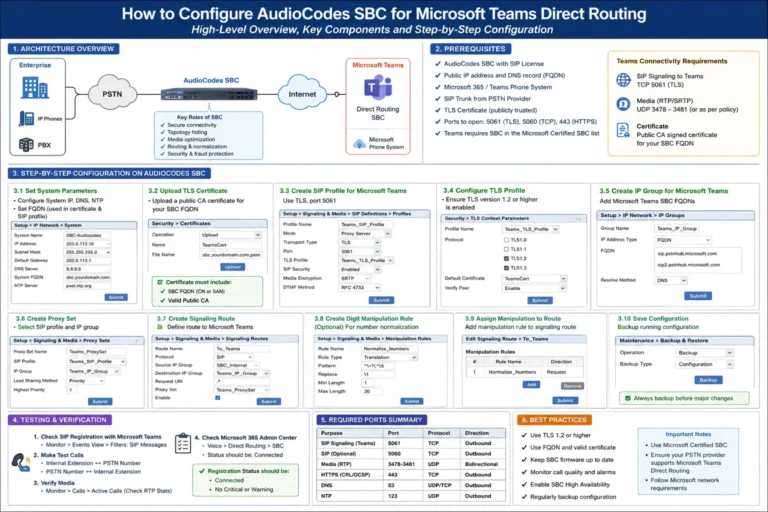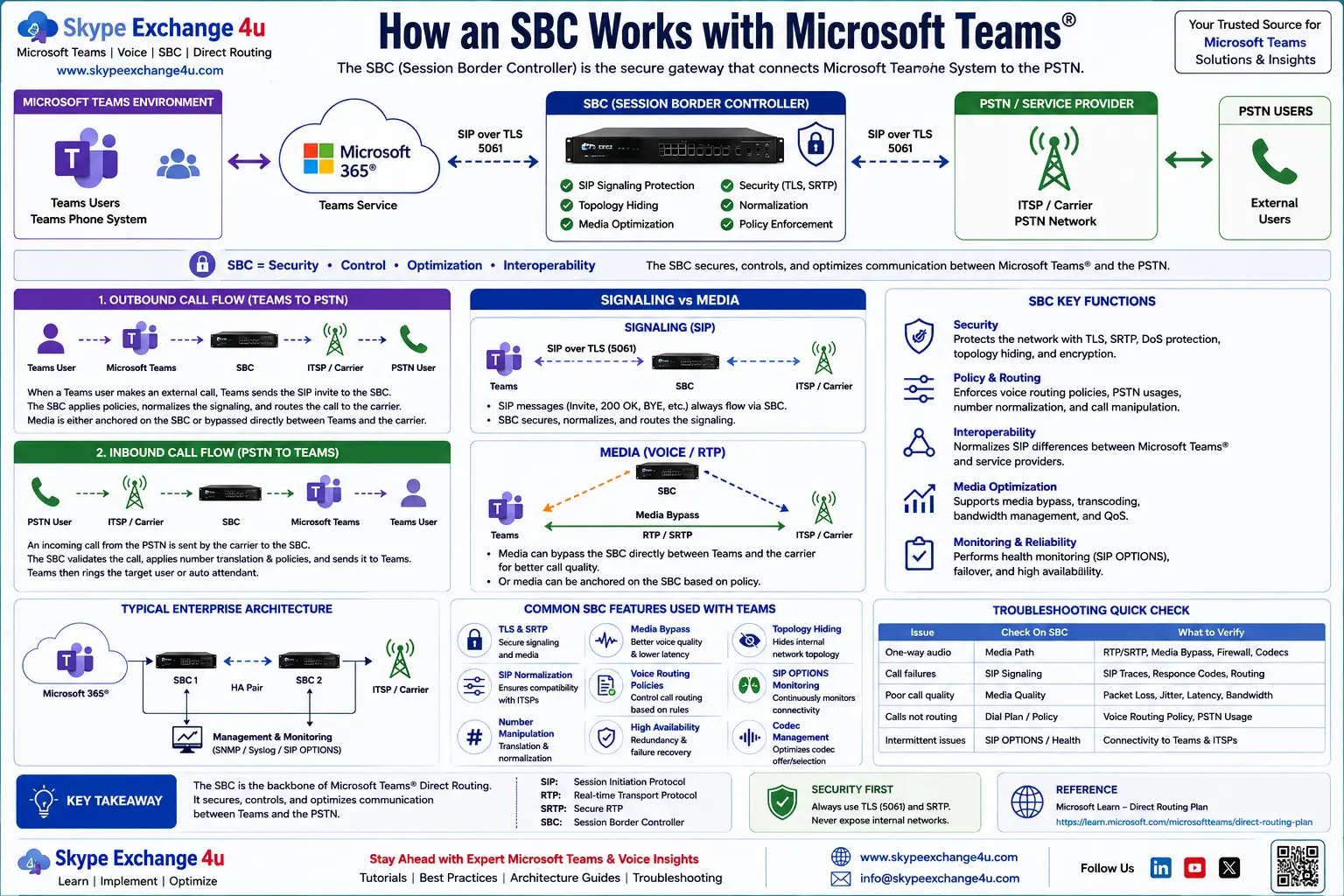
How an SBC Works with Microsoft Teams | Direct Routing
How an SBC Works with Microsoft Teams
A practical guide to SBC Microsoft Teams architecture, Direct Routing, SIP signaling, media flow, call routing, security, media bypass and troubleshooting.
Editorial update: October 9, 2026 • Reading time: 10 minutes
SBC Microsoft Teams architecture is a key part of connecting Microsoft Teams Phone with external telephony through Direct Routing. In this guide, SkypeExchange4U™ explains how the Session Border Controller handles SIP signaling, call routing, security, media and PSTN connectivity in an enterprise voice environment.
The SBC is not simply a device that passes calls from one network to another. It is an important control point between Microsoft cloud voice services and the organization’s existing telephony environment.
This guide is designed for Microsoft Teams administrators, voice engineers, SBC engineers, network teams and enterprise architects who want a practical understanding of the complete call flow.
Visit SkypeExchange4U™ for Microsoft Teams, enterprise voice, AI and technology articles.
🔌 What Is an SBC in Microsoft Teams?
A Session Border Controller (SBC) is a specialized voice-network device or software platform that controls and protects real-time communications across network boundaries.
In Microsoft Teams Direct Routing, the SBC provides the controlled connection between Teams Phone and an organization’s external telephony environment. Microsoft describes Direct Routing as a capability that connects a supported customer-provided SBC to Teams Phone so organizations can use their own PSTN connectivity.
Microsoft Learn: Plan Direct Routing
Teams uses Microsoft’s Direct Routing service for the cloud-side connection. The SBC then communicates with the organization’s carrier, PBX or other supported telephony environment.
🏗️ SBC Microsoft Teams Architecture
↓
Teams Phone / Direct Routing
↓
SESSION BORDER CONTROLLER (SBC)
↓
SIP Trunk / PSTN Carrier / PBX / Supported Voice Infrastructure
↓
Public Telephone Network / External Caller
SBC Microsoft Teams Direct Routing architecture and call flowThe exact design depends on the organization’s carrier, network topology, SBC platform and Direct Routing configuration. However, the SBC remains the key interconnection point between Teams Phone and the external voice environment.
🧠 How Does SBC Microsoft Teams Architecture Work?
The easiest way to understand an SBC with Microsoft Teams is to separate the call into two major components: SIP signaling and media.
| SBC function | What it does |
|---|---|
| SIP signaling | Helps establish, modify and terminate voice sessions. |
| Security | Creates a controlled boundary between voice networks. |
| Interoperability | Connects Teams with supported carriers and telephony systems. |
| Number manipulation | Can normalize or translate numbers between environments. |
| Routing | Helps direct calls toward the correct telephony destination. |
| Media handling | Participates in the media path according to the Direct Routing design. |
📞 How an SBC Handles an Outbound Teams Call
Imagine a Teams user dialing an external telephone number.
- The user enters the external number in Microsoft Teams.
- Teams Phone applies the organization’s configured voice-routing policy.
- Direct Routing sends the call toward the selected SBC.
- The SBC receives the SIP signaling.
- The SBC applies its configured routing and number-manipulation logic.
- The SBC sends the call toward the carrier, SIP trunk or connected PBX.
- The external telephone network completes the call.
- Voice media flows according to the configured Direct Routing architecture.
Microsoft documents different Direct Routing media paths depending on the architecture, including scenarios with and without media bypass. SIP signaling continues through the Direct Routing SIP proxy.
Microsoft Learn: Direct Routing protocols
📲 How an SBC Handles an Inbound Teams Call
Inbound calling reverses the basic direction:
- An external caller dials a Teams user’s telephone number.
- The PSTN carrier or connected telephony system sends the call toward the SBC.
- The SBC receives and processes the SIP request.
- The call is routed through Direct Routing toward Teams Phone.
- Teams identifies the destination user.
- The Teams client alerts the user.
- When answered, media follows the configured media architecture.
This makes the SBC an important point for both inbound and outbound enterprise voice traffic.
🔐 How Microsoft Teams Secures the SBC Connection
Security is a fundamental part of Direct Routing. Microsoft documents TLS-based SIP signaling between the customer SBC and the Direct Routing SIP proxy, along with certificate requirements for the SBC.
The SBC FQDN must be correctly configured, and certificates must meet Microsoft’s Direct Routing requirements. Administrators should verify the current Microsoft requirements before deploying or renewing certificates.
Microsoft Learn: Direct Routing planning and requirements
🎙️ What Happens to Voice Media?
Media is separate from SIP signaling. Microsoft documents RTP/SRTP-based media behavior for Direct Routing and different paths depending on whether media bypass is enabled.
With media bypass, supported Teams clients can send media directly toward the SBC rather than using the normal media-processor path. Microsoft documents specific SBC, ICE Lite, encryption and interoperability requirements for media bypass.
Microsoft Learn: Direct Routing media protocols
Media bypass should therefore be treated as an architecture decision—not simply a switch to turn on without validating firewall rules, SBC support, network paths and client scenarios.
🛣️ SBC Microsoft Teams Call Routing Explained
Teams Direct Routing uses voice-routing configuration to determine how calls are sent. Microsoft documents key components including:
- Voice routing policies
- PSTN usages
- Voice routes
- Online PSTN gateways
A voice route can contain number patterns and one or more online PSTN gateways. This allows organizations to build routing logic for countries, regions, number ranges, carriers and backup paths.
Microsoft Learn: Configure call routing for Direct Routing
❤️ How Teams Monitors SBC Health
Direct Routing uses SIP OPTIONS messages from SBCs as part of SBC health monitoring and routing behavior. This becomes particularly important in resilient deployments where multiple SBCs or gateways are available.
If an SBC is unhealthy or no longer meets the expected connectivity behavior, routing can move toward another available path according to the configured architecture.
🧩 Why Use an SBC with Microsoft Teams Direct Routing?
Direct Routing is particularly useful when an organization wants to connect Teams Phone with an existing PSTN carrier or telephony environment rather than replacing the entire voice infrastructure at once.
| Enterprise requirement | Where the SBC helps |
|---|---|
| Existing SIP carrier | Provides the controlled interconnection to the carrier. |
| Legacy PBX integration | Supports interoperability between Teams and the existing voice environment. |
| Multiple carriers | Enables routing across supported PSTN gateways. |
| Enterprise resilience | Can support redundant SBC and carrier architectures. |
🏢 Example Enterprise SBC Microsoft Teams Architecture
↓
Teams Phone / Direct Routing
↓
SBC Pair / Regional SBCs
↙ ↘
PSTN Carrier A PSTN Carrier B
↓ ↓
Public Telephone Network
A larger enterprise may use multiple SBCs across regions, multiple PSTN carriers, redundant network paths, Local Media Optimization, survivability options, centralized monitoring and integration with contact centers or legacy voice platforms.
Microsoft Learn: Local Media Optimization
🛠️ Common SBC Microsoft Teams Problems
| Symptom | What to investigate |
|---|---|
| SBC won’t pair | FQDN, DNS, certificate, TLS, firewall and SBC configuration. |
| Outbound call fails | Voice route, PSTN usage, number normalization, gateway and carrier signaling. |
| Inbound call fails | Number mapping, carrier routing, SBC routing and Teams configuration. |
| One-way audio | Media path, firewall/NAT, ports, codec negotiation and media-bypass design. |
| Poor call quality | Packet loss, latency, jitter, QoS and media routing. |
| SBC appears unhealthy | SIP OPTIONS, connectivity, SBC service health and routing status. |
🔎 Practical SBC Microsoft Teams Troubleshooting Order
- Check the user: Confirm Teams Phone, Direct Routing and required licensing/configuration.
- Check routing: Verify the voice routing policy, PSTN usage, route and selected gateway.
- Check the SBC: Confirm pairing and health.
- Check SIP: Trace the INVITE and SIP responses.
- Check number manipulation: Verify the number format presented to the carrier or PBX.
- Check media separately: If signaling succeeds but audio fails, investigate the media path.
- Check the carrier/PBX: Confirm the downstream system accepted and routed the call.
Microsoft Learn: Monitor and troubleshoot Direct Routing
🏅 Which SBCs Are Supported by Microsoft Teams?
Microsoft maintains a certification program for SBC vendors and devices used with Direct Routing. Microsoft states that Teams Phone with Direct Routing is supported when using certified SBC devices. Certification is tied to documented firmware versions, so administrators should check Microsoft’s current certification list before selecting or upgrading an SBC.
Microsoft Learn: Certified SBCs for Direct Routing
Examples of vendors represented in Microsoft’s certification ecosystem include AudioCodes, Ribbon, Cisco, Oracle, Avaya and other vendors. The exact certified model and firmware combination matters more than the vendor name alone.
📋 SBC Microsoft Teams Deployment Checklist
- ✅ Confirm the SBC is Microsoft-certified for Direct Routing.
- ✅ Confirm the SBC FQDN and DNS configuration.
- ✅ Obtain a certificate that meets Microsoft’s requirements.
- ✅ Confirm SIP signaling connectivity and firewall rules.
- ✅ Plan the media path separately from SIP signaling.
- ✅ Configure voice routing policies, PSTN usages and routes.
- ✅ Test inbound and outbound calls.
- ✅ Test number normalization and caller ID behavior.
- ✅ Test one-way audio and call-quality scenarios.
- ✅ Test SBC failure and recovery scenarios before production rollout.
- ✅ Document the carrier, SBC and Teams dependencies.
🎯 The Bottom Line
An SBC is the controlled voice bridge between Microsoft Teams Phone and external telephony infrastructure in a Direct Routing architecture.
It plays an important role in SIP signaling, security, routing, interoperability and media architecture. Understanding the relationship between Teams Phone → Direct Routing → SBC → PSTN/PBX → media makes enterprise voice troubleshooting much easier.
The SBC does not replace Microsoft Teams. Instead, it allows Teams to coexist with the broader enterprise voice ecosystem.
For enterprise voice architects, the SBC remains one of the most important building blocks in a Teams Direct Routing design.
❓ Frequently Asked Questions
What is an SBC in Microsoft Teams?
An SBC is a Session Border Controller that connects Teams Phone through Direct Routing with external telephony infrastructure such as supported SIP trunks, PSTN carriers and PBXs.
Does Microsoft Teams need an SBC?
Not for every PSTN connectivity model. An SBC is central to the Direct Routing model, where organizations connect Teams Phone to supported customer or partner telephony infrastructure.
What is Teams Direct Routing?
Direct Routing connects a supported customer-provided SBC to Teams Phone so an organization can use PSTN connectivity and integrate supported telephony infrastructure.
What protocol does Teams Direct Routing use?
SIP is used for signaling between the SBC and Microsoft’s Direct Routing SIP proxy. Media uses RTP/SRTP-based mechanisms according to the configured architecture.
What is media bypass in Microsoft Teams?
Media bypass is a Direct Routing architecture in which supported media can flow directly between Teams endpoints and the SBC while SIP signaling continues through the Direct Routing SIP proxy.
How does Teams know whether an SBC is healthy?
Direct Routing uses SIP OPTIONS messages from SBCs as part of SBC health monitoring and routing behavior.
Can an SBC support multiple Teams tenants?
Microsoft supports multi-tenant SBC scenarios for appropriate partner and carrier deployments, subject to Microsoft’s current configuration and support requirements.
Which SBCs are certified for Microsoft Teams Direct Routing?
Microsoft maintains a current certification list covering supported vendors, models and firmware versions. Always verify the exact model and software version before deployment.
What causes one-way audio in Teams Direct Routing?
Common areas to investigate include the media path, firewall or NAT behavior, required ports, codec negotiation, media-bypass configuration and network connectivity.
Why is an SBC important for enterprise voice?
An SBC provides a controlled interconnection between cloud voice services and external telephony networks, helping organizations integrate carriers, PBXs and other supported voice systems.
SkypeExchange4U™ publishes practical technology guides covering Microsoft Teams, enterprise voice, AI, cloud communications and emerging technology.
Microsoft Direct Routing planning •
Direct Routing protocols •
Direct Routing call routing •
Certified SBCs •
Troubleshooting Direct Routing.