SIP 487 Request Terminated & 408 Request Timeout in Teams Direct Routing: NAT Timeouts, Carrier Ring Timers, and Firewall Deep-Dive
When analyzing VoIP traces in an enterprise Microsoft Teams Direct Routing deployment, two SIP response codes frequently cause confusion among voice engineers: SIP 487 Request Terminated and SIP 408 Request Timeout.
While a SIP 487 is often completely benign—representing normal call abandonment by the calling party or an unanswered call forwarding to voicemail—it can also hide serious carrier ring-timer race conditions. Conversely, a SIP 408 is almost always an indicator of network failure: firewall state tables silently dropping TCP/TLS sessions, SIP ALG corruption, or SBC routing black holes. This guide breaks down the raw SIP packet flows, Q.850 reason codes, Wireshark filters, and exact SBC/firewall fixes for both errors.
• SIP 487 (Request Terminated): An active SIP transaction was explicitly aborted by a
CANCEL request. Look at the Reason: Q.850 header to identify who killed the call.• SIP 408 (Request Timeout): A SIP transaction timer (Timer B / Timer F) expired before receiving a response. Indicates packet drops, NAT table exhaustion, or dead gateway routes.
Decoding SIP 487 Request Terminated
According to RFC 3261, a SIP endpoint returns a 487 Request Terminated response when it receives a CANCEL request for an unconfirmed early dialog (a call that is currently ringing with 180 Ringing or 183 Session Progress, but has not yet received a 200 OK answer).
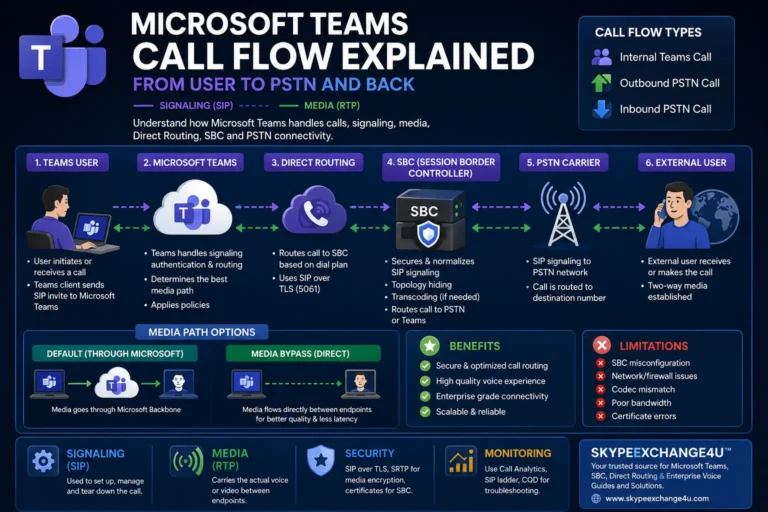
The Standard SIP 487 Call Flow
The Secret is in the Reason Header (Q.850 Cause Codes)
To determine why a call was terminated with a 487, you must inspect the Reason header embedded inside the incoming CANCEL or outgoing 487 packet. In Wireshark, filter by:
sip.Reason or sip.Status-Code == 487| Reason Header | Meaning & Context | Action Required? |
|---|---|---|
| Reason: Q.850;cause=16;text=”Normal call clearing” | The caller hung up the phone while the Teams user or Call Queue was ringing. | None (Normal user behavior) |
| Reason: Q.850;cause=19;text=”No answer from user” | Teams rang the user for the full duration (e.g., 20s), and the call timed out to voicemail or secondary forwarding. | None (Standard timeout routing) |
| Reason: Q.850;cause=102;text=”Recovery on timer expiry” | An intermediate gateway or carrier ring timer killed the call before Teams could finish routing. | Yes (Carrier timer mismatch) |
| Reason: Q.850;cause=26;text=”Non-selected user clearing” | Seen in Call Queues or parallel hunt groups: another agent answered the call, so the call was cancelled to this endpoint. | None (Expected CQ behavior) |
The Carrier Ring Timer vs. Teams Voicemail Race Condition
One of the most elusive operational bugs in Microsoft Teams Direct Routing occurs when external callers report: “Whenever I call your office and let it ring, the call drops with a fast busy tone instead of going to voicemail.”
The Root Cause
- In the Microsoft Teams client, the user’s unanswered call rule is set to: “If unanswered, redirect to Voicemail after 30 seconds“.
- However, many PSTN carriers configure a default No-Answer Timer (ISUP T9 Timer) of 25 or 28 seconds on their upstream Class 4/5 switches.
- At the 28-second mark, before the Teams cloud PBX can redirect the media session to the Azure voicemail processor, the carrier sends an unsolicited
CANCELto your SBC. The SBC cancels the Teams dialog, returns a487 Request Terminated, and the caller is disconnected.
The Fix
- Adjust Teams Unanswered Call Timers: Lower the global or user unanswered call duration to 20 seconds via TAC or PowerShell:
Set-CsUserCallingSettings -Identity "user@contoso.com" -IsUnansweredCallForwardingEnabled $true -UnansweredCallForwardingDuration 20 - Carrier Ring Timer Adjustment: Request your SIP trunk carrier increase their ISUP T9 / SIP No-Answer timer from 30s to 45s or 60s.
Decoding SIP 408 Request Timeout
Unlike SIP 487, a SIP 408 Request Timeout is almost never normal. It indicates that an endpoint sent a SIP request (typically an INVITE or OPTIONS ping), waited for the duration of the SIP transaction timer (RFC 3261 Timer B = 64 * T1 = 32 seconds), and received absolutely no response.
Outbound Scenario: Teams to SBC Times Out
When a Teams user dials an outbound number, the Teams cloud SIP proxy routes the INVITE to your SBC FQDN on port 5061. If Teams retransmits the INVITE and receives no 100 Trying within 32 seconds, Teams generates a 408 to the user client, and the call fails immediately.
# Wireshark Display Filter for Outbound 408 Timeouts
sip.Method == "INVITE" and not sip.response_for and frame.time_delta > 5
The 4 Primary Causes of SIP 408 in Direct Routing
1. Stateful Firewall / NAT Session Timeout (Silent Drop)
Enterprise firewalls (Palo Alto, Fortinet, Cisco Firepower) track TCP and TLS connections statefully. By default, many firewalls set an idle TCP session timeout of 30 to 60 minutes. Microsoft Teams SIP Proxies maintain persistent TLS sessions with your SBC. If no calls cross the trunk and the firewall silently flushes the TCP session from its state table without sending a TCP RST, the next incoming call hits a dead socket and hangs until a 408 timeout expires.
2. SIP ALG (Application Layer Gateway) Enabled
If SIP ALG or SIP Application Inspection is enabled on your perimeter firewall, the firewall attempts to inspect and rewrite SIP headers. Because Microsoft Teams Direct Routing uses encrypted TLS (port 5061), the firewall cannot inspect the payload, but its inspection engine can corrupt TCP window sizing, drop packets, or reject legitimate renegotiation. SIP ALG must always be disabled globally on perimeter firewalls.
3. Missing or Unmatched Public IP on SBC NAT Traversal
If your SBC is deployed behind a 1:1 NAT in AWS, Azure, or an on-premises DMZ, the SBC’s SIP signaling interface must know its external public IP address. If the SBC advertises its internal private IP (e.g., 10.0.1.5) inside the Via, Contact, or Origin headers instead of the public IP, Microsoft’s SIP proxy cannot return responses, causing an immediate 408 timeout.
4. TLS Mutual Authentication (mTLS) Handshake Black Hole
Microsoft Direct Routing requires TLS 1.2 with mutual certificate validation. If an expired root CA certificate, missing intermediate CA, or cipher suite mismatch occurs, the TLS handshake halts. The sender waits for the TLS ServerHello until Timer B expires, reporting a generic 408 Request Timeout in application logs.
SBC Hardening: AudioCodes & Ribbon Timeout Configurations
1. AudioCodes Mediant Configuration
To prevent NAT dropouts and keepalive timeouts on an AudioCodes Mediant SBC:
- Keep-Alive Settings: Navigate to Signaling & Media ➔ SIP Definitions ➔ Proxy Sets. In the Teams Proxy Set (
sip.pstnhub.microsoft.com), set Keep-Alive Assessment toUsing Optionswith an interval of 60 seconds. - TCP Connection Reuse: Set
SBCKeepAliveIntervalto 120 seconds to ensure the TLS connection remains pinned open through NAT firewalls. - SIP Transaction Timeout: Under SIP General Parameters, ensure
TransactionTimeoutis set to 32 (standard RFC 3261 Timer B).
2. Ribbon SBC (1000/2000/SWe Lite) Configuration
On a Ribbon SBC:
- Signaling Group Timers: Under Signaling Groups ➔ Teams SG, verify Timer B (Invite Transaction Timeout) is set to 32000 ms.
- NAT Keepalive: Under SIP Profiles ➔ Teams Profile, set TCP / TLS Inactivity Timeout to at least 300 seconds, and configure OPTIONS Ping Interval to 60 seconds.
Troubleshooting Dropped Calls or Carrier Interop Failures?
Our Microsoft-certified enterprise voice architects analyze raw SIP ladder diagrams, resolve complex stateful firewall drops, optimize carrier ring timers, and engineer carrier-grade Teams Direct Routing architectures.
Frequently Asked Questions (FAQ)
Is a SIP 487 Request Terminated considered a call failure?
In most cases, no. A SIP 487 is the standard RFC 3261 response indicating that a ringing call was cancelled before being answered. This occurs normally when a caller hangs up, when an unanswered call times out to voicemail, or when another agent in a call queue picks up the call.
Why do calls drop with a fast busy tone instead of going to Teams Voicemail?
This is caused by a ring timer race condition. If the carrier’s PSTN switch has a no-answer timer set to 28 seconds, but the Teams user’s voicemail redirect timer is set to 30 seconds, the carrier sends a CANCEL before Teams can route the call to voicemail. Lowering the Teams ring timer to 20 seconds resolves the issue.
What is the primary difference between a SIP 408 and a SIP 504 error?
A SIP 408 Request Timeout is generated directly by the client or server sending the original request when its local transaction timer (Timer B) expires without receiving any response. A SIP 504 Server Timeout is generated by an intermediate proxy or gateway indicating that an upstream server it was communicating with timed out.
How does a stateful firewall cause intermittent SIP 408 errors in Teams Direct Routing?
Teams Direct Routing relies on long-lived TLS connections on port 5061. If an enterprise firewall has a default TCP idle session timeout (e.g., 30 minutes) and drops the state table entry during an idle period without notifying the endpoints, subsequent inbound SIP packets are silently discarded, resulting in a 408 Request Timeout until the connection is re-established.
Related Direct Routing & Troubleshooting Guides
- Teams Direct Routing SIP 503 Service Unavailable: Trunk Failures & Carrier Routing
- Teams Direct Routing SIP 403 Forbidden: Packet Traces & Provisioning Gotchas
- Teams Direct Routing 488 Not Acceptable Here: SDP Codec & SRTP Gotchas
- How to Configure AudioCodes SBC for Microsoft Teams Direct Routing
- Ribbon SBC 1000/2000 Teams Direct Routing Step-by-Step Configuration
- Teams Survivable Branch Appliance (SBA) Deployment & Branch Resiliency