
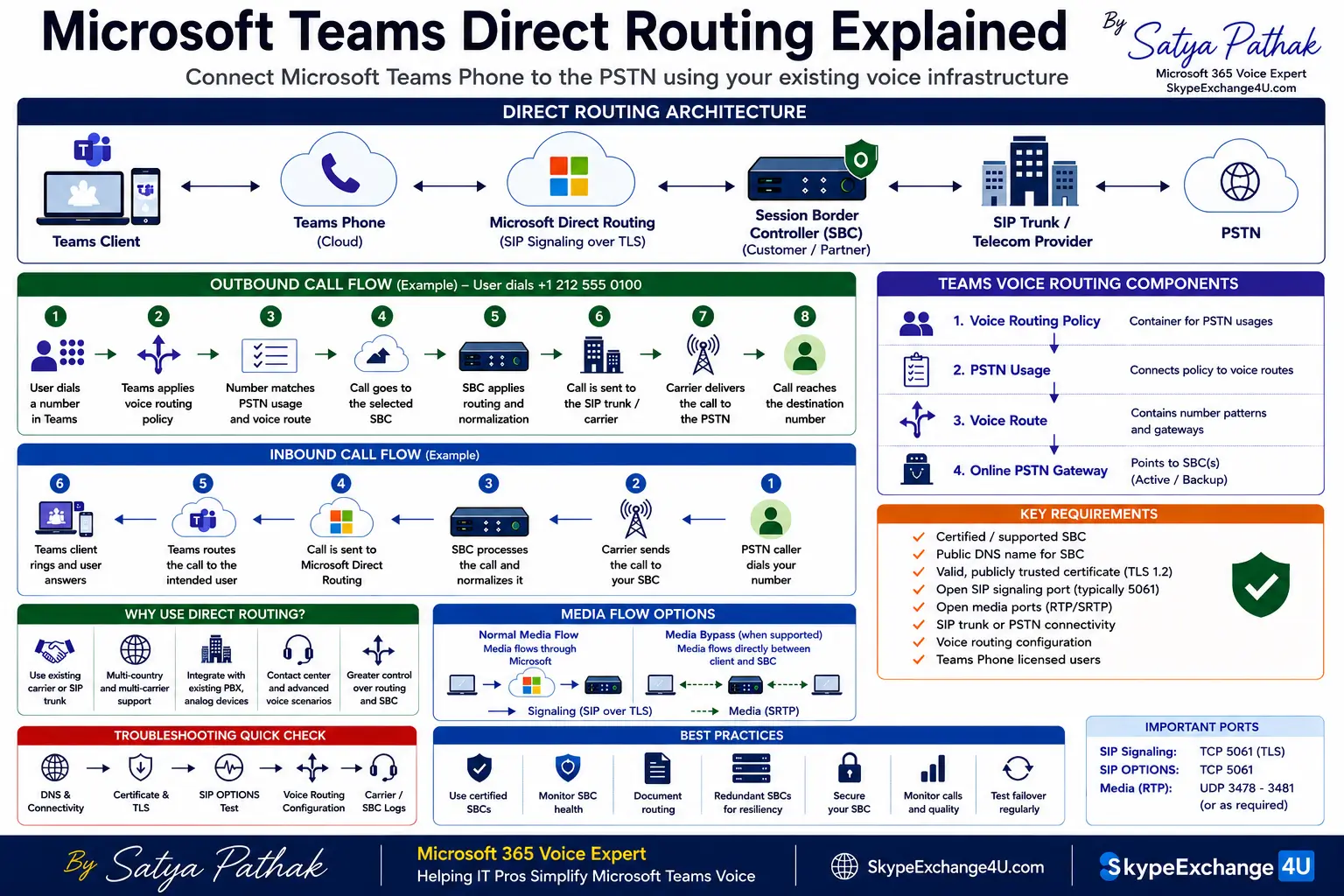
Microsoft Teams Direct Routing: Architecture & Best Practices
Short answer:
Microsoft Teams Direct Routing connects Microsoft Teams Phone to an organization’s external telephony environment through a supported Session Border Controller (SBC). It allows enterprises to use existing carriers, SIP trunks, PBXs, contact-center platforms, analog devices, and complex voice-routing architectures while moving users to Microsoft Teams.
Microsoft Teams Direct Routing is one of the most flexible ways for enterprises to connect Teams Phone with traditional and modern telephony infrastructure. Instead of replacing an organization’s entire voice environment, Direct Routing provides a controlled connection between Microsoft Teams and an external voice network.
For a small organization, this architecture may be relatively simple. For a multinational enterprise, however, Direct Routing can involve multiple SBCs, SIP trunks, carriers, countries, number ranges, voice-routing policies, failover paths, media optimization, legacy PBXs, and contact-center integrations.
This guide explains Microsoft Teams Direct Routing from the fundamentals through enterprise architecture, SBC design, call flow, voice routing, certificates, media, troubleshooting, security, and operational best practices.
In this guide:
- What is Microsoft Teams Direct Routing?
- How Teams Direct Routing works
- Teams Direct Routing architecture
- What is a Direct Routing SBC?
- Outbound call flow
- Inbound call flow
- Teams voice routing explained
- Direct Routing requirements
- SBC FQDN and certificate requirements
- Direct Routing configuration overview
- Number normalization
- Media Bypass
- Local Media Optimization
- Enterprise redundancy and failover
- Direct Routing troubleshooting
- Security and operational best practices
- Direct Routing vs Operator Connect
- Frequently asked questions
- Final recommendations
What Is Microsoft Teams Direct Routing?
Microsoft Teams Direct Routing is a Microsoft Teams Phone capability that allows an organization to connect a supported customer-provided Session Border Controller to Microsoft Teams and use that SBC to connect Teams users with external telephony infrastructure.
The external environment may include a traditional PSTN carrier, SIP trunk, enterprise PBX, contact-center platform, analog equipment, or another supported voice system.
Microsoft Teams
↓
Teams Phone / Direct Routing
↓
Session Border Controller
↓
SIP Trunk / PBX / PSTN
The SBC is the critical voice-network boundary between Microsoft Teams Direct Routing and the organization’s external telephony infrastructure. It handles signaling and can provide routing, number manipulation, interoperability, security, media handling, and failover functions depending on the architecture.
Why Do Enterprises Use Teams Direct Routing?
Direct Routing is especially useful when an organization already has a significant investment in enterprise voice infrastructure or needs more control over its PSTN connectivity.
Typical scenarios include:
- Existing SIP trunk or carrier contracts
- Existing enterprise SBC infrastructure
- Multiple countries and telecom providers
- Legacy PBX integration
- Analog devices
- Contact-center integration
- Specialized voice-routing requirements
- Existing telephone numbers that must remain with a preferred carrier
- Complex enterprise voice environments
- Regional PSTN requirements
For example, a multinational company may already operate different carriers in Europe, Asia, North America, and other regions. Moving every location to one PSTN model may not be practical.
Direct Routing allows the enterprise to maintain a controlled voice architecture while progressively moving users to Teams Phone.
How Does Teams Direct Routing Work?
At a high level, Microsoft Teams provides the user-facing calling experience, while Direct Routing provides the Microsoft-side telephony connection and the SBC provides the boundary into the organization’s voice environment.
A simplified architecture looks like this:
Teams Client
↓
Teams Phone
↓
Microsoft Direct Routing
↓
Certified Session Border Controller
↓
SIP Trunk / Carrier / PBX / PSTN
When a Teams user makes an external call, Teams evaluates the user’s voice-routing configuration. The appropriate PSTN usage and voice route are selected, an online PSTN gateway identifies the SBC, and the SBC applies its own routing and interoperability rules before sending the call toward the carrier or connected telephony system.
Microsoft Teams Direct Routing Architecture
A production Direct Routing architecture normally contains several logical components. Understanding the role of each component is important when designing or troubleshooting the solution.
1. Microsoft Teams Client
The Teams client provides the user interface for making and receiving calls. Users can make calls from supported Teams applications while Teams Phone provides the required calling capabilities.
2. Teams Phone
Teams Phone provides the enterprise calling capabilities within Microsoft Teams. It works with Microsoft’s cloud voice services and can be connected to external telephony through Direct Routing.
3. Microsoft Direct Routing
Direct Routing provides the Microsoft-side connection between Teams Phone and the customer-provided SBC.
4. Session Border Controller
The SBC is the enterprise voice boundary. It connects the Microsoft environment with SIP trunks, carriers, PBXs, contact centers, or other supported voice systems.
5. Carrier or SIP Trunk
The carrier or SIP trunk provides connectivity toward the public telephone network or another external telephony environment.
What Does a Direct Routing SBC Do?
The Direct Routing SBC is one of the most important components in an enterprise Teams voice architecture.
Depending on the platform and design, the SBC may perform functions such as:
- SIP signaling interconnection
- Voice-network security boundary
- Call routing
- Number normalization
- Number manipulation
- SIP header manipulation
- Carrier interoperability
- Legacy PBX interoperability
- Media handling
- Failover routing
- Call admission control
- Interconnection between different voice technologies
This is why an enterprise SBC should not be viewed simply as a device that connects Teams to the PSTN.
In a complex environment, the SBC can become the central point where Teams voice traffic is controlled, translated, routed, secured, and connected to external telephony systems.
Microsoft Teams Direct Routing Outbound Call Flow
Consider a Teams user dialing an external telephone number.
The simplified outbound call flow is:
- The user enters the destination telephone number in Teams.
- Teams Phone evaluates the user’s voice-routing configuration.
- The applicable PSTN usage is identified.
- The appropriate voice route is evaluated.
- The online PSTN gateway identifies the SBC.
- Direct Routing establishes the signaling path toward the SBC.
- The SBC evaluates its configured routing rules.
- The SBC sends the call toward the appropriate carrier or connected telephony system.
- The carrier delivers the call to the PSTN destination.
This layered routing model is important because a failed call may originate from Teams configuration, the SBC, the carrier, number normalization, or the destination network.
Microsoft Teams Direct Routing Inbound Call Flow
Inbound calling follows the opposite direction.
PSTN Caller
→
Carrier
→
SBC
→
Direct Routing
→
Teams User
The carrier sends the inbound call toward the SBC. The SBC evaluates the incoming signaling and applies the appropriate routing and number manipulation rules.
The call is then sent toward Microsoft Direct Routing, where Teams can deliver it to the appropriate user or service.
When troubleshooting inbound calls, administrators should investigate each stage separately instead of changing multiple configurations at the same time.
How Microsoft Teams Voice Routing Works
Teams voice routing is one of the most important areas for a Teams voice administrator to understand.
Voice Routing Policy
↓
PSTN Usage
↓
Voice Route
↓
Online PSTN Gateway
↓
SBC
A voice routing policy contains PSTN usages. PSTN usages connect the policy with voice routes. Voice routes contain number patterns and online PSTN gateways.
This structure allows administrators to create routing policies based on users, locations, number ranges, countries, carriers, and business requirements.
For large organizations, careful voice-routing design becomes essential because a poorly designed policy can create unexpected routing behavior or make troubleshooting much more difficult.
Microsoft Teams Direct Routing Requirements
Before implementing Direct Routing, an organization should validate the technical and operational requirements.
- A supported and certified SBC
- Microsoft Teams Phone capability
- A suitable PSTN carrier or SIP trunk
- An appropriate DNS name for the SBC
- A publicly trusted certificate
- Firewall and network connectivity
- Correct SIP signaling configuration
- Media connectivity
- Voice-routing configuration
- Properly licensed Teams users
- Telephone-number assignment
- Number normalization strategy
The exact implementation depends on the SBC vendor, network topology, carrier, Microsoft configuration, and organizational requirements.
SBC FQDN and Certificate Requirements
The SBC requires an appropriate fully qualified domain name. For example:
The SBC FQDN and certificate configuration must align with Microsoft’s Direct Routing requirements and the SBC vendor’s implementation guidance.
Certificate problems are a common source of connectivity failures. Administrators should monitor certificate expiration dates and validate the complete trust chain before deployment.
A production voice architecture should never rely on manual certificate monitoring alone. Certificate renewal should be documented and incorporated into operational procedures.
Microsoft Teams Direct Routing Configuration Flow
Step 1 — Prepare the SBC
Configure the SBC according to the manufacturer’s Microsoft Teams Direct Routing deployment guidance.
Validate:
- FQDN
- DNS
- Certificate
- TLS
- Firewall
- SIP signaling
- Media connectivity
- Carrier connectivity
Step 2 — Connect the SBC to Teams
The SBC can be connected using supported Microsoft administration methods, including the Teams administration interface and PowerShell.
Step 3 — Validate the Gateway
Validate the gateway configuration and confirm that the SBC is communicating correctly with the Microsoft environment.
Step 4 — Configure Users
Users require the appropriate Teams Phone licensing and voice configuration. Telephone-number assignment must also align with the organization’s design.
Step 5 — Configure Voice Routing
Create the required PSTN usages, voice routes, online PSTN gateways, and voice-routing policies.
Step 6 — Normalize Telephone Numbers
Number formatting must be consistent across Teams, the SBC, and the carrier environment. Number normalization should be documented before production deployment.
Number Normalization in Teams Direct Routing
Telephone-number formatting is an important part of enterprise voice architecture.
Different systems may represent the same telephone number differently. Teams may use international E.164 formatting, while a legacy PBX or carrier may expect a different format.
A number-normalization strategy should therefore define:
- Internal extension formats
- National numbers
- International numbers
- Country codes
- Emergency numbers
- Service numbers
- Carrier-specific formatting
- Inbound caller ID formatting
- Outbound caller ID requirements
Poor number normalization can cause calls to fail even when the underlying SBC and Teams connection is healthy.
Media Bypass in Teams Direct Routing
Signaling and media are separate concepts in a Teams voice architecture.
Microsoft Teams Direct Routing supports media-bypass scenarios when the supported clients, SBC configuration, network topology, and Microsoft requirements allow it.
Important:
Do not enable Media Bypass simply because it appears to provide a more direct media path. The complete network topology, SBC, firewall, security, and Microsoft requirements must support the design.
Before enabling Media Bypass in production, administrators should understand the expected media path and test both successful and failure scenarios.
What Is Local Media Optimization?
Large enterprises often have users and SBCs distributed across multiple offices, countries, and network regions.
Local Media Optimization is designed for supported network topologies where administrators need greater control over media paths and want to localize media within appropriate corporate network boundaries.
A multinational architecture may contain:
- Central SBCs
- Regional SBCs
- Branch-office SBCs
- Regional SIP trunks
- Centralized carrier connectivity
The design should be driven by network topology, voice quality requirements, resilience, carrier connectivity, and operational requirements.
Direct Routing Redundancy and Failover
Enterprise voice services should be designed around availability rather than relying on a single SBC or network path.
A resilient architecture may include redundant SBCs, multiple network paths, redundant carrier connectivity, and appropriate routing policies.
Teams
↓
Primary SBC
↓
Primary Carrier
Backup Path
Secondary SBC → Secondary Carrier
Failover should not simply exist on paper. Organizations should test it before production and document expected behavior during an SBC, carrier, network, or regional failure.
Microsoft Teams Direct Routing Troubleshooting
Problem 1 — SBC Is Not Available
Check:
- DNS resolution
- Certificate validity
- TLS connectivity
- Firewall rules
- SIP OPTIONS
- SBC service status
- Network connectivity
Problem 2 — Outbound Calls Fail
Follow the routing chain:
User
↓
Voice Routing Policy
↓
PSTN Usage
↓
Voice Route
↓
Online PSTN Gateway
↓
SBC
↓
Carrier
If the call stops at one stage, investigate that stage before changing multiple configurations.
Problem 3 — Inbound Calls Do Not Reach Teams
Check:
- Carrier routing
- SBC inbound routing
- Number normalization
- SIP Request-URI
- SIP headers
- Teams number assignment
- User voice-routing configuration
Problem 4 — Call Connects but There Is No Audio
When a call connects but there is no audio, signaling may have succeeded while the media path is failing.
Investigate:
- Firewall media ports
- NAT
- SRTP
- SBC media interfaces
- Media Bypass
- Local Media Optimization
- Network routing
Common Microsoft Teams Direct Routing Mistakes
Many Direct Routing problems are not caused by one large architectural failure. They are often caused by small configuration inconsistencies between Teams, the SBC, the carrier, and the network.
1. Poor Number Normalization
Different systems may expect different telephone-number formats. Define the numbering strategy before deployment.
2. No Certificate Monitoring
A valid certificate is critical to the SBC connection. Certificate expiration should be monitored proactively.
3. Incomplete Firewall Design
Opening only signaling traffic is not enough when media requires additional network connectivity.
4. No Failover Testing
A backup SBC or carrier route is only useful if it has been tested.
5. Poor Voice Route Documentation
Complex routing becomes difficult to troubleshoot when administrators cannot quickly understand which users, number patterns, gateways, and carriers are associated with each route.
Advantages of Microsoft Teams Direct Routing
Organizations can continue using suitable existing PSTN connectivity.
Organizations retain greater control over SBC and voice-routing architecture.
Teams can integrate with supported enterprise and third-party telephony systems.
Challenges of Teams Direct Routing
- SBC expertise: Enterprise SIP troubleshooting requires specialized skills.
- Certificate management: Certificate expiration can affect connectivity.
- Networking: DNS, firewall, NAT, and media paths require careful design.
- Carrier dependency: Carrier and SBC interoperability must be tested.
- Operational responsibility: More control means more components to monitor.
- Complex routing: Multi-country voice environments can become difficult to maintain.
Teams Direct Routing vs Operator Connect
| Area | Direct Routing | Operator Connect |
|---|---|---|
| SBC | Customer or partner-managed SBC architecture | Operator-managed integration |
| Operational control | Higher control and customization | Simpler operator-led model |
| Complex voice environments | Strong fit | Depends on operator capabilities |
| Administration | More responsibility | Generally simpler |
Neither model is automatically better. The right choice depends on the organization’s carrier strategy, existing infrastructure, operational capabilities, geographic requirements, and desired level of control.
Microsoft Teams Direct Routing Best Practices
1. Use a supported and certified SBC.
2. Monitor SBC certificates and renew them before expiration.
3. Keep SBC software and firmware within supported versions.
4. Restrict network exposure to required traffic.
5. Document every voice route and number-normalization rule.
6. Use redundant SBCs when business continuity requires them.
7. Test inbound and outbound calling separately.
8. Test SBC and carrier failover before production.
9. Monitor SBC health and SIP OPTIONS.
10. Keep Microsoft and SBC-vendor documentation aligned with the production configuration.
Real-World Enterprise Teams Direct Routing Example
Consider a multinational organization with 20,000 Teams users, multiple countries, existing SIP providers, regional SBCs, legacy PBX integrations, contact-center requirements, and local PSTN requirements.
A single global PSTN architecture may not satisfy every country’s technical, regulatory, carrier, or business requirements.
Teams
→
Direct Routing
→
Regional SBC
→
SIP Provider
→
PSTN
In this type of environment, Direct Routing can provide the architectural flexibility needed to connect Teams with existing regional voice infrastructure while maintaining control over routing and interoperability.
Frequently Asked Questions About Microsoft Teams Direct Routing
What is Microsoft Teams Direct Routing?
Microsoft Teams Direct Routing connects Teams Phone with an external telephony environment through a supported Session Border Controller. It is commonly used when organizations need control over carriers, SIP trunks, PBXs, routing, or existing enterprise voice infrastructure.
What is an SBC in Teams Direct Routing?
An SBC, or Session Border Controller, acts as the voice-network boundary between Microsoft Teams Direct Routing and the external telephony environment. It can provide signaling, routing, number manipulation, interoperability, security, media, and failover functions depending on the deployment.
Do I need an SBC for Direct Routing?
Direct Routing is based on connecting Microsoft Teams Phone to a supported customer-provided SBC. The SBC is therefore a fundamental component of the Direct Routing architecture.
What can Direct Routing connect to?
Depending on the supported architecture, Direct Routing can connect Teams with PSTN carriers, SIP trunks, enterprise PBXs, analog environments, contact-center systems, and other telephony infrastructure.
Is Direct Routing suitable for large enterprises?
Yes. Direct Routing can be particularly useful for large organizations that require multiple carriers, regional SBCs, complex voice routing, legacy integrations, or greater control over their enterprise voice architecture.
What is the biggest advantage of Direct Routing?
The biggest advantage is flexibility. Organizations can design their Teams voice architecture around existing carriers, SBCs, routing requirements, and enterprise telephony systems.
What is the biggest disadvantage of Direct Routing?
The biggest trade-off is operational complexity. Organizations are responsible for more components, including SBCs, certificates, networking, routing, carrier interoperability, monitoring, and troubleshooting.
Final Takeaway
Microsoft Teams Direct Routing is more than a method for making PSTN calls from Microsoft Teams. For enterprise environments, it can form a complete voice architecture connecting Teams Phone, Microsoft’s Direct Routing service, a certified SBC, and the external telephony environment.
Its greatest strength is flexibility. Its main trade-off is operational complexity.
If an organization already has complex enterprise voice infrastructure, multiple carriers, legacy systems, regional PSTN requirements, or specialized routing needs, Direct Routing can provide the control required to connect those systems with Teams.
Teams is the user experience.
Direct Routing is the connection.
The SBC is the enterprise voice boundary.
Related Microsoft Teams Voice Articles
Official Microsoft Learn References
The following Microsoft Learn resources provide the official technical documentation for Microsoft Teams Direct Routing:
-
Plan Direct Routing — Microsoft Learn
-
Connect Your Session Border Controller (SBC) to Direct Routing — Microsoft Learn
-
Configure Direct Routing — Microsoft Learn
-
Configure Call Routing for Direct Routing — Microsoft Learn
-
Direct Routing — Definitions and RFC Standards — Microsoft Learn
-
Session Border Controllers Certified for Direct Routing — Microsoft Learn
-
Plan for Local Media Optimization for Direct Routing — Microsoft Learn